


aiyabot
A neat Discord bot for old Stable Diffusion Web UIs
Stars: 308
AIYA is a Discord bot interface for Stable Diffusion, offering features like live preview, negative prompts, model swapping, image generation, image captioning, image resizing, and more. It supports various options and bonus features to enhance user experience. Users can set per-channel defaults, view stats, manage queues, upscale images, and perform various commands on images. AIYA requires setup with AUTOMATIC1111's Stable Diffusion AI Web UI or SD.Next, and can be deployed using Docker with additional configuration options. Credits go to AUTOMATIC1111, vladmandic, harubaru, and various contributors for their contributions to AIYA's development.
README:
A Discord bot interface for Stable Diffusion

To generate an image from text, use the /draw command and include your prompt as the query.
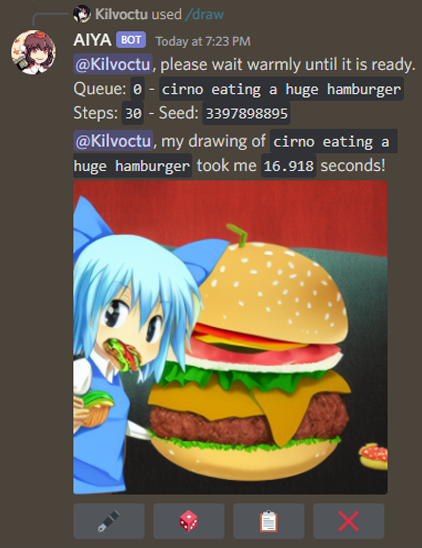
To generate a prompt from a couple of words, use the /generate command and include your text as the query.
- live preview
- negative prompts
- swap model/checkpoint (see wiki)
- sampling steps
- width/height
- CFG scale
- sampling method
- seed
- Web UI styles
- extra networks (hypernetwork, LoRA)
- face restoration
- high-res fix
- CLIP skip
- img2img
- denoising strength
- batch count
- compatibility with SD.Next
- "Full quality" VAE toggle
- /settings command - set per-channel defaults for supported options (see Notes!):
- also can set maximum steps limit and max batch count limit
- refresh (update AIYA's options with any changes from Web UI)
- /identify command - create a caption for your image.
- /generate command - generate a prompt from text, using https://huggingface.co/Gustavosta/MagicPrompt-Stable-Diffusion
- /stats command - shows how many /draw commands have been used.
- /queue command - shows the size of each queue.
- /info command - basic usage guide, other info, and download batch images.
- /upscale command - resize your image.
- buttons - certain outputs will contain buttons.
- 🖋 - edit prompt, then generate a new image with same parameters.
- 🎲 - randomize seed, then generate a new image with same parameters.
- 📋 - view the generated image's information.
- ⬆️ - upscale the generated image with defaults. Batch grids require use of the drop downs
- ❌ - deletes the generated image. In Live preview this button interrupts generation process
- ➡️ - skips the current image generation in live preview and go to next batch (if there's more than 1)
- dropdown menus - batch images produce two drop down menus for the first 25 images.
- The first menu prompts the bot to send only the images that you select at single images
- The second menu prompts the bot to upscale the selected image from the batch.
- context menu options - commands you can try on any message.
- Get Image Info - view information of an image generated by Stable Diffusion.
- Quick Upscale - upscale an image without needing to set options.
- Batch Download - download all images of a batch set without needing to specify batch_id and image_id
- mark image as spoiler
- Per image (on
/draw) - Set channel-wide default or force based on role with
/settings
- Per image (on
- configuration file - can change some of AIYA's operational aspects.
- Set up AUTOMATIC1111's Stable Diffusion AI Web UI OR SD.Next
- AIYA is currently tested on commit
20ae71faa8ef035c31aa3a410b707d792c8203a3of the Web UI. - For SD.Next currently tested on master branch at 2024-03-01 (
325ed10a04775c49c36fc3308559507a4a82271b)
- AIYA is currently tested on commit
- Run the Web UI as local host with API (
COMMANDLINE_ARGS= --api). - Clone this repo.
- Create a file in your cloned repo called ".env", formatted like so:
# .env
TOKEN = put your bot token here- Run AIYA by running launch.bat (or launch.sh for Linux)
AIYA can be deployed using Docker.
The docker image supports additional configuration by adding environment variables or config file updates detailed in the wiki.
docker run --name aiyabot --network=host --restart=always -e TOKEN=your_token_here -e TZ=America/New_York -v ./aiyabot/outputs:/app/outputs -v ./aiyabot/resources:/app/resources -d ghcr.io/kilvoctu/aiyabot:latestNote the following environment variables work with the docker image:
-
TOKEN- [Required] Discord bot token. -
URL- URL of the Web UI API. Defaults tohttp://localhost:7860. -
TZ- Timezone for the container in the formatAmerica/New_York. Defaults toAmerica/New_York -
APIUSER- API username if required for your Web UI instance. -
APIPASS- API password if required for your Web UI instance. -
USER- Username if required for your Web UI instance. -
PASS- Password if required for your Web UI instance. -
USE_GENERATE- Set whether the/generatecommand is enabled as well as if required package (torch nvidia transformers) are installed
- Clone the repo and refer to the
docker-compose.ymlfile in thedeploydirectory. - Rename the
/deploy/.env.examplefile to.envand update theTOKENvariable with your bot token (and any other configuration as desired). - Run
docker-compose up -dto start the bot.
- See wiki for notes on additional configuration.
- See wiki for notes on swapping models.
- 📋 requires a Web UI script. Please see wiki for details.
- Ensure AIYA has
botandapplication.commandsscopes when inviting to your Discord server, and intents are enabled. - As /settings can be abused, consider reviewing who can access the command. This can be done through Apps -> Integrations in your Server Settings. Read more about /settings here.
- AIYA uses Web UI's legacy high-res fix method. To ensure this works correctly, in your Web UI settings, enable this option:
For hires fix, use width/height sliders to set final resolution rather than first pass - For systems with less memory/cpu, or if the
/generatecommand is not needed, it can be disabled by setting the environmental variableUSE_GENERATE=falsefor docker/cli.
AIYA only exists thanks to these awesome people:
- AUTOMATIC1111, and all the contributors to the Web UI repo.
- vladmandic and all SD.Next contributors
- harubaru, my entryway into Stable Diffusion (with Waifu Diffusion) and foundation for the AIYA Discord bot.
These people played a large role in AIYA's development in some way:
- solareon, for developing a more sensible way to display and interact with batches of images.
- danstis, for dockerizing AIYA.
- ashen-sensored, for developing a workaround for Discord removing PNG info to image uploads. edit Discord is no longer doing this at the moment, but credit is still due.
- gingivere0, for PayloadFormatter class for the original API. Without that, I'd have given up from the start. Also has a great Discord bot as a no-slash-command alternative.
- You, for using AIYA and contributing with PRs, bug reports, feedback, and more!
For Tasks:
Click tags to check more tools for each tasksFor Jobs:
Alternative AI tools for aiyabot
Similar Open Source Tools
aiyabot
AIYA is a Discord bot interface for Stable Diffusion, offering features like live preview, negative prompts, model swapping, image generation, image captioning, image resizing, and more. It supports various options and bonus features to enhance user experience. Users can set per-channel defaults, view stats, manage queues, upscale images, and perform various commands on images. AIYA requires setup with AUTOMATIC1111's Stable Diffusion AI Web UI or SD.Next, and can be deployed using Docker with additional configuration options. Credits go to AUTOMATIC1111, vladmandic, harubaru, and various contributors for their contributions to AIYA's development.
latex2ai
LaTeX2AI is a plugin for Adobe Illustrator that allows users to use editable text labels typeset in LaTeX inside an Illustrator document. It provides a seamless integration of LaTeX functionality within the Illustrator environment, enabling users to create and edit LaTeX labels, manage item scaling behavior, set global options, and save documents as PDF with included LaTeX labels. The tool simplifies the process of including LaTeX-generated content in Illustrator designs, ensuring accurate scaling and alignment with other elements in the document.
LARS
LARS is an application that enables users to run Large Language Models (LLMs) locally on their devices, upload their own documents, and engage in conversations where the LLM grounds its responses with the uploaded content. The application focuses on Retrieval Augmented Generation (RAG) to increase accuracy and reduce AI-generated inaccuracies. LARS provides advanced citations, supports various file formats, allows follow-up questions, provides full chat history, and offers customization options for LLM settings. Users can force enable or disable RAG, change system prompts, and tweak advanced LLM settings. The application also supports GPU-accelerated inferencing, multiple embedding models, and text extraction methods. LARS is open-source and aims to be the ultimate RAG-centric LLM application.
PolyMind
PolyMind is a multimodal, function calling powered LLM webui designed for various tasks such as internet searching, image generation, port scanning, Wolfram Alpha integration, Python interpretation, and semantic search. It offers a plugin system for adding extra functions and supports different models and endpoints. The tool allows users to interact via function calling and provides features like image input, image generation, and text file search. The application's configuration is stored in a `config.json` file with options for backend selection, compatibility mode, IP address settings, API key, and enabled features.
STMP
SillyTavern MultiPlayer (STMP) is an LLM chat interface that enables multiple users to chat with an AI. It features a sidebar chat for users, tools for the Host to manage the AI's behavior and moderate users. Users can change display names, chat in different windows, and the Host can control AI settings. STMP supports Text Completions, Chat Completions, and HordeAI. Users can add/edit APIs, manage past chats, view user lists, and control delays. Hosts have access to various controls, including AI configuration, adding presets, and managing characters. Planned features include smarter retry logic, host controls enhancements, and quality of life improvements like user list fading and highlighting exact usernames in AI responses.

aider-composer
Aider Composer is a VSCode extension that integrates Aider into your development workflow. It allows users to easily add and remove files, toggle between read-only and editable modes, review code changes, use different chat modes, and reference files in the chat. The extension supports multiple models, code generation, code snippets, and settings customization. It has limitations such as lack of support for multiple workspaces, Git repository features, linting, testing, voice features, in-chat commands, and configuration options.
warc-gpt
WARC-GPT is an experimental retrieval augmented generation pipeline for web archive collections. It allows users to interact with WARC files, extract text, generate text embeddings, visualize embeddings, and interact with a web UI and API. The tool is highly customizable, supporting various LLMs, providers, and embedding models. Users can configure the application using environment variables, ingest WARC files, start the server, and interact with the web UI and API to search for content and generate text completions. WARC-GPT is designed for exploration and experimentation in exploring web archives using AI.
OpenAI-sublime-text
The OpenAI Completion plugin for Sublime Text provides first-class code assistant support within the editor. It utilizes LLM models to manipulate code, engage in chat mode, and perform various tasks. The plugin supports OpenAI, llama.cpp, and ollama models, allowing users to customize their AI assistant experience. It offers separated chat histories and assistant settings for different projects, enabling context-specific interactions. Additionally, the plugin supports Markdown syntax with code language syntax highlighting, server-side streaming for faster response times, and proxy support for secure connections. Users can configure the plugin's settings to set their OpenAI API key, adjust assistant modes, and manage chat history. Overall, the OpenAI Completion plugin enhances the Sublime Text editor with powerful AI capabilities, streamlining coding workflows and fostering collaboration with AI assistants.
llm-subtrans
LLM-Subtrans is an open source subtitle translator that utilizes LLMs as a translation service. It supports translating subtitles between any language pairs supported by the language model. The application offers multiple subtitle formats support through a pluggable system, including .srt, .ssa/.ass, and .vtt files. Users can choose to use the packaged release for easy usage or install from source for more control over the setup. The tool requires an active internet connection as subtitles are sent to translation service providers' servers for translation.
CoolCline
CoolCline is a proactive programming assistant that combines the best features of Cline, Roo Code, and Bao Cline. It seamlessly collaborates with your command line interface and editor, providing the most powerful AI development experience. It optimizes queries, allows quick switching of LLM Providers, and offers auto-approve options for actions. Users can configure LLM Providers, select different chat modes, perform file and editor operations, integrate with the command line, automate browser tasks, and extend capabilities through the Model Context Protocol (MCP). Context mentions help provide explicit context, and installation is easy through the editor's extension panel or by dragging and dropping the `.vsix` file. Local setup and development instructions are available for contributors.
sage
Sage is a tool that allows users to chat with any codebase, providing a chat interface for code understanding and integration. It simplifies the process of learning how a codebase works by offering heavily documented answers sourced directly from the code. Users can set up Sage locally or on the cloud with minimal effort. The tool is designed to be easily customizable, allowing users to swap components of the pipeline and improve the algorithms powering code understanding and generation.
aiogram_dialog
Aiogram Dialog is a framework for developing interactive messages and menus in Telegram bots, inspired by Android SDK. It allows splitting data retrieval, rendering, and action processing, creating reusable widgets, and designing bots with a focus on user experience. The tool supports rich text rendering, automatic message updating, multiple dialog stacks, inline keyboard widgets, stateful widgets, various button layouts, media handling, transitions between windows, and offline HTML-preview for messages and transitions diagram.
torchchat
torchchat is a codebase showcasing the ability to run large language models (LLMs) seamlessly. It allows running LLMs using Python in various environments such as desktop, server, iOS, and Android. The tool supports running models via PyTorch, chatting, generating text, running chat in the browser, and running models on desktop/server without Python. It also provides features like AOT Inductor for faster execution, running in C++ using the runner, and deploying and running on iOS and Android. The tool supports popular hardware and OS including Linux, Mac OS, Android, and iOS, with various data types and execution modes available.
orcish-ai-nextjs-framework
The Orcish AI Next.js Framework is a powerful tool that leverages OpenAI API to seamlessly integrate AI functionalities into Next.js applications. It allows users to generate text, images, and text-to-speech based on specified input. The framework provides an easy-to-use interface for utilizing AI capabilities in application development.
safety-tooling
This repository, safety-tooling, is designed to be shared across various AI Safety projects. It provides an LLM API with a common interface for OpenAI, Anthropic, and Google models. The aim is to facilitate collaboration among AI Safety researchers, especially those with limited software engineering backgrounds, by offering a platform for contributing to a larger codebase. The repo can be used as a git submodule for easy collaboration and updates. It also supports pip installation for convenience. The repository includes features for installation, secrets management, linting, formatting, Redis configuration, testing, dependency management, inference, finetuning, API usage tracking, and various utilities for data processing and experimentation.
honcho
Honcho is a platform for creating personalized AI agents and LLM powered applications for end users. The repository is a monorepo containing the server/API for managing database interactions and storing application state, along with a Python SDK. It utilizes FastAPI for user context management and Poetry for dependency management. The API can be run using Docker or manually by setting environment variables. The client SDK can be installed using pip or Poetry. The project is open source and welcomes contributions, following a fork and PR workflow. Honcho is licensed under the AGPL-3.0 License.
For similar tasks
wenxin-starter
WenXin-Starter is a spring-boot-starter for Baidu's "Wenxin Qianfan WENXINWORKSHOP" large model, which can help you quickly access Baidu's AI capabilities. It fully integrates the official API documentation of Wenxin Qianfan. Supports text-to-image generation, built-in dialogue memory, and supports streaming return of dialogue. Supports QPS control of a single model and supports queuing mechanism. Plugins will be added soon.
modelfusion
ModelFusion is an abstraction layer for integrating AI models into JavaScript and TypeScript applications, unifying the API for common operations such as text streaming, object generation, and tool usage. It provides features to support production environments, including observability hooks, logging, and automatic retries. You can use ModelFusion to build AI applications, chatbots, and agents. ModelFusion is a non-commercial open source project that is community-driven. You can use it with any supported provider. ModelFusion supports a wide range of models including text generation, image generation, vision, text-to-speech, speech-to-text, and embedding models. ModelFusion infers TypeScript types wherever possible and validates model responses. ModelFusion provides an observer framework and logging support. ModelFusion ensures seamless operation through automatic retries, throttling, and error handling mechanisms. ModelFusion is fully tree-shakeable, can be used in serverless environments, and only uses a minimal set of dependencies.
freeGPT
freeGPT provides free access to text and image generation models. It supports various models, including gpt3, gpt4, alpaca_7b, falcon_40b, prodia, and pollinations. The tool offers both asynchronous and non-asynchronous interfaces for text completion and image generation. It also features an interactive Discord bot that provides access to all the models in the repository. The tool is easy to use and can be integrated into various applications.
generative-ai-go
The Google AI Go SDK enables developers to use Google's state-of-the-art generative AI models (like Gemini) to build AI-powered features and applications. It supports use cases like generating text from text-only input, generating text from text-and-images input (multimodal), building multi-turn conversations (chat), and embedding.
ai-flow
AI Flow is an open-source, user-friendly UI application that empowers you to seamlessly connect multiple AI models together, specifically leveraging the capabilities of multiples AI APIs such as OpenAI, StabilityAI and Replicate. In a nutshell, AI Flow provides a visual platform for crafting and managing AI-driven workflows, thereby facilitating diverse and dynamic AI interactions.
runpod-worker-comfy
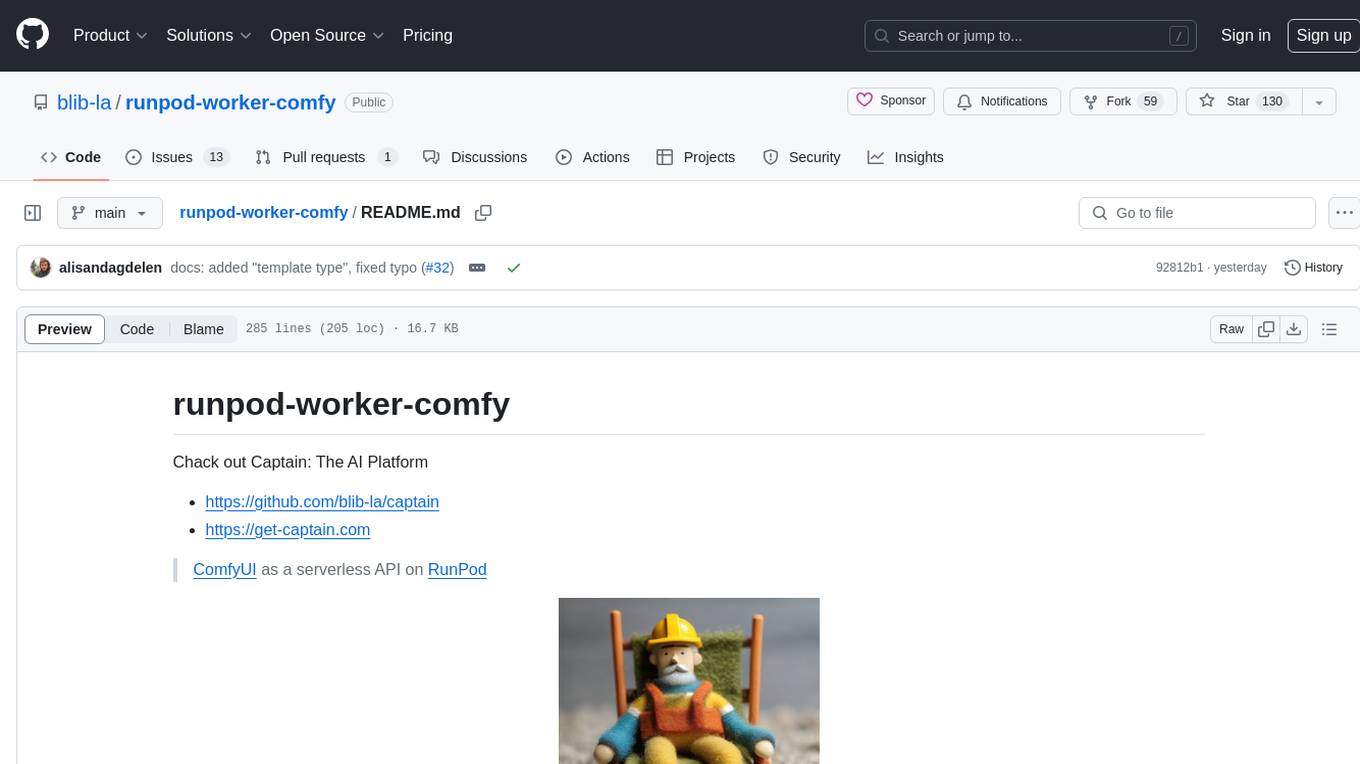
runpod-worker-comfy is a serverless API tool that allows users to run any ComfyUI workflow to generate an image. Users can provide input images as base64-encoded strings, and the generated image can be returned as a base64-encoded string or uploaded to AWS S3. The tool is built on Ubuntu + NVIDIA CUDA and provides features like built-in checkpoints and VAE models. Users can configure environment variables to upload images to AWS S3 and interact with the RunPod API to generate images. The tool also supports local testing and deployment to Docker hub using Github Actions.
liboai
liboai is a simple C++17 library for the OpenAI API, providing developers with access to OpenAI endpoints through a collection of methods and classes. It serves as a spiritual port of OpenAI's Python library, 'openai', with similar structure and features. The library supports various functionalities such as ChatGPT, Audio, Azure, Functions, Image DALL·E, Models, Completions, Edit, Embeddings, Files, Fine-tunes, Moderation, and Asynchronous Support. Users can easily integrate the library into their C++ projects to interact with OpenAI services.
OpenAI-DotNet
OpenAI-DotNet is a simple C# .NET client library for OpenAI to use through their RESTful API. It is independently developed and not an official library affiliated with OpenAI. Users need an OpenAI API account to utilize this library. The library targets .NET 6.0 and above, working across various platforms like console apps, winforms, wpf, asp.net, etc., and on Windows, Linux, and Mac. It provides functionalities for authentication, interacting with models, assistants, threads, chat, audio, images, files, fine-tuning, embeddings, and moderations.
For similar jobs
StoryToolKit
StoryToolkitAI is a film editing tool that utilizes AI to transcribe, index scenes, search through footage, and create stories. It offers features such as automatic transcription, translation, story creation, speaker detection, project file management, and more. The tool works locally on your machine and integrates with DaVinci Resolve Studio 18. It aims to streamline the editing process by leveraging AI capabilities and enhancing user efficiency.
genai-toolbox
Gen AI Toolbox for Databases is an open source server that simplifies building Gen AI tools for interacting with databases. It handles complexities like connection pooling, authentication, and more, enabling easier, faster, and more secure tool development. The toolbox sits between the application's orchestration framework and the database, providing a control plane to modify, distribute, or invoke tools. It offers simplified development, better performance, enhanced security, and end-to-end observability. Users can install the toolbox as a binary, container image, or compile from source. Configuration is done through a 'tools.yaml' file, defining sources, tools, and toolsets. The project follows semantic versioning and welcomes contributions.
sdialog
SDialog is an MIT-licensed open-source toolkit for building, simulating, and evaluating LLM-based conversational agents end-to-end. It aims to bridge agent construction, user simulation, dialog generation, and evaluation in a single reproducible workflow, enabling the generation of reliable, controllable dialog systems or data at scale. The toolkit standardizes a Dialog schema, offers persona-driven multi-agent simulation with LLMs, provides composable orchestration for precise control over behavior and flow, includes built-in evaluation metrics, and offers mechanistic interpretability. It allows for easy creation of user-defined components and interoperability across various AI platforms.
xhs-ai-writer
AI小红书爆款文案生成器 is a revolutionary upgrade from 'general model' to 'Little Red Book explosive expert'. It intelligently analyzes popular notes and generates explosive copy with human touch. It features a dual expert system, triple security guarantee, complete content ecosystem, and enhanced user experience. The tool uses Next.js, React, TypeScript, Tailwind CSS, and custom UI components in the frontend, Next.js API Routes for backend, and integrates OpenAI API with intelligent retry mechanism for AI. It ensures content safety, stability, and error handling. Users can input keywords, provide original materials, let AI intelligently create content, and easily copy the generated content for use. The tool supports multiple AI models for high availability and has a smart cache system for faster response and reduced API calls. It also highlights core technical features like dual expert system architecture, threefold security system, intelligent content parsing engine, and user experience optimization.
aiyabot
AIYA is a Discord bot interface for Stable Diffusion, offering features like live preview, negative prompts, model swapping, image generation, image captioning, image resizing, and more. It supports various options and bonus features to enhance user experience. Users can set per-channel defaults, view stats, manage queues, upscale images, and perform various commands on images. AIYA requires setup with AUTOMATIC1111's Stable Diffusion AI Web UI or SD.Next, and can be deployed using Docker with additional configuration options. Credits go to AUTOMATIC1111, vladmandic, harubaru, and various contributors for their contributions to AIYA's development.
aimp-discord-presence
AIMP - Discord Presence is a plugin for AIMP that changes the status of Discord based on the music you are listening to. It allows users to share their detected activity with others on Discord. The plugin settings are stored in the AIMP configuration file, and users can customize various options such as application ID, timestamp, album art display, and image settings for different playback states.
aiode
aiode is a Discord bot that plays Spotify tracks and YouTube videos or any URL including Soundcloud links and Twitch streams. It allows users to create cross-platform playlists, customize player commands, create custom command presets, adjust properties for deeper customization, sign in to Spotify to play personal playlists, manage access permissions for commands, customize bot summoning methods, and execute advanced admin commands. The bot also features a scripting sandbox for running and storing custom groovy scripts and modifying command behavior through interceptors.
Discord-AI-Selfbot
Discord-AI-Selfbot is a Python-based Discord selfbot that uses the `discord.py-self` library to automatically respond to messages mentioning its trigger word using Groq API's Llama-3 model. It functions as a normal Discord bot on a real Discord account, enabling interactions in DMs, servers, and group chats without needing to invite a bot. The selfbot comes with features like custom AI instructions, free LLM model usage, mention and reply recognition, message handling, channel-specific responses, and a psychoanalysis command to analyze user messages for insights on personality.