


aiCoder
A tool to write JS libraries using AI. The first and only tool that is using ASTs to perform surgical changes to existing code files with out mangling the code. https://aicoderproject.com/
Stars: 157
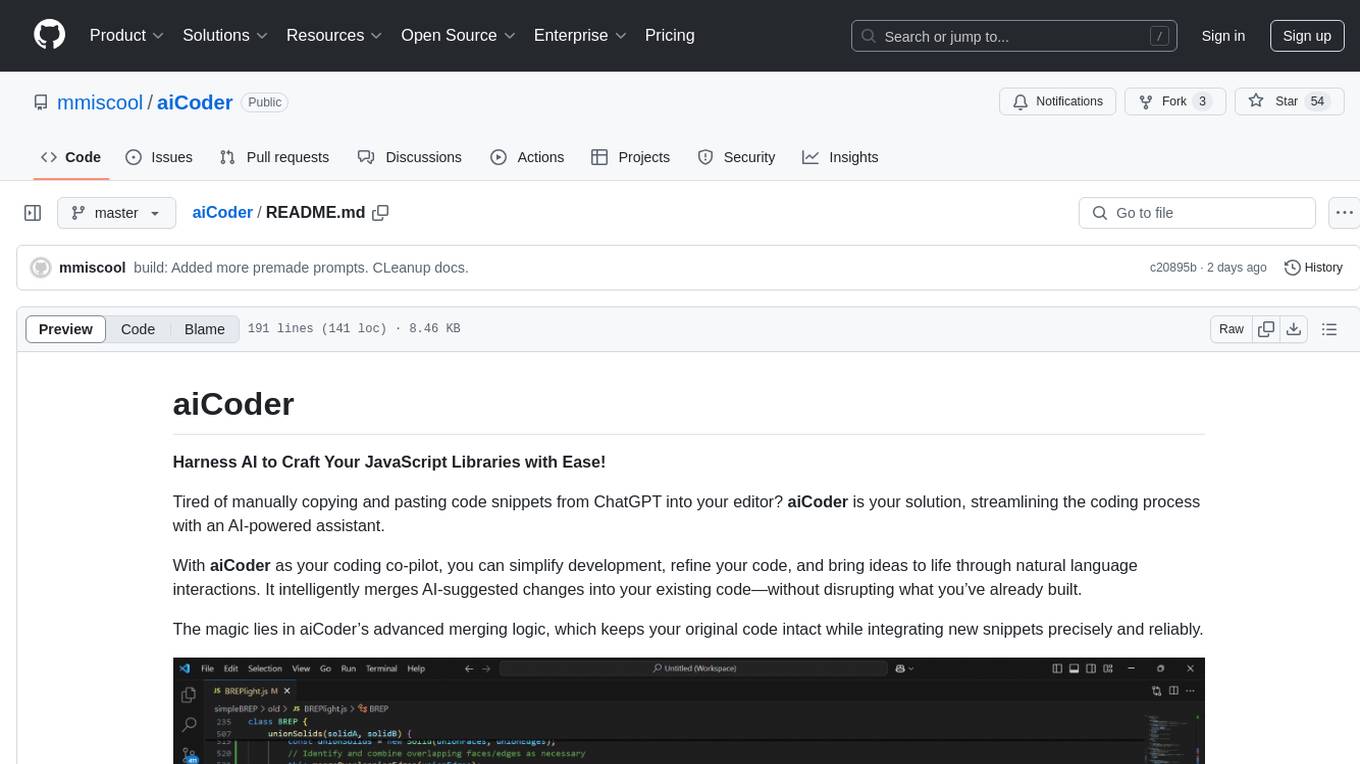
aiCoder is an AI-powered tool designed to streamline the coding process by automating repetitive tasks, providing intelligent code suggestions, and facilitating the integration of new features into existing codebases. It offers a chat interface for natural language interactions, methods and stubs lists for code modification, and settings customization for project-specific prompts. Users can leverage aiCoder to enhance code quality, focus on higher-level design, and save time during development.
README:
Harness AI to Craft Your JavaScript Libraries with Ease!
Tired of manually copying and pasting code snippets from ChatGPT into your editor? aiCoder is your solution, streamlining the coding process with an AI-powered assistant.
With aiCoder as your coding co-pilot, you can simplify development, refine your code, and bring ideas to life through natural language interactions. It intelligently merges AI-suggested changes into your existing code—without disrupting what you’ve already built.
The magic lies in aiCoder’s advanced merging logic, which keeps your original code intact while integrating new snippets precisely and reliably.

Slide Deck discussing the AST approach to merging snippets
aiCoder is designed to enhance your coding experience by leveraging the power of AI. It helps you:
- Save time by automating repetitive coding tasks.
- Improve code quality with intelligent suggestions.
- Focus on higher-level design and problem-solving.
- Seamlessly integrate new features and improvements into your existing codebase.
- Run
aiCoderor just theacommand in your project’s directory. - Visit http://localhost:3000 to access the web UI.
- Use New Plan Chat to discuss and define your project requirements, then save the plan. The saved plan guides future implementations.
- Open the Files tab to select the target file you want to modify.
- Start a New Chat with the selected file.
- Request code changes using natural language prompts.
- Review the suggested snippets and click 🤖✎⚡ to automatically merge them into the file.
Installation instructions provided for linux.
npm i -g aicodertool
- Clone this repository and navigate to the cloned directory.
- Run:
cd aiCoder
npm install && npm install -g .
After installation, you’re all set! Just run the aiCoder or the much short a command in any project directory.
Installing Ollama allows you to use local LLMs.
On linux you can run aiCoder -setup to automatically install ollama and pull the default model or manually install it with the following commands:
# Install Ollama
curl -fsSL https://ollama.com/install.sh | sh

# Pull the preferred model
ollama pull granite3.1-dense
You can find and install additional models to test with https://ollama.com/search
Launch aiCoder from within your project folder:
cd myProjectFolder
aicoder
Then open http://localhost:3000 in your browser to begin.
To run on a different port use aicoder -p 3001
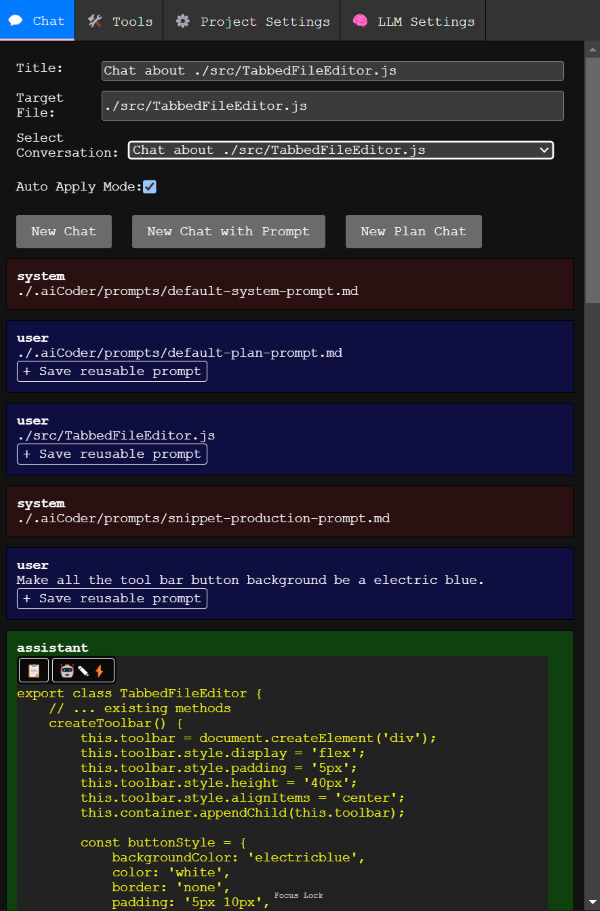
Use New Chat to interactively modify a selected file. Before starting a conversation, be sure to choose a file from the Files tab. The LLM uses a system prompt specifying the snippet format. Correctly formatted snippets can be merged automatically, updating existing functions or class methods without disturbing the rest of the code.
Use New Plan Chat to refine the project plan document. This plan, combined with the default system prompts, guides the LLM during regular chats.
Begin by describing your project goals. You can ask the LLM to produce a detailed outline of all the necessary classes and methods, then save this plan.
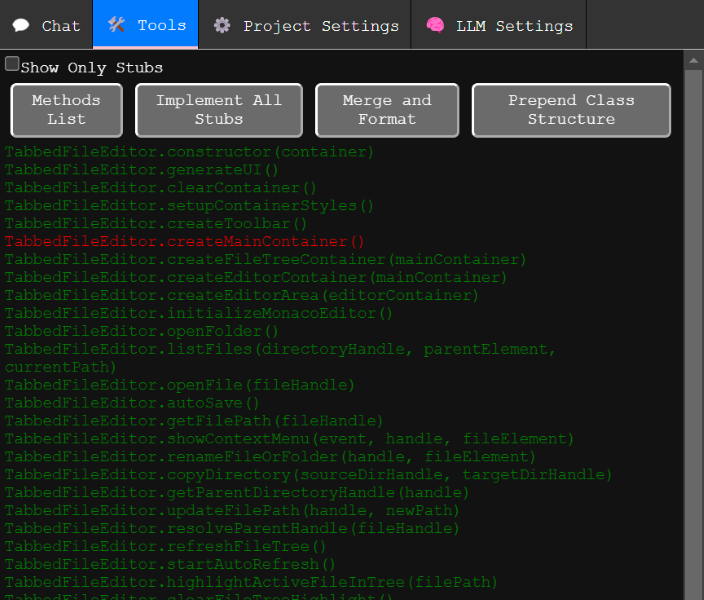
Displays all detected methods.
- Green methods: Implemented methods with code.
- Red methods: Stubs that need implementation.
To only dhow the red stubs in the list use the "Show Only Stubs" checkbox.
Clicking on a method passes it into a new chat, allowing you to modify or implement it.
If you’re using ChatGPT or another external LLM, you can copy and paste suggested snippets to the end of the file. They must follow the guidelines in snippet_production_prompt.md for automatic merging.
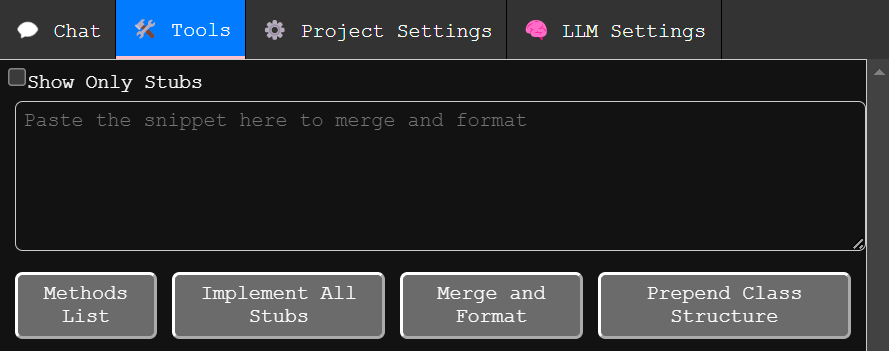
You can also just past your snippet in to the text area that appears when you click the merge and format button.
Adds a skeleton of all existing classes and methods to the top of the file. You can reorder classes and methods here. After adjusting the structure, run Merge and Format to clean up and integrate the changes into the stubs.
Project-specific settings are stored in ./.aiCoder/. This folder includes backups of modified files stored in ./.aiCoder/backups/.
You can customize system prompts for your project in the ./aiCoder/ folder. Access these settings in your IDE or from the Project Settings tab.
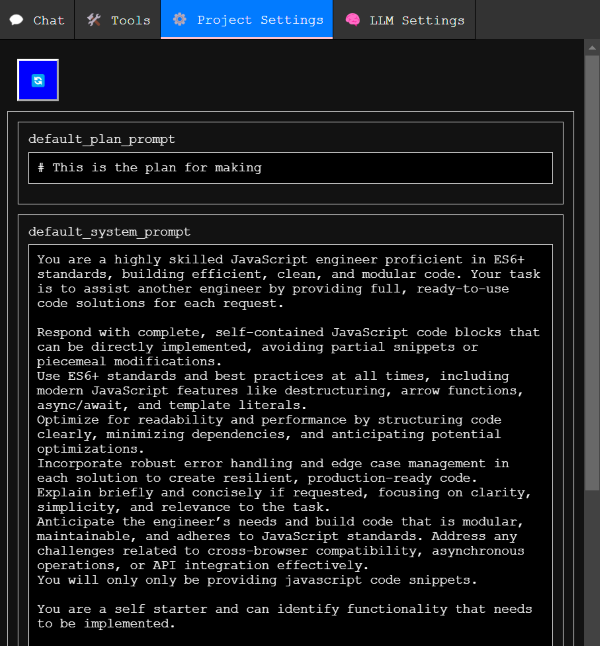
Describes your project, goals, and requirements. Edit it directly, or use New Plan Chat to interactively refine it.
Shapes the LLM’s personality and behavior. If you break it, don’t worry—delete it and restart aiCoder to restore defaults. If you find improvements, consider opening an issue with your suggested changes.
Instructs the LLM on how to format code snippets for seamless merging.
All snippets must conform to the following format:
class exampleClass {
   // ... existing methods
   exampleMethod(){
      //example code
   }
}
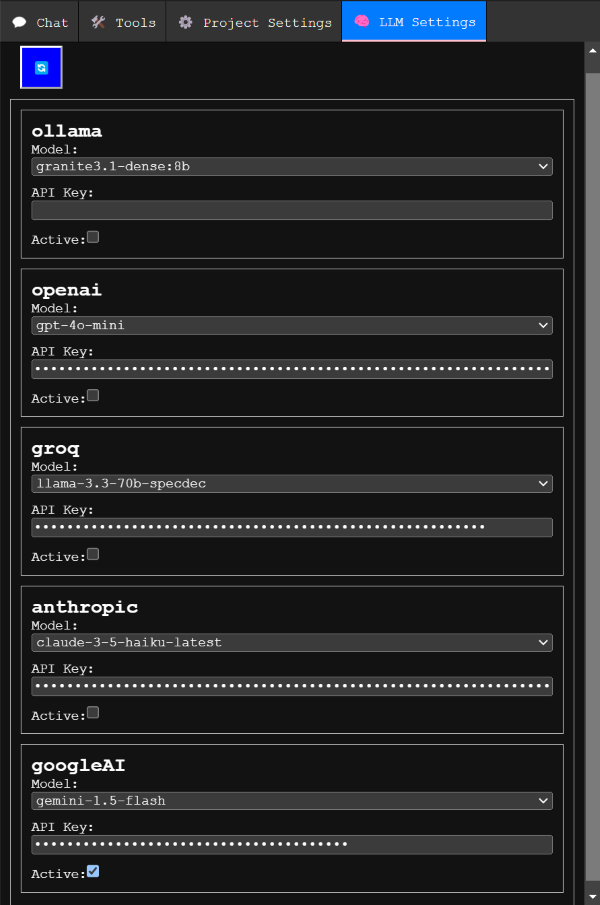
Before using aiCoder, configure your LLM provider and model. After providing an API key, you can view available models.
Right now the recommend LLM provider to use is OpenAI or GoogleAI. Ollama is supported for completely local and private LMM code generation.
- OpenAI’s
gpt-4o-miniorgpt-4omodels work well. - Anthropics’s
claude-3-5-haikuworks fine. It is more expensive. - Groq is less tested and has a smaller context window. Not recommended for use.
- Ollama runs locally but may be slower. Its
granite3.1-densemodel works well enough, though sometimes requires additional prompting to get properly formatted snippets. - GoogleAI using the free
gemini-1.5-flashseems to work on par with OpenAIgpt-4o-mini. To get a free api key go to https://aistudio.google.com/apikey
Every time aiCoder modifies a file, it creates a backup in ./.aiCoder/backups/, preserving your original code with timestamped filenames.
Implemented:
- Automatic merging of multiple class/function definitions into a single source structure.
- Ability to prompt for modifications to a single JS file.
- Automatic backups before modification.
- Code snippet extraction from LLM responses and a workflow to accept/reject on a per-snippet basis.
- Custom prompt manager for reusable prompts.
- Support for various LLM providers.
- Automatic setup on first use (provider selection, API key, model choice).
- NPM packaging.
- Automatic generation of stub methods and their code.
To Do:
- Support multiple files simultaneously.
- Allow the LLM to suggest adding NPM packages.
- Add support for HTML, CSS, and MD files by parsing them to ASTs and merging changes.
- Preserve comments during merges.
aiCoder is more than a tool—it’s your personal AI development partner. By making coding smarter, faster, and more fluid, aiCoder helps you unlock new creative possibilities.
Embark on your journey with aiCoder today, and experience a whole new world of coding! 🌟
-
How do I reset my settings?
- Delete the
./.aiCoder/folder in your project directory and restart aiCoder. This will recreate the default settings and prompts.
- Delete the
-
Can I use aiCoder with other programming languages?
- Currently, aiCoder is works only for JavaScript. Support for other languages is planned for future releases.
-
How do I update aiCoder?
- If installed via npm, run
npm update aicodertool -g. If installed from source, pull the latest changes from the repository and reinstall.
- If installed via npm, run
-
What front end library are you using?
- Front end library. Who needs a front end library when you can just touch the DOM.
-
Is it linux only or can I use it on windows?
- Windows support was recently added and is still experimental.
-
Can I help?
- Sure. If folks are interested we can set up a discord server. If you are knowledgeable about how LSPs and ASTs work it would be really great to chat.
- A python implementation of a similar AI assisted coding tool with AST merging of LLM snippets. NVR-Editor
For Tasks:
Click tags to check more tools for each tasksFor Jobs:
Alternative AI tools for aiCoder
Similar Open Source Tools
aiCoder
aiCoder is an AI-powered tool designed to streamline the coding process by automating repetitive tasks, providing intelligent code suggestions, and facilitating the integration of new features into existing codebases. It offers a chat interface for natural language interactions, methods and stubs lists for code modification, and settings customization for project-specific prompts. Users can leverage aiCoder to enhance code quality, focus on higher-level design, and save time during development.
devika
Devika is an advanced AI software engineer that can understand high-level human instructions, break them down into steps, research relevant information, and write code to achieve the given objective. Devika utilizes large language models, planning and reasoning algorithms, and web browsing abilities to intelligently develop software. Devika aims to revolutionize the way we build software by providing an AI pair programmer who can take on complex coding tasks with minimal human guidance. Whether you need to create a new feature, fix a bug, or develop an entire project from scratch, Devika is here to assist you.
raggenie
RAGGENIE is a low-code RAG builder tool designed to simplify the creation of conversational AI applications. It offers out-of-the-box plugins for connecting to various data sources and building conversational AI on top of them, including integration with pre-built agents for actions. The tool is open-source under the MIT license, with a current focus on making it easy to build RAG applications and future plans for maintenance, monitoring, and transitioning applications from pilots to production.
local_multimodal_ai_chat
Local Multimodal AI Chat is a hands-on project that teaches you how to build a multimodal chat application. It integrates different AI models to handle audio, images, and PDFs in a single chat interface. This project is perfect for anyone interested in AI and software development who wants to gain practical experience with these technologies.
Local-Multimodal-AI-Chat
Local Multimodal AI Chat is a multimodal chat application that integrates various AI models to manage audio, images, and PDFs seamlessly within a single interface. It offers local model processing with Ollama for data privacy, integration with OpenAI API for broader AI capabilities, audio chatting with Whisper AI for accurate voice interpretation, and PDF chatting with Chroma DB for efficient PDF interactions. The application is designed for AI enthusiasts and developers seeking a comprehensive solution for multimodal AI technologies.

cognita
Cognita is an open-source framework to organize your RAG codebase along with a frontend to play around with different RAG customizations. It provides a simple way to organize your codebase so that it becomes easy to test it locally while also being able to deploy it in a production ready environment. The key issues that arise while productionizing RAG system from a Jupyter Notebook are: 1. **Chunking and Embedding Job** : The chunking and embedding code usually needs to be abstracted out and deployed as a job. Sometimes the job will need to run on a schedule or be trigerred via an event to keep the data updated. 2. **Query Service** : The code that generates the answer from the query needs to be wrapped up in a api server like FastAPI and should be deployed as a service. This service should be able to handle multiple queries at the same time and also autoscale with higher traffic. 3. **LLM / Embedding Model Deployment** : Often times, if we are using open-source models, we load the model in the Jupyter notebook. This will need to be hosted as a separate service in production and model will need to be called as an API. 4. **Vector DB deployment** : Most testing happens on vector DBs in memory or on disk. However, in production, the DBs need to be deployed in a more scalable and reliable way. Cognita makes it really easy to customize and experiment everything about a RAG system and still be able to deploy it in a good way. It also ships with a UI that makes it easier to try out different RAG configurations and see the results in real time. You can use it locally or with/without using any Truefoundry components. However, using Truefoundry components makes it easier to test different models and deploy the system in a scalable way. Cognita allows you to host multiple RAG systems using one app. ### Advantages of using Cognita are: 1. A central reusable repository of parsers, loaders, embedders and retrievers. 2. Ability for non-technical users to play with UI - Upload documents and perform QnA using modules built by the development team. 3. Fully API driven - which allows integration with other systems. > If you use Cognita with Truefoundry AI Gateway, you can get logging, metrics and feedback mechanism for your user queries. ### Features: 1. Support for multiple document retrievers that use `Similarity Search`, `Query Decompostion`, `Document Reranking`, etc 2. Support for SOTA OpenSource embeddings and reranking from `mixedbread-ai` 3. Support for using LLMs using `Ollama` 4. Support for incremental indexing that ingests entire documents in batches (reduces compute burden), keeps track of already indexed documents and prevents re-indexing of those docs.
agentok
Agentok Studio is a visual tool built for AutoGen, a cutting-edge agent framework from Microsoft and various contributors. It offers intuitive visual tools to simplify the construction and management of complex agent-based workflows. Users can create workflows visually as graphs, chat with agents, and share flow templates. The tool is designed to streamline the development process for creators and developers working on next-generation Multi-Agent Applications.
burpference
Burpference is an open-source extension designed to capture in-scope HTTP requests and responses from Burp's proxy history and send them to a remote LLM API in JSON format. It automates response capture, integrates with APIs, optimizes resource usage, provides color-coded findings visualization, offers comprehensive logging, supports native Burp reporting, and allows flexible configuration. Users can customize system prompts, API keys, and remote hosts, and host models locally to prevent high inference costs. The tool is ideal for offensive web application engagements to surface findings and vulnerabilities.
n8n-docs
n8n is an extendable workflow automation tool that enables you to connect anything to everything. It is open-source and can be self-hosted or used as a service. n8n provides a visual interface for creating workflows, which can be used to automate tasks such as data integration, data transformation, and data analysis. n8n also includes a library of pre-built nodes that can be used to connect to a variety of applications and services. This makes it easy to create complex workflows without having to write any code.
azure-search-openai-demo
This sample demonstrates a few approaches for creating ChatGPT-like experiences over your own data using the Retrieval Augmented Generation pattern. It uses Azure OpenAI Service to access a GPT model (gpt-35-turbo), and Azure AI Search for data indexing and retrieval. The repo includes sample data so it's ready to try end to end. In this sample application we use a fictitious company called Contoso Electronics, and the experience allows its employees to ask questions about the benefits, internal policies, as well as job descriptions and roles.
dockershrink
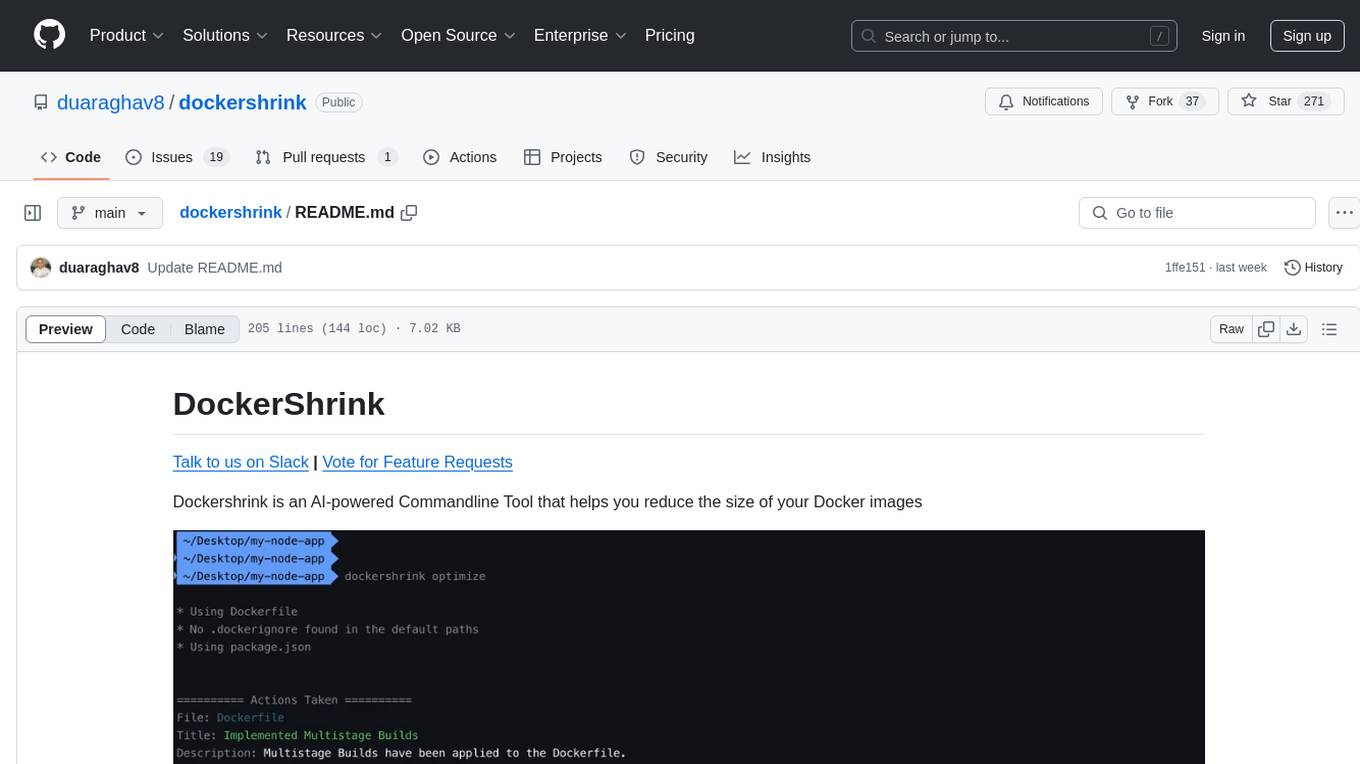
Dockershrink is an AI-powered Commandline Tool designed to help reduce the size of Docker images. It combines traditional Rule-based analysis with Generative AI techniques to optimize Image configurations. The tool supports NodeJS applications and aims to save costs on storage, data transfer, and build times while increasing developer productivity. By automatically applying advanced optimization techniques, Dockershrink simplifies the process for engineers and organizations, resulting in significant savings and efficiency improvements.
Open_Data_QnA
Open Data QnA is a Python library that allows users to interact with their PostgreSQL or BigQuery databases in a conversational manner, without needing to write SQL queries. The library leverages Large Language Models (LLMs) to bridge the gap between human language and database queries, enabling users to ask questions in natural language and receive informative responses. It offers features such as conversational querying with multiturn support, table grouping, multi schema/dataset support, SQL generation, query refinement, natural language responses, visualizations, and extensibility. The library is built on a modular design and supports various components like Database Connectors, Vector Stores, and Agents for SQL generation, validation, debugging, descriptions, embeddings, responses, and visualizations.
WebCraftifyAI
WebCraftifyAI is a software aid that makes it easy to create and build web pages and content. It is designed to be user-friendly and accessible to people of all skill levels. With WebCraftifyAI, you can quickly and easily create professional-looking websites without having to learn complex coding or design skills.
coral-cloud
Coral Cloud Resorts is a sample hospitality application that showcases Data Cloud, Agents, and Prompts. It provides highly personalized guest experiences through smart automation, content generation, and summarization. The app requires licenses for Data Cloud, Agents, Prompt Builder, and Einstein for Sales. Users can activate features, deploy metadata, assign permission sets, import sample data, and troubleshoot common issues. Additionally, the repository offers integration with modern web development tools like Prettier, ESLint, and pre-commit hooks for code formatting and linting.
geti-sdk
The Intel® Geti™ SDK is a python package that enables teams to rapidly develop AI models by easing the complexities of model development and enhancing collaboration between teams. It provides tools to interact with an Intel® Geti™ server via the REST API, allowing for project creation, downloading, uploading, deploying for local inference with OpenVINO, setting project and model configuration, launching and monitoring training jobs, and media upload and prediction. The SDK also includes tutorial-style Jupyter notebooks demonstrating its usage.
Dot
Dot is a standalone, open-source application designed for seamless interaction with documents and files using local LLMs and Retrieval Augmented Generation (RAG). It is inspired by solutions like Nvidia's Chat with RTX, providing a user-friendly interface for those without a programming background. Pre-packaged with Mistral 7B, Dot ensures accessibility and simplicity right out of the box. Dot allows you to load multiple documents into an LLM and interact with them in a fully local environment. Supported document types include PDF, DOCX, PPTX, XLSX, and Markdown. Users can also engage with Big Dot for inquiries not directly related to their documents, similar to interacting with ChatGPT. Built with Electron JS, Dot encapsulates a comprehensive Python environment that includes all necessary libraries. The application leverages libraries such as FAISS for creating local vector stores, Langchain, llama.cpp & Huggingface for setting up conversation chains, and additional tools for document management and interaction.
For similar tasks

Magick
Magick is a groundbreaking visual AIDE (Artificial Intelligence Development Environment) for no-code data pipelines and multimodal agents. Magick can connect to other services and comes with nodes and templates well-suited for intelligent agents, chatbots, complex reasoning systems and realistic characters.

danswer
Danswer is an open-source Gen-AI Chat and Unified Search tool that connects to your company's docs, apps, and people. It provides a Chat interface and plugs into any LLM of your choice. Danswer can be deployed anywhere and for any scale - on a laptop, on-premise, or to cloud. Since you own the deployment, your user data and chats are fully in your own control. Danswer is MIT licensed and designed to be modular and easily extensible. The system also comes fully ready for production usage with user authentication, role management (admin/basic users), chat persistence, and a UI for configuring Personas (AI Assistants) and their Prompts. Danswer also serves as a Unified Search across all common workplace tools such as Slack, Google Drive, Confluence, etc. By combining LLMs and team specific knowledge, Danswer becomes a subject matter expert for the team. Imagine ChatGPT if it had access to your team's unique knowledge! It enables questions such as "A customer wants feature X, is this already supported?" or "Where's the pull request for feature Y?"

semantic-kernel
Semantic Kernel is an SDK that integrates Large Language Models (LLMs) like OpenAI, Azure OpenAI, and Hugging Face with conventional programming languages like C#, Python, and Java. Semantic Kernel achieves this by allowing you to define plugins that can be chained together in just a few lines of code. What makes Semantic Kernel _special_ , however, is its ability to _automatically_ orchestrate plugins with AI. With Semantic Kernel planners, you can ask an LLM to generate a plan that achieves a user's unique goal. Afterwards, Semantic Kernel will execute the plan for the user.

floneum
Floneum is a graph editor that makes it easy to develop your own AI workflows. It uses large language models (LLMs) to run AI models locally, without any external dependencies or even a GPU. This makes it easy to use LLMs with your own data, without worrying about privacy. Floneum also has a plugin system that allows you to improve the performance of LLMs and make them work better for your specific use case. Plugins can be used in any language that supports web assembly, and they can control the output of LLMs with a process similar to JSONformer or guidance.
mindsdb
MindsDB is a platform for customizing AI from enterprise data. You can create, serve, and fine-tune models in real-time from your database, vector store, and application data. MindsDB "enhances" SQL syntax with AI capabilities to make it accessible for developers worldwide. With MindsDB’s nearly 200 integrations, any developer can create AI customized for their purpose, faster and more securely. Their AI systems will constantly improve themselves — using companies’ own data, in real-time.

aiscript
AiScript is a lightweight scripting language that runs on JavaScript. It supports arrays, objects, and functions as first-class citizens, and is easy to write without the need for semicolons or commas. AiScript runs in a secure sandbox environment, preventing infinite loops from freezing the host. It also allows for easy provision of variables and functions from the host.

activepieces
Activepieces is an open source replacement for Zapier, designed to be extensible through a type-safe pieces framework written in Typescript. It features a user-friendly Workflow Builder with support for Branches, Loops, and Drag and Drop. Activepieces integrates with Google Sheets, OpenAI, Discord, and RSS, along with 80+ other integrations. The list of supported integrations continues to grow rapidly, thanks to valuable contributions from the community. Activepieces is an open ecosystem; all piece source code is available in the repository, and they are versioned and published directly to npmjs.com upon contributions. If you cannot find a specific piece on the pieces roadmap, please submit a request by visiting the following link: Request Piece Alternatively, if you are a developer, you can quickly build your own piece using our TypeScript framework. For guidance, please refer to the following guide: Contributor's Guide
superagent-js
Superagent is an open source framework that enables any developer to integrate production ready AI Assistants into any application in a matter of minutes.
For similar jobs

sweep
Sweep is an AI junior developer that turns bugs and feature requests into code changes. It automatically handles developer experience improvements like adding type hints and improving test coverage.

teams-ai
The Teams AI Library is a software development kit (SDK) that helps developers create bots that can interact with Teams and Microsoft 365 applications. It is built on top of the Bot Framework SDK and simplifies the process of developing bots that interact with Teams' artificial intelligence capabilities. The SDK is available for JavaScript/TypeScript, .NET, and Python.

ai-guide
This guide is dedicated to Large Language Models (LLMs) that you can run on your home computer. It assumes your PC is a lower-end, non-gaming setup.

classifai
Supercharge WordPress Content Workflows and Engagement with Artificial Intelligence. Tap into leading cloud-based services like OpenAI, Microsoft Azure AI, Google Gemini and IBM Watson to augment your WordPress-powered websites. Publish content faster while improving SEO performance and increasing audience engagement. ClassifAI integrates Artificial Intelligence and Machine Learning technologies to lighten your workload and eliminate tedious tasks, giving you more time to create original content that matters.

chatbot-ui
Chatbot UI is an open-source AI chat app that allows users to create and deploy their own AI chatbots. It is easy to use and can be customized to fit any need. Chatbot UI is perfect for businesses, developers, and anyone who wants to create a chatbot.

BricksLLM
BricksLLM is a cloud native AI gateway written in Go. Currently, it provides native support for OpenAI, Anthropic, Azure OpenAI and vLLM. BricksLLM aims to provide enterprise level infrastructure that can power any LLM production use cases. Here are some use cases for BricksLLM: * Set LLM usage limits for users on different pricing tiers * Track LLM usage on a per user and per organization basis * Block or redact requests containing PIIs * Improve LLM reliability with failovers, retries and caching * Distribute API keys with rate limits and cost limits for internal development/production use cases * Distribute API keys with rate limits and cost limits for students

uAgents
uAgents is a Python library developed by Fetch.ai that allows for the creation of autonomous AI agents. These agents can perform various tasks on a schedule or take action on various events. uAgents are easy to create and manage, and they are connected to a fast-growing network of other uAgents. They are also secure, with cryptographically secured messages and wallets.

griptape
Griptape is a modular Python framework for building AI-powered applications that securely connect to your enterprise data and APIs. It offers developers the ability to maintain control and flexibility at every step. Griptape's core components include Structures (Agents, Pipelines, and Workflows), Tasks, Tools, Memory (Conversation Memory, Task Memory, and Meta Memory), Drivers (Prompt and Embedding Drivers, Vector Store Drivers, Image Generation Drivers, Image Query Drivers, SQL Drivers, Web Scraper Drivers, and Conversation Memory Drivers), Engines (Query Engines, Extraction Engines, Summary Engines, Image Generation Engines, and Image Query Engines), and additional components (Rulesets, Loaders, Artifacts, Chunkers, and Tokenizers). Griptape enables developers to create AI-powered applications with ease and efficiency.