


OSA
Tool that just makes your open source project better using LLM agents
Stars: 94
OSA (Open-Source-Advisor) is a tool designed to improve the quality of scientific open source projects by automating the generation of README files, documentation, CI/CD scripts, and providing advice and recommendations for repositories. It supports various LLMs accessible via API, local servers, or osa_bot hosted on ITMO servers. OSA is currently under development with features like README file generation, documentation generation, automatic implementation of changes, LLM integration, and GitHub Action Workflow generation. It requires Python 3.10 or higher and tokens for GitHub/GitLab/Gitverse and LLM API key. Users can install OSA using PyPi or build from source, and run it using CLI commands or Docker containers.
README:







Built with:


OSA (Open-Source-Advisor) is a LLM-based tool for improving the quality of scientific open source projects and helping create them from scratch. It automates the generation of README, different levels of documentation, CI/CD scripts, etc. It also generates advices and recommendations for the repository.
OSA is currently under development, so not all features are implemented.
Here is a short video:

- Core features
- Installation
- Getting started
- Examples
- Documentation
- Chat with developers: OSA_helpdesk
- Publications about OSA
- Contributing
- License
- Acknowledgments
- Citation
-
README file generation: Automates the creation of a clear and structured README file for a repository, including projects based on research papers.
-
Documentation generation: Automatically generates docstrings for Python code.
-
Automatic implementation of changes: Clones the repository, creates a branch, commits and pushes changes, and creates a pull request with proposed changes.
-
Various LLMs: Use OSA with an LLM accessible via API (e.g., OpenAI, VseGPT, Ollama), a local server, or try an osa_bot hosted on ITMO servers.
-
GitHub Action Workflow Generator: Automatically generates customizable CI/CD workflows for Python repositories, including unit tests, code formatting, PEP 8 compliance checks, and PyPI publication.
Install Open-Source-Advisor using one of the following methods:
Using PyPi:
pip install osa_toolBuild from source:
- Clone the Open-Source-Advisor repository:
git clone https://github.com/aimclub/OSA- Navigate to the project directory:
cd Open-Source-Advisor- Install the project dependencies:
Using pip

pip install -r requirements.txtUsing poetry

poetry install Using docker

docker build --build-arg GIT_USER_NAME="your-user-name" --build-arg GIT_USER_EMAIL="your-user-email" -f docker/Dockerfile -t {image-name} .OSA requires Python 3.10 or higher.
File .env is required to specify GitHub/GitLab/Gitverse token (GIT_TOKEN) and LLM API key (OPENAI_API_KEY or
AUTHORIZATION_KEY)
When running osa-tool from CLI, you need to set the GIT_TOKEN and API key first:
# Linux / macOS (bash/zsh)
export OPENAI_API_KEY=<your_api_key>
export GIT_TOKEN=<your_git_token>

# Windows (PowerShell)
setx OPENAI_API_KEY "<your_api_key>"
setx GIT_TOKEN "<your_git_token>"| Token name | Description | Mandatory |
|---|---|---|
GIT_TOKEN |
Personal GitHub/GitLab/Gitverse token used to clone private repositories, access metadata, and interact with its API. | Yes |
OPENAI_API_KEY |
API key for accessing OpenAI, vsegpt and openrouter providers | No |
AUTHORIZATION_KEY |
API key for gigachat provider | No |
X-API-Key |
API key for the pepy.tech REST API, used to fetch Python package download statistics | No |
Run Open-Source-Advisor using the following command:
Using pip
python -m osa_tool.run -r {repository} [--api {api}] [--base-url {base_url}] [--model {model_name}] [--article {article}] [--convert-notebooks {notebook_paths}]Using docker
docker run --env-file .env {image-name} -r {repository} [--api {api}] [--base-url {base_url}] [--model {model_name}] [--article {article}] [--convert-notebooks {notebook_paths}]The --article option enables you to choose a README template for a repository based on an article. You can provide either a link to a PDF file of the article or a path to a local PDF file after the --article option. If you are using Docker, ensure that you upload the PDF file to the OSA folder before building the image, then, specify the path as /app/OSA/... or just use volume mounting to access the file.
The --generate-workflows option is intended to create customizable CI/CD pipelines for Python repositories. For detailed documentation, see the GitHub Action Workflow Generator README.
| Flag | Description | Default |
|---|---|---|
-r, --repository
|
URL of the GitHub/GitLab/Gitverse repository (Mandatory) | |
-b, --branch
|
Branch name of the repository | Default branch |
-o, --output
|
Path to the output directory | Current working directory |
--api |
LLM API service provider | itmo |
--base-url |
URL of the provider compatible with API OpenAI | https://api.openai.com/v1 |
--model |
Specific LLM model to use | gpt-3.5-turbo |
--top_p |
Nucleus sampling probability | None |
--temperature |
Sampling temperature to use for the LLM output (0 = deterministic, 1 = creative). | None |
--max_tokens |
Maximum number of tokens the model can generate in a single response | None |
--article |
Link to the pdf file of the article | None |
-m, --mode
|
Operation mode for repository processing: basic, auto (default), or advanced. |
auto |
--delete-dir |
Enable deleting the downloaded repository after processing | disabled |
--no-fork |
Avoid create fork for target repository | False |
--no-pull-request |
Avoid create pull request for target repository | False |
To learn how to work with the interactive CLI and view descriptions of all available keys, visit the CLI usage guide.
Examples of generated README files are available in examples.
URL of the GitHub/GitLab/Gitverse repository, LLM API service provider (optional) and Specific LLM model to use (optional) are required to use the generator.
Supported LLM providers are available as part of the ProtoLLM ecosystem. See the connectors directory for the full list.
Local ITMO model:
python -m osa_tool.run -r https://github.com/aimclub/OSA --base-url [ITMO_MODEL_URL]For this API provider itmo model url must be specified in dotenv (ITMO_MODEL_URL=) or in the --base-url argument.
OpenAI:
python -m osa_tool.run -r https://github.com/aimclub/OSA --api openaiVseGPT:
python -m osa_tool.run -r https://github.com/aimclub/OSA --api openai --base-url https://api.vsegpt.ru/v1 --model openai/gpt-3.5-turboOpenrouter:
python -m osa_tool.run -r https://github.com/aimclub/OSA --api openai --base-url https://openrouter.ai/api/v1 --model qwen/qwen3-30b-a3b-instruct-2507Ollama:
python -m osa_tool.run -r https://github.com/aimclub/OSA --api ollama --base-url http://[YOUR_OLLAMA_IP]:11434 --model gemma3:27bDetailed description of OSA API is available here.
In our Telegram chat OSA_helpdesk you can ask questions about working with OSA and find the latest news about the project.
In English:
In Russian:
- Report Issues: Submit bugs found or log feature requests for the Open-Source-Advisor project.
This project is protected under the BSD 3-Clause "New" or "Revised" License. For more details, refer to the LICENSE file.
The project is supported as ITMO University Research Project in AI Initiative (RPAII).
OSA is tested by the members of ITMO OpenSource community. Useful content from community is available in Open-source-ops
Also, we thank Readme-ai for their code that we used as a foundation for our own version of README generator.
If you use this software, please cite it as below.
Nikitin N. et al. An LLM-Powered Tool for Enhancing Scientific Open-Source Repositories // Championing Open-source DEvelopment in ML Workshop@ ICML25.
@inproceedings{nikitinllm,
title={An LLM-Powered Tool for Enhancing Scientific Open-Source Repositories},
author={Nikitin, Nikolay and Getmanov, Andrey and Popov, Zakhar and
    Ulyanova Ekaterina and Aksenkin, Yaroslav and
    Sokolov, Ilya and Boukhanovsky, Alexander},
booktitle={Championing Open-source DEvelopment in ML Workshop@ ICML25}
}
For Tasks:
Click tags to check more tools for each tasksFor Jobs:
Alternative AI tools for OSA
Similar Open Source Tools
OSA
OSA (Open-Source-Advisor) is a tool designed to improve the quality of scientific open source projects by automating the generation of README files, documentation, CI/CD scripts, and providing advice and recommendations for repositories. It supports various LLMs accessible via API, local servers, or osa_bot hosted on ITMO servers. OSA is currently under development with features like README file generation, documentation generation, automatic implementation of changes, LLM integration, and GitHub Action Workflow generation. It requires Python 3.10 or higher and tokens for GitHub/GitLab/Gitverse and LLM API key. Users can install OSA using PyPi or build from source, and run it using CLI commands or Docker containers.
agentscope
AgentScope is a multi-agent platform designed to empower developers to build multi-agent applications with large-scale models. It features three high-level capabilities: Easy-to-Use, High Robustness, and Actor-Based Distribution. AgentScope provides a list of `ModelWrapper` to support both local model services and third-party model APIs, including OpenAI API, DashScope API, Gemini API, and ollama. It also enables developers to rapidly deploy local model services using libraries such as ollama (CPU inference), Flask + Transformers, Flask + ModelScope, FastChat, and vllm. AgentScope supports various services, including Web Search, Data Query, Retrieval, Code Execution, File Operation, and Text Processing. Example applications include Conversation, Game, and Distribution. AgentScope is released under Apache License 2.0 and welcomes contributions.
PDFMathTranslate
PDFMathTranslate is a tool designed for translating scientific papers and conducting bilingual comparisons. It preserves formulas, charts, table of contents, and annotations. The tool supports multiple languages and diverse translation services. It provides a command-line tool, interactive user interface, and Docker deployment. Users can try the application through online demos. The tool offers various installation methods including command-line, portable, graphic user interface, and Docker. Advanced options allow users to customize translation settings. Additionally, the tool supports secondary development through APIs for Python and HTTP. Future plans include parsing layout with DocLayNet based models, fixing page rotation and format issues, supporting non-PDF/A files, and integrating plugins for Zotero and Obsidian.
rpaframework
RPA Framework is an open-source collection of libraries and tools for Robotic Process Automation (RPA), designed to be used with Robot Framework and Python. It offers well-documented core libraries for Software Robot Developers, optimized for Robocorp Control Room and Developer Tools, and accepts external contributions. The project includes various libraries for tasks like archiving, browser automation, date/time manipulations, cloud services integration, encryption operations, database interactions, desktop automation, document processing, email operations, Excel manipulation, file system operations, FTP interactions, web API interactions, image manipulation, AI services, and more. The development of the repository is Python-based and requires Python version 3.8+, with tooling based on poetry and invoke for compiling, building, and running the package. The project is licensed under the Apache License 2.0.

tokscale
Tokscale is a high-performance CLI tool and visualization dashboard for tracking token usage and costs across multiple AI coding agents. It helps monitor and analyze token consumption from various AI coding tools, providing real-time pricing calculations using LiteLLM's pricing data. Inspired by the Kardashev scale, Tokscale measures token consumption as users scale the ranks of AI-augmented development. It offers interactive TUI mode, multi-platform support, real-time pricing, detailed breakdowns, web visualization, flexible filtering, and social platform features.

mcp-devtools
MCP DevTools is a high-performance server written in Go that replaces multiple Node.js and Python-based servers. It provides access to essential developer tools through a unified, modular interface. The server is efficient, with minimal memory footprint and fast response times. It offers a comprehensive tool suite for agentic coding, including 20+ essential developer agent tools. The tool registry allows for easy addition of new tools. The server supports multiple transport modes, including STDIO, HTTP, and SSE. It includes a security framework for multi-layered protection and a plugin system for adding new tools.
paperbanana
PaperBanana is an automated academic illustration tool designed for AI scientists. It implements an agentic framework for generating publication-quality academic diagrams and statistical plots from text descriptions. The tool utilizes a two-phase multi-agent pipeline with iterative refinement, Gemini-based VLM planning, and image generation. It offers a CLI, Python API, and MCP server for IDE integration, along with Claude Code skills for generating diagrams, plots, and evaluating diagrams. PaperBanana is not affiliated with or endorsed by the original authors or Google Research, and it may differ from the original system described in the paper.

ClaudeBar
ClaudeBar is a macOS menu bar application that monitors AI coding assistant usage quotas. It allows users to keep track of their usage of Claude, Codex, Gemini, GitHub Copilot, Antigravity, and Z.ai at a glance. The application offers multi-provider support, real-time quota tracking, multiple themes, visual status indicators, system notifications, auto-refresh feature, and keyboard shortcuts for quick access. Users can customize monitoring by toggling individual providers on/off and receive alerts when quota status changes. The tool requires macOS 15+, Swift 6.2+, and CLI tools installed for the providers to be monitored.
mdream
Mdream is a lightweight and user-friendly markdown editor designed for developers and writers. It provides a simple and intuitive interface for creating and editing markdown files with real-time preview. The tool offers syntax highlighting, markdown formatting options, and the ability to export files in various formats. Mdream aims to streamline the writing process and enhance productivity for individuals working with markdown documents.
MHA2MLA
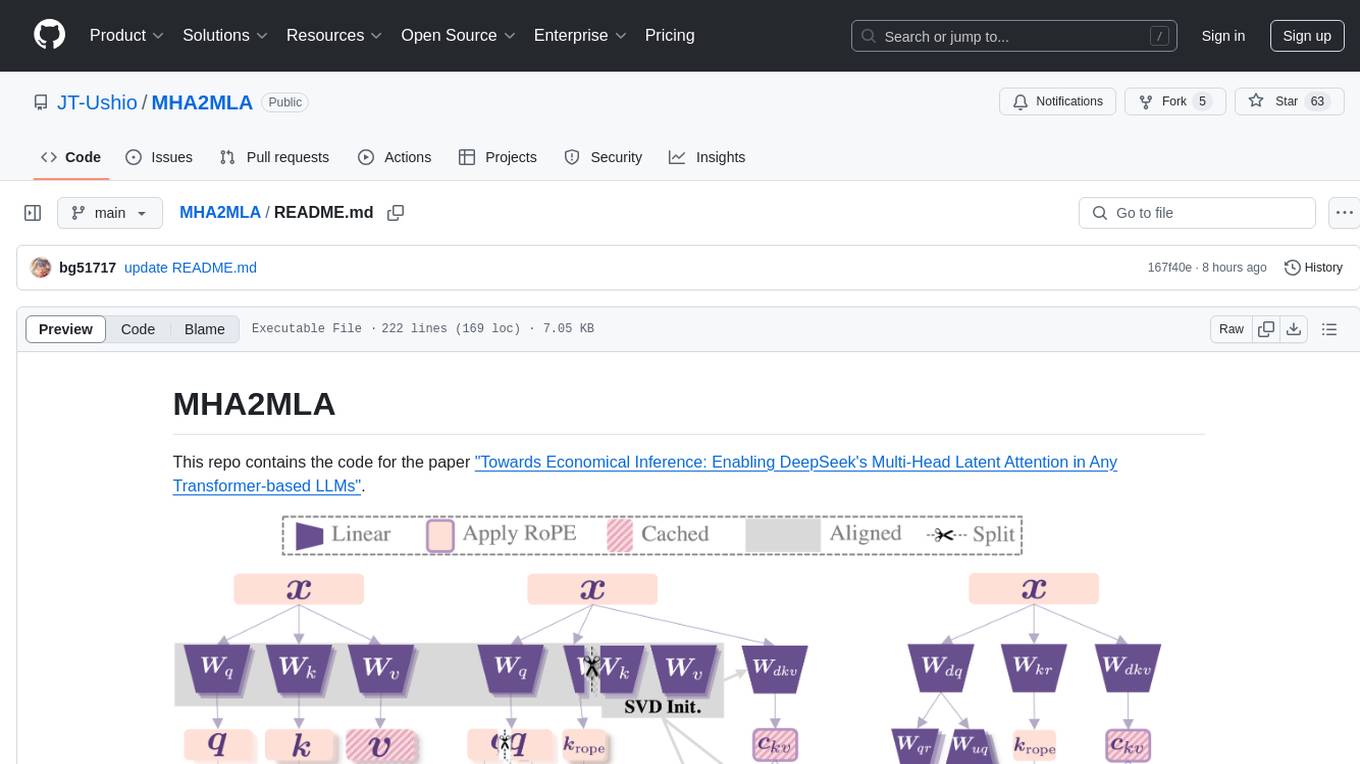
This repository contains the code for the paper 'Towards Economical Inference: Enabling DeepSeek's Multi-Head Latent Attention in Any Transformer-based LLMs'. It provides tools for fine-tuning and evaluating Llama models, converting models between different frameworks, processing datasets, and performing specific model training tasks like Partial-RoPE Fine-Tuning and Multiple-Head Latent Attention Fine-Tuning. The repository also includes commands for model evaluation using Lighteval and LongBench, along with necessary environment setup instructions.
git-mcp-server
A secure and scalable Git MCP server providing AI agents with powerful version control capabilities for local and serverless environments. It offers 28 comprehensive Git operations organized into seven functional categories, resources for contextual information about the Git environment, and structured prompt templates for guiding AI agents through complex workflows. The server features declarative tools, robust error handling, pluggable authentication, abstracted storage, full-stack observability, dependency injection, and edge-ready architecture. It also includes specialized features for Git integration such as cross-runtime compatibility, provider-based architecture, optimized Git execution, working directory management, configurable Git identity, safety features, and commit signing.
ai-coders-context
The @ai-coders/context repository provides the Ultimate MCP for AI Agent Orchestration, Context Engineering, and Spec-Driven Development. It simplifies context engineering for AI by offering a universal process called PREVC, which consists of Planning, Review, Execution, Validation, and Confirmation steps. The tool aims to address the problem of context fragmentation by introducing a single `.context/` directory that works universally across different tools. It enables users to create structured documentation, generate agent playbooks, manage workflows, provide on-demand expertise, and sync across various AI tools. The tool follows a structured, spec-driven development approach to improve AI output quality and ensure reproducible results across projects.

llamafarm
LlamaFarm is a comprehensive AI framework that empowers users to build powerful AI applications locally, with full control over costs and deployment options. It provides modular components for RAG systems, vector databases, model management, prompt engineering, and fine-tuning. Users can create differentiated AI products without needing extensive ML expertise, using simple CLI commands and YAML configs. The framework supports local-first development, production-ready components, strategy-based configuration, and deployment anywhere from laptops to the cloud.
dora
Dataflow-oriented robotic application (dora-rs) is a framework that makes creation of robotic applications fast and simple. Building a robotic application can be summed up as bringing together hardwares, algorithms, and AI models, and make them communicate with each others. At dora-rs, we try to: make integration of hardware and software easy by supporting Python, C, C++, and also ROS2. make communication low latency by using zero-copy Arrow messages. dora-rs is still experimental and you might experience bugs, but we're working very hard to make it stable as possible.
agentops
AgentOps is a toolkit for evaluating and developing robust and reliable AI agents. It provides benchmarks, observability, and replay analytics to help developers build better agents. AgentOps is open beta and can be signed up for here. Key features of AgentOps include: - Session replays in 3 lines of code: Initialize the AgentOps client and automatically get analytics on every LLM call. - Time travel debugging: (coming soon!) - Agent Arena: (coming soon!) - Callback handlers: AgentOps works seamlessly with applications built using Langchain and LlamaIndex.
rank_llm
RankLLM is a suite of prompt-decoders compatible with open source LLMs like Vicuna and Zephyr. It allows users to create custom ranking models for various NLP tasks, such as document reranking, question answering, and summarization. The tool offers a variety of features, including the ability to fine-tune models on custom datasets, use different retrieval methods, and control the context size and variable passages. RankLLM is easy to use and can be integrated into existing NLP pipelines.
For similar tasks
screenpipe
24/7 Screen & Audio Capture Library to build personalized AI powered by what you've seen, said, or heard. Works with Ollama. Alternative to Rewind.ai. Open. Secure. You own your data. Rust. We are shipping daily, make suggestions, post bugs, give feedback. Building a reliable stream of audio and screenshot data, simplifying life for developers by solving non-trivial problems. Multiple installation options available. Experimental tool with various integrations and features for screen and audio capture, OCR, STT, and more. Open source project focused on enabling tooling & infrastructure for a wide range of applications.
nuxt-llms
Nuxt LLMs automatically generates llms.txt markdown documentation for Nuxt applications. It provides runtime hooks to collect data from various sources and generate structured documentation. The tool allows customization of sections directly from nuxt.config.ts and integrates with Nuxt modules via the runtime hooks system. It generates two documentation formats: llms.txt for concise structured documentation and llms_full.txt for detailed documentation. Users can extend documentation using hooks to add sections, links, and metadata. The tool is suitable for developers looking to automate documentation generation for their Nuxt applications.
OSA
OSA (Open-Source-Advisor) is a tool designed to improve the quality of scientific open source projects by automating the generation of README files, documentation, CI/CD scripts, and providing advice and recommendations for repositories. It supports various LLMs accessible via API, local servers, or osa_bot hosted on ITMO servers. OSA is currently under development with features like README file generation, documentation generation, automatic implementation of changes, LLM integration, and GitHub Action Workflow generation. It requires Python 3.10 or higher and tokens for GitHub/GitLab/Gitverse and LLM API key. Users can install OSA using PyPi or build from source, and run it using CLI commands or Docker containers.
opencode.nvim
opencode.nvim is a tool that integrates the opencode AI assistant with Neovim, allowing users to streamline editor-aware research, reviews, and requests. It provides features such as connecting to opencode instances, sharing editor context, input prompts with completions, executing commands, and monitoring state via statusline component. Users can define their own prompts, reload edited buffers in real-time, and forward Server-Sent-Events for automation. The tool offers sensible defaults with flexible configuration and API to fit various workflows, supporting ranges and dot-repeat in a Vim-like manner.

llm-chatbot-python
This repository provides resources for building a chatbot backed by Neo4j using Python. It includes instructions on running the application, setting up tests, and installing necessary libraries. The chatbot is designed to interact with users and provide recommendations based on data stored in a Neo4j database. The repository is part of the Neo4j GraphAcademy course on building chatbots with Python.
chatmcp
Chatmcp is a chatbot framework for building conversational AI applications. It provides a flexible and extensible platform for creating chatbots that can interact with users in a natural language. With Chatmcp, developers can easily integrate chatbot functionality into their applications, enabling users to communicate with the system through text-based conversations. The framework supports various natural language processing techniques and allows for the customization of chatbot behavior and responses. Chatmcp simplifies the development of chatbots by providing a set of pre-built components and tools that streamline the creation process. Whether you are building a customer support chatbot, a virtual assistant, or a chat-based game, Chatmcp offers the necessary features and capabilities to bring your conversational AI ideas to life.
duckduckgo-ai-chat
This repository contains a chatbot tool powered by AI technology. The chatbot is designed to interact with users in a conversational manner, providing information and assistance on various topics. Users can engage with the chatbot to ask questions, seek recommendations, or simply have a casual conversation. The AI technology behind the chatbot enables it to understand natural language inputs and provide relevant responses, making the interaction more intuitive and engaging. The tool is versatile and can be customized for different use cases, such as customer support, information retrieval, or entertainment purposes. Overall, the chatbot offers a user-friendly and interactive experience, leveraging AI to enhance communication and engagement.
baibot
Baibot is a versatile chatbot framework designed to simplify the process of creating and deploying chatbots. It provides a user-friendly interface for building custom chatbots with various functionalities such as natural language processing, conversation flow management, and integration with external APIs. Baibot is highly customizable and can be easily extended to suit different use cases and industries. With Baibot, developers can quickly create intelligent chatbots that can interact with users in a seamless and engaging manner, enhancing user experience and automating customer support processes.
For similar jobs

sweep
Sweep is an AI junior developer that turns bugs and feature requests into code changes. It automatically handles developer experience improvements like adding type hints and improving test coverage.

teams-ai
The Teams AI Library is a software development kit (SDK) that helps developers create bots that can interact with Teams and Microsoft 365 applications. It is built on top of the Bot Framework SDK and simplifies the process of developing bots that interact with Teams' artificial intelligence capabilities. The SDK is available for JavaScript/TypeScript, .NET, and Python.

ai-guide
This guide is dedicated to Large Language Models (LLMs) that you can run on your home computer. It assumes your PC is a lower-end, non-gaming setup.

classifai
Supercharge WordPress Content Workflows and Engagement with Artificial Intelligence. Tap into leading cloud-based services like OpenAI, Microsoft Azure AI, Google Gemini and IBM Watson to augment your WordPress-powered websites. Publish content faster while improving SEO performance and increasing audience engagement. ClassifAI integrates Artificial Intelligence and Machine Learning technologies to lighten your workload and eliminate tedious tasks, giving you more time to create original content that matters.

chatbot-ui
Chatbot UI is an open-source AI chat app that allows users to create and deploy their own AI chatbots. It is easy to use and can be customized to fit any need. Chatbot UI is perfect for businesses, developers, and anyone who wants to create a chatbot.

BricksLLM
BricksLLM is a cloud native AI gateway written in Go. Currently, it provides native support for OpenAI, Anthropic, Azure OpenAI and vLLM. BricksLLM aims to provide enterprise level infrastructure that can power any LLM production use cases. Here are some use cases for BricksLLM: * Set LLM usage limits for users on different pricing tiers * Track LLM usage on a per user and per organization basis * Block or redact requests containing PIIs * Improve LLM reliability with failovers, retries and caching * Distribute API keys with rate limits and cost limits for internal development/production use cases * Distribute API keys with rate limits and cost limits for students

uAgents
uAgents is a Python library developed by Fetch.ai that allows for the creation of autonomous AI agents. These agents can perform various tasks on a schedule or take action on various events. uAgents are easy to create and manage, and they are connected to a fast-growing network of other uAgents. They are also secure, with cryptographically secured messages and wallets.

griptape
Griptape is a modular Python framework for building AI-powered applications that securely connect to your enterprise data and APIs. It offers developers the ability to maintain control and flexibility at every step. Griptape's core components include Structures (Agents, Pipelines, and Workflows), Tasks, Tools, Memory (Conversation Memory, Task Memory, and Meta Memory), Drivers (Prompt and Embedding Drivers, Vector Store Drivers, Image Generation Drivers, Image Query Drivers, SQL Drivers, Web Scraper Drivers, and Conversation Memory Drivers), Engines (Query Engines, Extraction Engines, Summary Engines, Image Generation Engines, and Image Query Engines), and additional components (Rulesets, Loaders, Artifacts, Chunkers, and Tokenizers). Griptape enables developers to create AI-powered applications with ease and efficiency.