


flutter_gen_ai_chat_ui
A modern, customizable chat UI package for Flutter applications, optimized for AI interactions.
Stars: 64
A modern, high-performance Flutter chat UI kit for building beautiful messaging interfaces. Features streaming text animations, markdown support, file attachments, and extensive customization options. Perfect for AI assistants, customer support, team chat, social messaging, and any conversational application. Production Ready, Cross-Platform, High Performance, Fully Customizable. Core features include dark/light mode, word-by-word streaming with animations, enhanced markdown support, speech-to-text integration, responsive layout, RTL language support, high performance message handling, improved pagination support. AI-specific features include customizable welcome message, example questions component, persistent example questions, AI typing indicators, streaming markdown rendering. New AI Actions System with function calling support, generative UI, human-in-the-loop confirmation dialogs, real-time status updates, type-safe parameters, event streaming, error handling. UI components include customizable message bubbles, custom bubble builder, multiple input field styles, loading indicators, smart scroll management, enhanced theme customization, better code block styling.
README:








A modern, high-performance Flutter chat UI kit for building beautiful messaging interfaces. Features streaming text animations, markdown support, file attachments, and extensive customization options. Perfect for AI assistants, customer support, team chat, social messaging, and any conversational application.
🚀 Production Ready | 📱 Cross-Platform | ⚡ High Performance | 🎨 Fully Customizable
- Features
- Performance & Features
- Installation
- Quick Start
- Live Examples
- Configuration Options
- AI Actions System
- Advanced Features
- Showcase
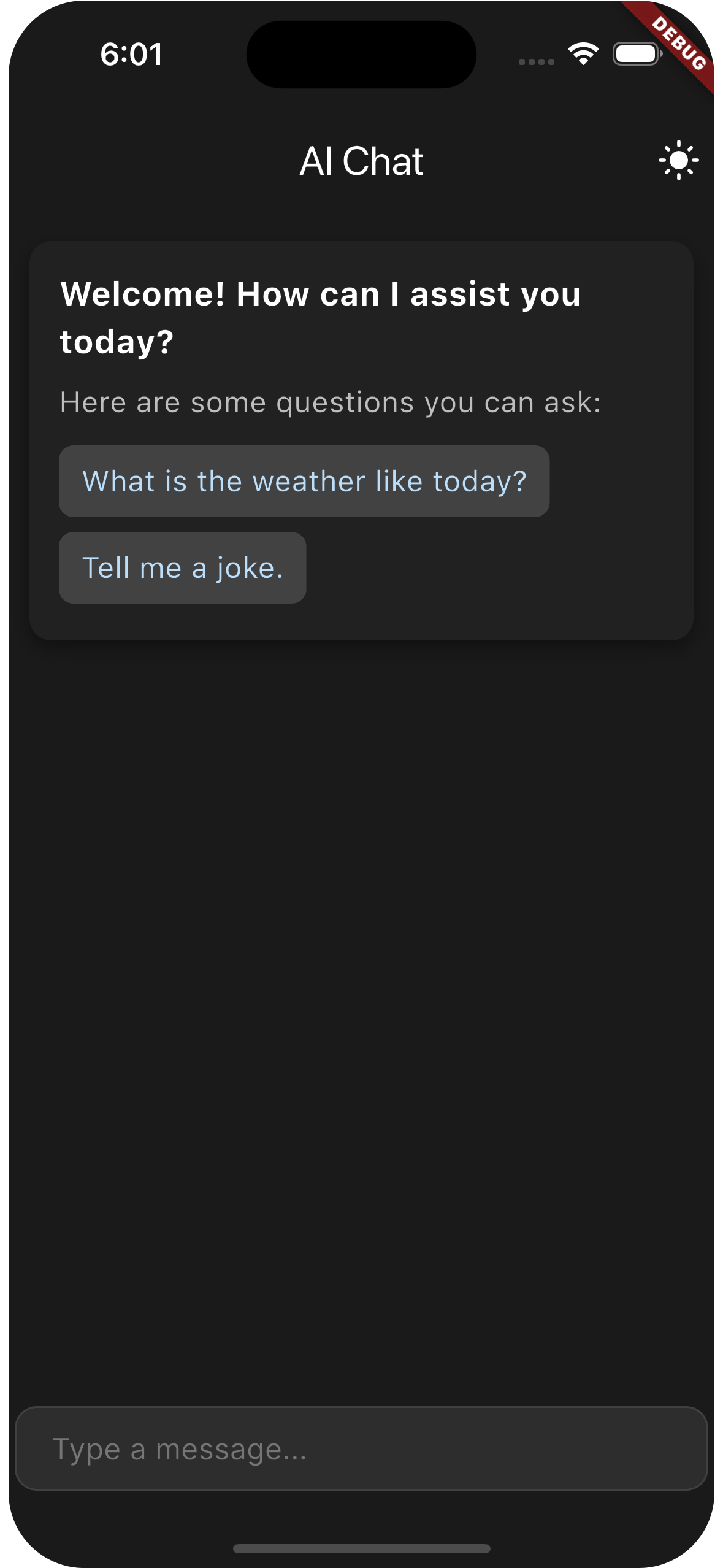
Dark Mode |
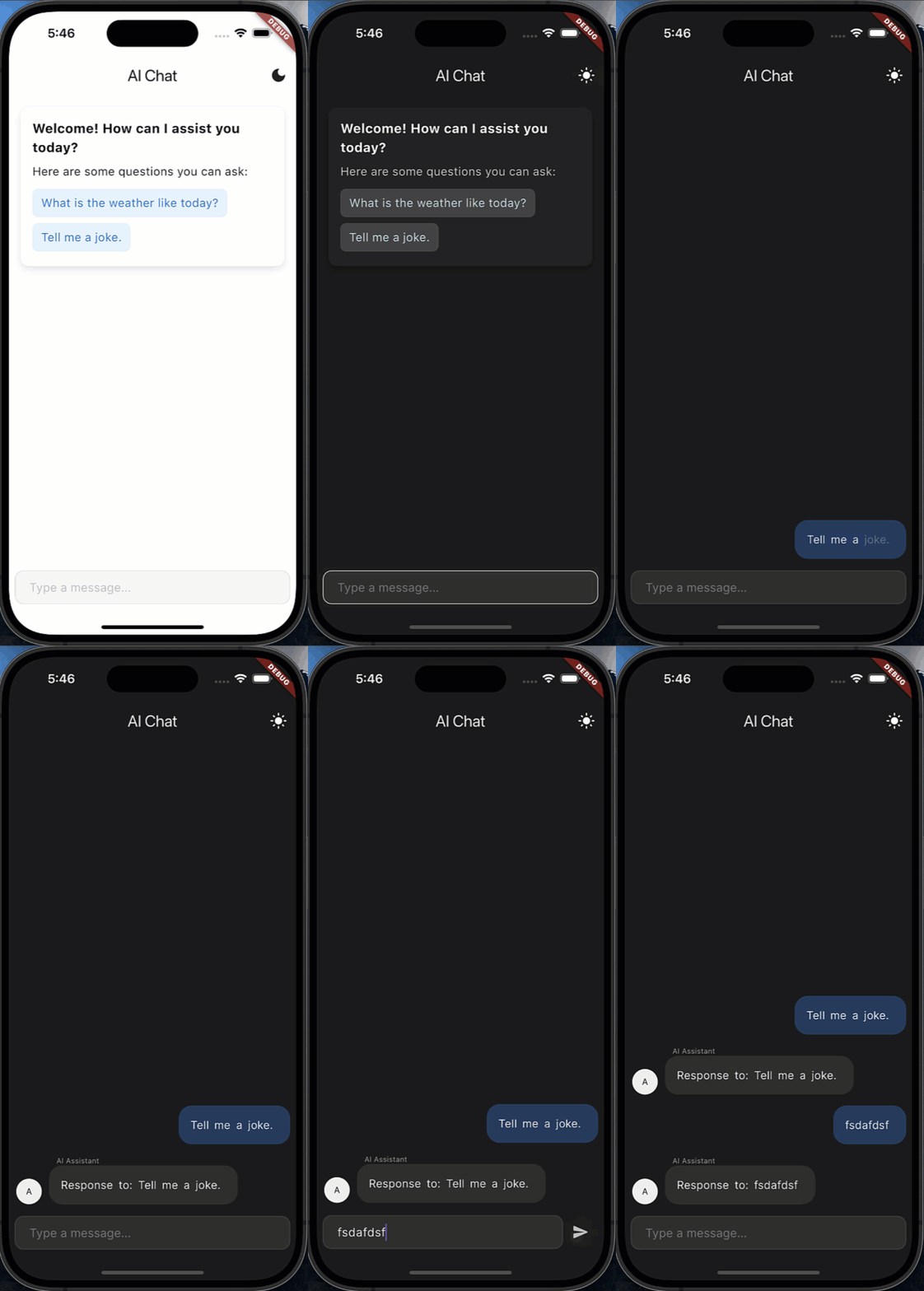
Chat Demo |
- 🎨 Dark/light mode with adaptive theming
- 💫 Word-by-word streaming with animations (like ChatGPT and Claude)
- 📝 Enhanced markdown support with code highlighting for technical content
- 🎤 Optional speech-to-text integration
- 📱 Responsive layout with customizable width
- 🌐 RTL language support for global applications
- ⚡ High performance message handling for large conversations
- 📊 Improved pagination support for message history
- 👋 Customizable welcome message similar to ChatGPT and other AI assistants
- ❓ Example questions component for user guidance
- 💬 Persistent example questions for better user experience
- 🔄 AI typing indicators like modern chatbot interfaces
- 📜 Streaming markdown rendering for code and rich content
- ⚡ Function Calling Support - AI can execute predefined actions with parameters
- 🎨 Generative UI - Actions render custom widgets showing execution status
- ✋ Human-in-the-Loop - Automatic confirmation dialogs for sensitive operations
- 📊 Real-time Status - Live updates of action execution progress with animations
- 🛡️ Type-Safe Parameters - Full validation system with custom validators
- 🎯 Event Streaming - Track action lifecycle with comprehensive event system
- 🔧 Error Handling - Rich error management with user-friendly feedback
- 💬 Customizable message bubbles with modern design options
- 🎨 Custom Bubble Builder for complete message styling control
- ⌨️ Multiple input field styles (minimal, glassmorphic, custom)
- 🔄 Loading indicators with shimmer effects
- ⬇️ Smart scroll management for chat history
- 🎨 Enhanced theme customization to match your brand
- 📝 Better code block styling for developers
- ✨ Unique Streaming Text: Word-by-word animations like ChatGPT and Claude
- 📁 Complete File Support: Multi-format attachments (images, documents, videos)
- 📝 Advanced Markdown: Full support with syntax highlighting for code blocks
- 🚀 High Performance: Optimized for large conversations (10K+ messages)
- 🎨 Extensive Theming: Complete customization to match your brand
- 📱 Cross-Platform: Works on all Flutter-supported platforms
- 🔗 Backend Agnostic: Compatible with any API or service
- ⚡ Real-time Ready: Built-in support for live updates
- Message Rendering: 60 FPS with 1000+ messages
- Memory Efficiency: Optimized for large conversations
- Startup Time: <100ms initialization
- Streaming Speed: Configurable 10-100ms per word
- AI Services: OpenAI, Anthropic Claude, Google Gemini, Llama, Mistral
- Backends: Firebase, Supabase, REST APIs, WebSockets, GraphQL
- Use Cases: Customer support, AI assistants, team chat, social messaging
- Industries: SaaS, E-commerce, Healthcare, Education, Gaming
Add this to your package's pubspec.yaml file:
dependencies:
  flutter_gen_ai_chat_ui: ^2.4.2
Then run:
flutter pub get✅ Superior Performance: Optimized for large conversations with efficient message rendering
✅ Modern UI: Beautiful, customizable interfaces that match current design trends
✅ Streaming Text: Smooth word-by-word animations like ChatGPT and Claude
✅ File Support: Complete file attachment system with image, document, and media support
✅ Production Ready: Stable API with comprehensive testing and documentation
✅ Framework Agnostic: Works with any backend - REST APIs, WebSockets, Firebase, Supabase
Explore all features with our comprehensive example app:
- Basic Chat: Simple ChatGPT-style interface
- Streaming Text: Real-time word-by-word animations
- File Attachments: Upload images, documents, videos
- Custom Themes: Light, dark, and glassmorphic styles
- Advanced Features: Scroll behavior, markdown, code highlighting
To run the example app:
cd example/
flutter runimport 'package:flutter_gen_ai_chat_ui/flutter_gen_ai_chat_ui.dart';
class ChatScreen extends StatefulWidget {
@override
_ChatScreenState createState() => _ChatScreenState();
}
class _ChatScreenState extends State<ChatScreen> {
final _controller = ChatMessagesController();
final _currentUser = ChatUser(id: 'user', firstName: 'User');
final _aiUser = ChatUser(id: 'ai', firstName: 'AI Assistant');
bool _isLoading = false;
@override
Widget build(BuildContext context) {
return Scaffold(
appBar: AppBar(title: Text('AI Chat')),
body: AiChatWidget(
// Required parameters
currentUser: _currentUser,
aiUser: _aiUser,
controller: _controller,
onSendMessage: _handleSendMessage,
// Optional parameters
loadingConfig: LoadingConfig(isLoading: _isLoading),
inputOptions: InputOptions(
hintText: 'Ask me anything...',
sendOnEnter: true,
),
welcomeMessageConfig: WelcomeMessageConfig(
title: 'Welcome to AI Chat',
questionsSectionTitle: 'Try asking me:',
),
exampleQuestions: [
ExampleQuestion(question: "What can you help me with?"),
ExampleQuestion(question: "Tell me about your features"),
],
),
);
}
Future<void> _handleSendMessage(ChatMessage message) async {
setState(() => _isLoading = true);
try {
// Your AI service logic here
await Future.delayed(Duration(seconds: 1)); // Simulating API call
// Add AI response
_controller.addMessage(ChatMessage(
text: "This is a response to: ${message.text}",
user: _aiUser,
createdAt: DateTime.now(),
));
} finally {
setState(() => _isLoading = false);
}
}
}AiChatWidget(
// Required parameters
currentUser: ChatUser(...), // The current user
aiUser: ChatUser(...), // The AI assistant
controller: ChatMessagesController(), // Message controller
onSendMessage: (message) { // Message handler
// Handle user messages here
},
// ... optional parameters
)AiChatWidget(
// ... required parameters
// Message display options
messages: [], // Optional list of messages (if not using controller)
messageOptions: MessageOptions(...), // Message bubble styling
messageListOptions: MessageListOptions(...), // Message list behavior
// Input field customization
inputOptions: InputOptions(...), // Input field styling and behavior
readOnly: false, // Whether the chat is read-only
// AI-specific features
exampleQuestions: [ // Suggested questions for users
ExampleQuestion(question: 'What is AI?'),
],
persistentExampleQuestions: true, // Keep questions visible after welcome
enableAnimation: true, // Enable message animations
enableMarkdownStreaming: true, // Enable streaming text (FIXED in v2.4.2+)
streamingWordByWord: false, // Control word-by-word vs character animation
streamingDuration: Duration(milliseconds: 30), // Stream speed
welcomeMessageConfig: WelcomeMessageConfig(...), // Welcome message styling
// Loading states
loadingConfig: LoadingConfig( // Loading configuration
isLoading: false,
showCenteredIndicator: true,
),
// Pagination
paginationConfig: PaginationConfig( // Pagination configuration
enabled: true,
reverseOrder: true, // Newest messages at bottom
),
// Layout
maxWidth: 800, // Maximum width
padding: EdgeInsets.all(16), // Overall padding
// Scroll behavior
scrollBehaviorConfig: ScrollBehaviorConfig(
// Control auto-scrolling behavior
autoScrollBehavior: AutoScrollBehavior.onUserMessageOnly,
// Scroll to first message of a response instead of the last (for long responses)
scrollToFirstResponseMessage: true,
),
// Custom bubble builder for complete styling control
customBubbleBuilder: (context, message, isCurrentUser, defaultBubble) {
// Return your custom bubble widget
return Container(
decoration: BoxDecoration(
borderRadius: BorderRadius.circular(12),
boxShadow: [
BoxShadow(
color: Colors.black.withOpacity(0.1),
blurRadius: 4,
offset: Offset(0, 2),
),
],
),
child: defaultBubble, // Or create completely custom UI
);
},
)The package offers multiple ways to style the input field:
InputOptions(
  // Basic properties
  sendOnEnter: true,

  // Focus behavior (NEW in v2.4.2+)
  autofocus: true,          // Automatically focus the input field
  focusNode: myFocusNode,   // Custom focus node for external control

  // Styling
  textStyle: TextStyle(...),
  decoration: InputDecoration(...),
)InputOptions.minimal(
hintText: 'Ask a question...',
textColor: Colors.black,
hintColor: Colors.grey,
backgroundColor: Colors.white,
borderRadius: 24.0,
autofocus: true, // Available in factory constructors too
focusNode: myFocusNode, // Custom focus node support
)InputOptions.glassmorphic(
colors: [Colors.blue.withOpacityCompat(0.2), Colors.purple.withOpacityCompat(0.2)],
borderRadius: 24.0,
blurStrength: 10.0,
hintText: 'Ask me anything...',
textColor: Colors.white,
autofocus: false, // Control autofocus behavior
focusNode: myFocusNode, // Optional custom focus node
)InputOptions.custom(
decoration: yourCustomDecoration,
textStyle: yourCustomTextStyle,
sendButtonBuilder: (onSend) => CustomSendButton(onSend: onSend),
)The send button is now hardcoded to always be visible by design, regardless of text content. This removes the need for an explicit setting and ensures a consistent experience across the package.
By default:
- The send button is always shown regardless of text input
- Focus is maintained when tapping outside the input field
- The keyboard's send button is disabled by default to prevent focus issues
// Configure input options to ensure a consistent typing experience
InputOptions(
  // Prevent losing focus when tapping outside
  unfocusOnTapOutside: false,

  // Use newline for Enter key to prevent keyboard focus issues
  textInputAction: TextInputAction.newline,
)Control how the chat widget scrolls when new messages are added:
// Default configuration with manual parameters
ScrollBehaviorConfig(
  // When to auto-scroll (one of: always, onNewMessage, onUserMessageOnly, never)
  autoScrollBehavior: AutoScrollBehavior.onUserMessageOnly,

  // Fix for long responses: scroll to first message of response instead of the last message
  // This prevents the top part of long AI responses from being pushed out of view
  scrollToFirstResponseMessage: true,

  // Customize animation
  scrollAnimationDuration: Duration(milliseconds: 300),
  scrollAnimationCurve: Curves.easeOut,
)

// Or use convenient preset configurations:
ScrollBehaviorConfig.smooth() // Smooth easeInOutCubic curve
ScrollBehaviorConfig.bouncy() // Bouncy elasticOut curve
ScrollBehaviorConfig.fast()   // Quick scrolling with minimal animation
ScrollBehaviorConfig.decelerate() // Starts fast, slows down
ScrollBehaviorConfig.accelerate() // Starts slow, speeds upWhen an AI returns a long response in multiple parts, scrollToFirstResponseMessage ensures users see the beginning of the response rather than being automatically scrolled to the end. This is crucial for readability, especially with complex information.
For optimal scroll behavior with long responses:
- Mark the first message in a response with
'isStartOfResponse': true - Link related messages in a chain using a shared
'responseId'property - Set
scrollToFirstResponseMessage: truein your configuration
MessageOptions(
  // Basic options
  showTime: true,
  showUserName: true,

  // Styling
  bubbleStyle: BubbleStyle(
    userBubbleColor: Colors.blue.withOpacityCompat(0.1),
    aiBubbleColor: Colors.white,
    userNameColor: Colors.blue.shade700,
    aiNameColor: Colors.purple.shade700,
    bottomLeftRadius: 22,
    bottomRightRadius: 22,
    enableShadow: true,
  ),
)Create completely custom message bubbles with full control over styling and behavior:
AiChatWidget(
  // ... other parameters
  customBubbleBuilder: (context, message, isCurrentUser, defaultBubble) {
    // Wrapper approach: enhance default bubble
    return Container(
      margin: EdgeInsets.symmetric(horizontal: 16, vertical: 4),
      decoration: BoxDecoration(
        borderRadius: BorderRadius.circular(16),
        boxShadow: [
          BoxShadow(
            color: Colors.black.withOpacity(0.1),
            blurRadius: 4,
            offset: Offset(0, 2),
          ),
        ],
      ),
      child: defaultBubble,
    );

    // Or create completely custom UI:
    // return MyCustomBubbleWidget(message: message, isCurrentUser: isCurrentUser);
  },
)Transform your chat into a powerful AI agent platform! The AI Actions System allows your AI to execute real functions, display rich results, and maintain human oversight - taking your chat beyond simple text exchanges.
import 'package:flutter_gen_ai_chat_ui/flutter_gen_ai_chat_ui.dart';

class MyAiChat extends StatefulWidget {
  @override
  _MyAiChatState createState() => _MyAiChatState();
}

class _MyAiChatState extends State<MyAiChat> {
  late ChatMessagesController _controller;

  @override
  Widget build(BuildContext context) {
    return AiActionProvider(
      config: AiActionConfig(
        actions: [
          // Define what your AI can do
          AiAction(
            name: 'calculate',
            description: 'Perform mathematical calculations',
            parameters: [
              ActionParameter.number(name: 'a', description: 'First number', required: true),
              ActionParameter.number(name: 'b', description: 'Second number', required: true),
              ActionParameter.string(
                name: 'operation',
                description: 'Math operation',
                required: true,
                enumValues: ['add', 'subtract', 'multiply', 'divide']
              ),
            ],
            handler: (params) async {
              final a = params['a'] as num;
              final b = params['b'] as num;
              final op = params['operation'] as String;

              double result;
              switch (op) {
                case 'add': result = a + b; break;
                case 'subtract': result = a - b; break;
                case 'multiply': result = a * b; break;
                case 'divide': result = a / b; break;
                default: throw 'Unknown operation';
              }

              return ActionResult.createSuccess({
                'result': result,
                'equation': '$a $op $b = $result'
              });
            },
            // Custom UI for results
            render: (context, status, params, {result, error}) {
              if (status == ActionStatus.completed && result?.data != null) {
                return Card(
                  child: Padding(
                    padding: EdgeInsets.all(16),
                    child: Text(
                      result!.data['equation'],
                      style: TextStyle(fontSize: 18, fontWeight: FontWeight.bold),
                    ),
                  ),
                );
              }
              return SizedBox.shrink();
            },
          ),
        ],
      ),
      child: AiChatWidget(
        // Your existing chat configuration
        currentUser: currentUser,
        aiUser: aiUser,
        controller: _controller,
        onSendMessage: _handleMessage,
      ),
    );
  }

  void _handleMessage(ChatMessage message) {
    // Add user message
    _controller.addMessage(message);

    // Simulate AI deciding to use an action
    if (message.text.contains('calculate')) {
      _executeCalculation(message.text);
    }
  }

  void _executeCalculation(String userMessage) async {
    final actionHook = AiActionHook.of(context);

    // AI parses user message and calls action
    final result = await actionHook.executeAction('calculate', {
      'a': 15,
      'b': 3,
      'operation': 'multiply'
    });

    // Add AI response with result
    _controller.addMessage(ChatMessage(
      text: result.success ?
        'I calculated that for you: ${result.data['equation']}' :
        'Sorry, calculation failed: ${result.error}',
      user: aiUser,
    ));
  }
}AiAction(
name: 'send_email',
description: 'Send an email to a contact',
parameters: [
ActionParameter.string(
name: 'to',
description: 'Recipient email address',
required: true,
validator: (email) => email.contains('@'), // Custom validation
),
ActionParameter.string(
name: 'subject',
description: 'Email subject',
required: true,
),
ActionParameter.string(
name: 'priority',
description: 'Email priority level',
enumValues: ['low', 'normal', 'high'], // Constrained options
defaultValue: 'normal',
),
],
handler: (params) async {
// Your email sending logic
await sendEmailService(params);
return ActionResult.createSuccess({'sent': true});
},
)AiAction(
name: 'delete_file',
description: 'Delete a file from storage',
parameters: [...],
confirmationConfig: ActionConfirmationConfig(
title: 'Delete File',
message: 'This action cannot be undone. Continue?',
required: true, // Always ask for confirmation
),
handler: (params) async {
// Only executed after user confirms
await deleteFile(params['filename']);
return ActionResult.createSuccess();
},
)AiAction(
name: 'generate_report',
description: 'Generate a comprehensive report',
render: (context, status, params, {result, error}) {
switch (status) {
case ActionStatus.executing:
return Card(
child: Row(children: [
CircularProgressIndicator(),
Text('Generating report...'),
]),
);
case ActionStatus.completed:
return ReportWidget(data: result!.data);
case ActionStatus.failed:
return ErrorWidget(error: error!);
default:
return SizedBox.shrink();
}
},
handler: (params) async {
// Long-running operation with progress updates
return await generateComplexReport(params);
},
)class MyAiChat extends StatefulWidget {
@override
_MyAiChatState createState() => _MyAiChatState();
}
class _MyAiChatState extends State<MyAiChat> {
late StreamSubscription<ActionEvent> _actionSubscription;
@override
void initState() {
super.initState();
// Listen to all action events
_actionSubscription = AiActionProvider.of(context).events.listen((event) {
switch (event.type) {
case ActionEventType.started:
print('Action ${event.actionName} started');
break;
case ActionEventType.completed:
print('Action ${event.actionName} completed: ${event.result?.data}');
break;
case ActionEventType.failed:
print('Action ${event.actionName} failed: ${event.error}');
break;
}
});
}
@override
void dispose() {
_actionSubscription.cancel();
super.dispose();
}
}// Convert actions to OpenAI function format
final actionHook = AiActionHook.of(context);
final functions = actionHook.getActionsForFunctionCalling();
// Send to OpenAI with functions
final response = await openAI.createChatCompletion(
messages: messages,
functions: functions,
functionCall: 'auto',
);
// Execute function if AI wants to call one
if (response.functionCall != null) {
final result = await actionHook.handleFunctionCall(
response.functionCall.name,
json.decode(response.functionCall.arguments),
);
}void _processAIMessage(String userMessage) async {
// Your AI logic decides which action to call
if (_shouldCalculate(userMessage)) {
final actionHook = AiActionHook.of(context);
// Extract parameters from user message
final params = _parseCalculationParams(userMessage);
// Execute action
final result = await actionHook.executeAction('calculate', params);
// Show result in chat
_controller.addMessage(ChatMessage(
text: 'Result: ${result.data}',
user: aiUser,
));
}
}- Parameter Validation: All inputs are validated before execution
- User Confirmation: Sensitive actions require explicit user approval
- Error Isolation: Failed actions don't crash your app
- Timeout Protection: Long-running actions can be cancelled
- Type Safety: Full Dart type checking for all parameters
- Event Auditing: Complete log of all action executions
The package includes complete working examples:
- Weather Actions - API calls with rich UI display
- Calculator Actions - Mathematical operations with validation
- Unit Converter - Type conversions with error handling
- AI Integration - Pattern matching and function calling
Run the example app to see AI Actions in action:
cd example/
flutter run- AI Customer Support Bot - SaaS company with 10K+ daily conversations
- Educational Tutor App - Language learning with interactive chat
- Healthcare Assistant - HIPAA-compliant patient communication
- E-commerce Support - Real-time shopping assistance
- Gaming Guild Chat - Team communication with file sharing
Want your app featured? Submit a showcase request
- 🐛 Issue Tracker - Report bugs and request features
- ⭐ Star on GitHub - Show your support!
-
Fixed Streaming Animation Disable: The
enableAnimation: false,enableMarkdownStreaming: false, andstreamingWordByWord: falseparameters now work correctly. Previously, markdown messages would always stream regardless of these settings. -
Added Focus Control: New
autofocusandfocusNodesupport inInputOptionsfor better input field control.InputOptions( autofocus: true, // Auto-focus input on widget load focusNode: myFocusNode, // External focus control )
-
Enhanced Factory Constructors:
InputOptions.minimal()andInputOptions.glassmorphic()now support the new focus parameters.
"The streaming text animation is incredibly smooth and the file attachment system saved us weeks of development." - Sarah Chen, Senior Flutter Developer
"Best chat UI package I've used. The performance with large message lists is outstanding." - Ahmed Hassan, Mobile Team Lead
"Finally, a chat package that actually works well for AI applications. The streaming feature is exactly what we needed." - Maria Rodriguez, Product Manager
Made with ❤️ by the Flutter community | Star ⭐ this repo if it helped you!
For Tasks:
Click tags to check more tools for each tasksFor Jobs:
Alternative AI tools for flutter_gen_ai_chat_ui
Similar Open Source Tools
flutter_gen_ai_chat_ui
A modern, high-performance Flutter chat UI kit for building beautiful messaging interfaces. Features streaming text animations, markdown support, file attachments, and extensive customization options. Perfect for AI assistants, customer support, team chat, social messaging, and any conversational application. Production Ready, Cross-Platform, High Performance, Fully Customizable. Core features include dark/light mode, word-by-word streaming with animations, enhanced markdown support, speech-to-text integration, responsive layout, RTL language support, high performance message handling, improved pagination support. AI-specific features include customizable welcome message, example questions component, persistent example questions, AI typing indicators, streaming markdown rendering. New AI Actions System with function calling support, generative UI, human-in-the-loop confirmation dialogs, real-time status updates, type-safe parameters, event streaming, error handling. UI components include customizable message bubbles, custom bubble builder, multiple input field styles, loading indicators, smart scroll management, enhanced theme customization, better code block styling.
flutter_gemma
Flutter Gemma is a family of lightweight, state-of-the art open models that bring the power of Google's Gemma language models directly to Flutter applications. It allows for local execution on user devices, supports both iOS and Android platforms, and offers LoRA support for tailored AI behavior. The tool provides a simple interface for integrating Gemma models into Flutter projects, enabling advanced AI capabilities without relying on external servers. Users can easily download pre-trained Gemma models, fine-tune them for specific use cases, and customize behavior using LoRA weights. The tool supports model and LoRA weight management, model initialization, response generation, and chat scenarios, with considerations for model size, LoRA weights, and production app deployment.
ai-counsel
AI Counsel is a true deliberative consensus MCP server where AI models engage in actual debate, refine positions across multiple rounds, and converge with voting and confidence levels. It features two modes (quick and conference), mixed adapters (CLI tools and HTTP services), auto-convergence, structured voting, semantic grouping, model-controlled stopping, evidence-based deliberation, local model support, data privacy, context injection, semantic search, fault tolerance, and full transcripts. Users can run local and cloud models to deliberate on various questions, ground decisions in reality by querying code and files, and query past decisions for analysis. The tool is designed for critical technical decisions requiring multi-model deliberation and consensus building.
polyfire-js
Polyfire is an all-in-one managed backend for AI apps that allows users to build AI apps directly from the frontend, eliminating the need for a separate backend. It simplifies the process by providing most backend services in just a few lines of code. With Polyfire, users can easily create chatbots, transcribe audio files to text, generate simple text, create a long-term memory, and generate images with Dall-E. The tool also offers starter guides and tutorials to help users get started quickly and efficiently.
BrowserAI
BrowserAI is a production-ready tool that allows users to run AI models directly in the browser, offering simplicity, speed, privacy, and open-source capabilities. It provides WebGPU acceleration for fast inference, zero server costs, offline capability, and developer-friendly features. Perfect for web developers, companies seeking privacy-conscious AI solutions, researchers experimenting with browser-based AI, and hobbyists exploring AI without infrastructure overhead. The tool supports various AI tasks like text generation, speech recognition, and text-to-speech, with pre-configured popular models ready to use. It offers a simple SDK with multiple engine support and seamless switching between MLC and Transformers engines.
ai-sdk-cpp
The AI SDK CPP is a modern C++ toolkit that provides a unified, easy-to-use API for building AI-powered applications with popular model providers like OpenAI and Anthropic. It bridges the gap for C++ developers by offering a clean, expressive codebase with minimal dependencies. The toolkit supports text generation, streaming content, multi-turn conversations, error handling, tool calling, async tool execution, and configurable retries. Future updates will include additional providers, text embeddings, and image generation models. The project also includes a patched version of nlohmann/json for improved thread safety and consistent behavior in multi-threaded environments.
acte
Acte is a framework designed to build GUI-like tools for AI Agents. It aims to address the issues of cognitive load and freedom degrees when interacting with multiple APIs in complex scenarios. By providing a graphical user interface (GUI) for Agents, Acte helps reduce cognitive load and constraints interaction, similar to how humans interact with computers through GUIs. The tool offers APIs for starting new sessions, executing actions, and displaying screens, accessible via HTTP requests or the SessionManager class.
aio-pika
Aio-pika is a wrapper around aiormq for asyncio and humans. It provides a completely asynchronous API, object-oriented API, transparent auto-reconnects with complete state recovery, Python 3.7+ compatibility, transparent publisher confirms support, transactions support, and complete type-hints coverage.
crawl4ai
Crawl4AI is a powerful and free web crawling service that extracts valuable data from websites and provides LLM-friendly output formats. It supports crawling multiple URLs simultaneously, replaces media tags with ALT, and is completely free to use and open-source. Users can integrate Crawl4AI into Python projects as a library or run it as a standalone local server. The tool allows users to crawl and extract data from specified URLs using different providers and models, with options to include raw HTML content, force fresh crawls, and extract meaningful text blocks. Configuration settings can be adjusted in the `crawler/config.py` file to customize providers, API keys, chunk processing, and word thresholds. Contributions to Crawl4AI are welcome from the open-source community to enhance its value for AI enthusiasts and developers.
mem0
Mem0 is a tool that provides a smart, self-improving memory layer for Large Language Models, enabling personalized AI experiences across applications. It offers persistent memory for users, sessions, and agents, self-improving personalization, a simple API for easy integration, and cross-platform consistency. Users can store memories, retrieve memories, search for related memories, update memories, get the history of a memory, and delete memories using Mem0. It is designed to enhance AI experiences by enabling long-term memory storage and retrieval.
modelfusion
ModelFusion is an abstraction layer for integrating AI models into JavaScript and TypeScript applications, unifying the API for common operations such as text streaming, object generation, and tool usage. It provides features to support production environments, including observability hooks, logging, and automatic retries. You can use ModelFusion to build AI applications, chatbots, and agents. ModelFusion is a non-commercial open source project that is community-driven. You can use it with any supported provider. ModelFusion supports a wide range of models including text generation, image generation, vision, text-to-speech, speech-to-text, and embedding models. ModelFusion infers TypeScript types wherever possible and validates model responses. ModelFusion provides an observer framework and logging support. ModelFusion ensures seamless operation through automatic retries, throttling, and error handling mechanisms. ModelFusion is fully tree-shakeable, can be used in serverless environments, and only uses a minimal set of dependencies.
x
Ant Design X is a tool for crafting AI-driven interfaces effortlessly. It is built on the best practices of enterprise-level AI products, offering flexible and diverse atomic components for various AI dialogue scenarios. The tool provides out-of-the-box model integration with inference services compatible with OpenAI standards. It also enables efficient management of conversation data flows, supports rich template options, complete TypeScript support, and advanced theme customization. Ant Design X is designed to enhance development efficiency and deliver exceptional AI interaction experiences.
BrowserAI
BrowserAI is a tool that allows users to run large language models (LLMs) directly in the browser, providing a simple, fast, and open-source solution. It prioritizes privacy by processing data locally, is cost-effective with no server costs, works offline after initial download, and offers WebGPU acceleration for high performance. It is developer-friendly with a simple API, supports multiple engines, and comes with pre-configured models for easy use. Ideal for web developers, companies needing privacy-conscious AI solutions, researchers experimenting with browser-based AI, and hobbyists exploring AI without infrastructure overhead.
sre
SmythOS is an operating system designed for building, deploying, and managing intelligent AI agents at scale. It provides a unified SDK and resource abstraction layer for various AI services, making it easy to scale and flexible. With an agent-first design, developer-friendly SDK, modular architecture, and enterprise security features, SmythOS offers a robust foundation for AI workloads. The system is built with a philosophy inspired by traditional operating system kernels, ensuring autonomy, control, and security for AI agents. SmythOS aims to make shipping production-ready AI agents accessible and open for everyone in the coming Internet of Agents era.
req_llm
ReqLLM is a Req-based library for LLM interactions, offering a unified interface to AI providers through a plugin-based architecture. It brings composability and middleware advantages to LLM interactions, with features like auto-synced providers/models, typed data structures, ergonomic helpers, streaming capabilities, usage & cost extraction, and a plugin-based provider system. Users can easily generate text, structured data, embeddings, and track usage costs. The tool supports various AI providers like Anthropic, OpenAI, Groq, Google, and xAI, and allows for easy addition of new providers. ReqLLM also provides API key management, detailed documentation, and a roadmap for future enhancements.
agent-sdk-go
Agent Go SDK is a powerful Go framework for building production-ready AI agents that seamlessly integrates memory management, tool execution, multi-LLM support, and enterprise features into a flexible, extensible architecture. It offers core capabilities like multi-model intelligence, modular tool ecosystem, advanced memory management, and MCP integration. The SDK is enterprise-ready with built-in guardrails, complete observability, and support for enterprise multi-tenancy. It provides a structured task framework, declarative configuration, and zero-effort bootstrapping for development experience. The SDK supports environment variables for configuration and includes features like creating agents with YAML configuration, auto-generating agent configurations, using MCP servers with an agent, and CLI tool for headless usage.
For similar tasks
flutter_gen_ai_chat_ui
A modern, high-performance Flutter chat UI kit for building beautiful messaging interfaces. Features streaming text animations, markdown support, file attachments, and extensive customization options. Perfect for AI assistants, customer support, team chat, social messaging, and any conversational application. Production Ready, Cross-Platform, High Performance, Fully Customizable. Core features include dark/light mode, word-by-word streaming with animations, enhanced markdown support, speech-to-text integration, responsive layout, RTL language support, high performance message handling, improved pagination support. AI-specific features include customizable welcome message, example questions component, persistent example questions, AI typing indicators, streaming markdown rendering. New AI Actions System with function calling support, generative UI, human-in-the-loop confirmation dialogs, real-time status updates, type-safe parameters, event streaming, error handling. UI components include customizable message bubbles, custom bubble builder, multiple input field styles, loading indicators, smart scroll management, enhanced theme customization, better code block styling.
assistant-ui
assistant-ui is a set of React components for AI chat. It provides a collection of components that can be easily integrated into projects to create AI chat interfaces for Discord, websites, and demos. The components are designed to streamline the process of setting up AI chat functionality in React applications, making it easier for developers to incorporate AI chat features into their projects.
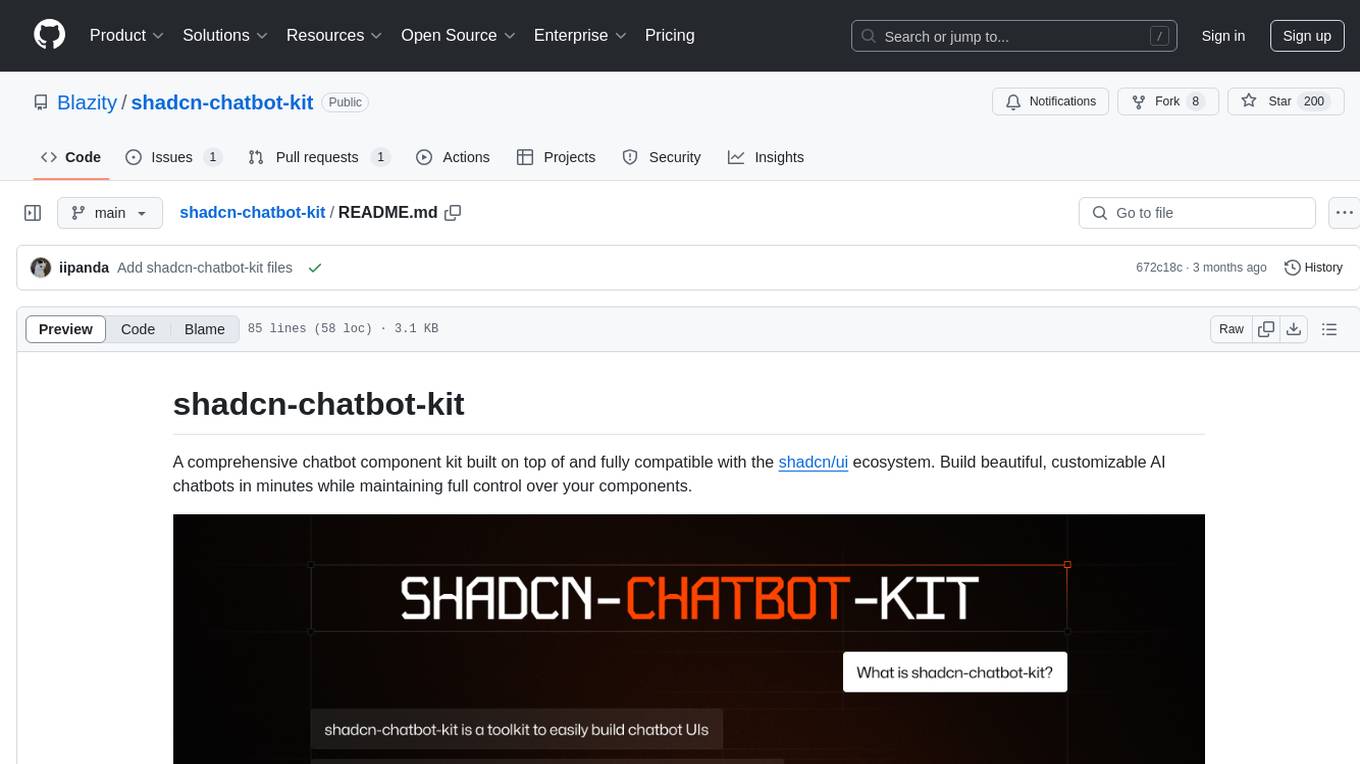
shadcn-chatbot-kit
A comprehensive chatbot component kit built on top of and fully compatible with the shadcn/ui ecosystem. Build beautiful, customizable AI chatbots in minutes while maintaining full control over your components. The kit includes pre-built chat components, auto-scroll message area, message input with auto-resize textarea and file upload support, prompt suggestions, message actions, loading states, and more. Fully themeable, highly customizable, and responsive design. Built with modern web standards and best practices. Installation instructions available with detailed documentation. Customizable using CSS variables.
For similar jobs

promptflow
**Prompt flow** is a suite of development tools designed to streamline the end-to-end development cycle of LLM-based AI applications, from ideation, prototyping, testing, evaluation to production deployment and monitoring. It makes prompt engineering much easier and enables you to build LLM apps with production quality.

deepeval
DeepEval is a simple-to-use, open-source LLM evaluation framework specialized for unit testing LLM outputs. It incorporates various metrics such as G-Eval, hallucination, answer relevancy, RAGAS, etc., and runs locally on your machine for evaluation. It provides a wide range of ready-to-use evaluation metrics, allows for creating custom metrics, integrates with any CI/CD environment, and enables benchmarking LLMs on popular benchmarks. DeepEval is designed for evaluating RAG and fine-tuning applications, helping users optimize hyperparameters, prevent prompt drifting, and transition from OpenAI to hosting their own Llama2 with confidence.

MegaDetector
MegaDetector is an AI model that identifies animals, people, and vehicles in camera trap images (which also makes it useful for eliminating blank images). This model is trained on several million images from a variety of ecosystems. MegaDetector is just one of many tools that aims to make conservation biologists more efficient with AI. If you want to learn about other ways to use AI to accelerate camera trap workflows, check out our of the field, affectionately titled "Everything I know about machine learning and camera traps".

leapfrogai
LeapfrogAI is a self-hosted AI platform designed to be deployed in air-gapped resource-constrained environments. It brings sophisticated AI solutions to these environments by hosting all the necessary components of an AI stack, including vector databases, model backends, API, and UI. LeapfrogAI's API closely matches that of OpenAI, allowing tools built for OpenAI/ChatGPT to function seamlessly with a LeapfrogAI backend. It provides several backends for various use cases, including llama-cpp-python, whisper, text-embeddings, and vllm. LeapfrogAI leverages Chainguard's apko to harden base python images, ensuring the latest supported Python versions are used by the other components of the stack. The LeapfrogAI SDK provides a standard set of protobuffs and python utilities for implementing backends and gRPC. LeapfrogAI offers UI options for common use-cases like chat, summarization, and transcription. It can be deployed and run locally via UDS and Kubernetes, built out using Zarf packages. LeapfrogAI is supported by a community of users and contributors, including Defense Unicorns, Beast Code, Chainguard, Exovera, Hypergiant, Pulze, SOSi, United States Navy, United States Air Force, and United States Space Force.

llava-docker
This Docker image for LLaVA (Large Language and Vision Assistant) provides a convenient way to run LLaVA locally or on RunPod. LLaVA is a powerful AI tool that combines natural language processing and computer vision capabilities. With this Docker image, you can easily access LLaVA's functionalities for various tasks, including image captioning, visual question answering, text summarization, and more. The image comes pre-installed with LLaVA v1.2.0, Torch 2.1.2, xformers 0.0.23.post1, and other necessary dependencies. You can customize the model used by setting the MODEL environment variable. The image also includes a Jupyter Lab environment for interactive development and exploration. Overall, this Docker image offers a comprehensive and user-friendly platform for leveraging LLaVA's capabilities.

carrot
The 'carrot' repository on GitHub provides a list of free and user-friendly ChatGPT mirror sites for easy access. The repository includes sponsored sites offering various GPT models and services. Users can find and share sites, report errors, and access stable and recommended sites for ChatGPT usage. The repository also includes a detailed list of ChatGPT sites, their features, and accessibility options, making it a valuable resource for ChatGPT users seeking free and unlimited GPT services.

TrustLLM
TrustLLM is a comprehensive study of trustworthiness in LLMs, including principles for different dimensions of trustworthiness, established benchmark, evaluation, and analysis of trustworthiness for mainstream LLMs, and discussion of open challenges and future directions. Specifically, we first propose a set of principles for trustworthy LLMs that span eight different dimensions. Based on these principles, we further establish a benchmark across six dimensions including truthfulness, safety, fairness, robustness, privacy, and machine ethics. We then present a study evaluating 16 mainstream LLMs in TrustLLM, consisting of over 30 datasets. The document explains how to use the trustllm python package to help you assess the performance of your LLM in trustworthiness more quickly. For more details about TrustLLM, please refer to project website.

AI-YinMei
AI-YinMei is an AI virtual anchor Vtuber development tool (N card version). It supports fastgpt knowledge base chat dialogue, a complete set of solutions for LLM large language models: [fastgpt] + [one-api] + [Xinference], supports docking bilibili live broadcast barrage reply and entering live broadcast welcome speech, supports Microsoft edge-tts speech synthesis, supports Bert-VITS2 speech synthesis, supports GPT-SoVITS speech synthesis, supports expression control Vtuber Studio, supports painting stable-diffusion-webui output OBS live broadcast room, supports painting picture pornography public-NSFW-y-distinguish, supports search and image search service duckduckgo (requires magic Internet access), supports image search service Baidu image search (no magic Internet access), supports AI reply chat box [html plug-in], supports AI singing Auto-Convert-Music, supports playlist [html plug-in], supports dancing function, supports expression video playback, supports head touching action, supports gift smashing action, supports singing automatic start dancing function, chat and singing automatic cycle swing action, supports multi scene switching, background music switching, day and night automatic switching scene, supports open singing and painting, let AI automatically judge the content.