


playwright-smart-reporter
An intelligent Playwright HTML reporter with AI-powered failure analysis, flakiness detection, and performance regression alerts
Stars: 153
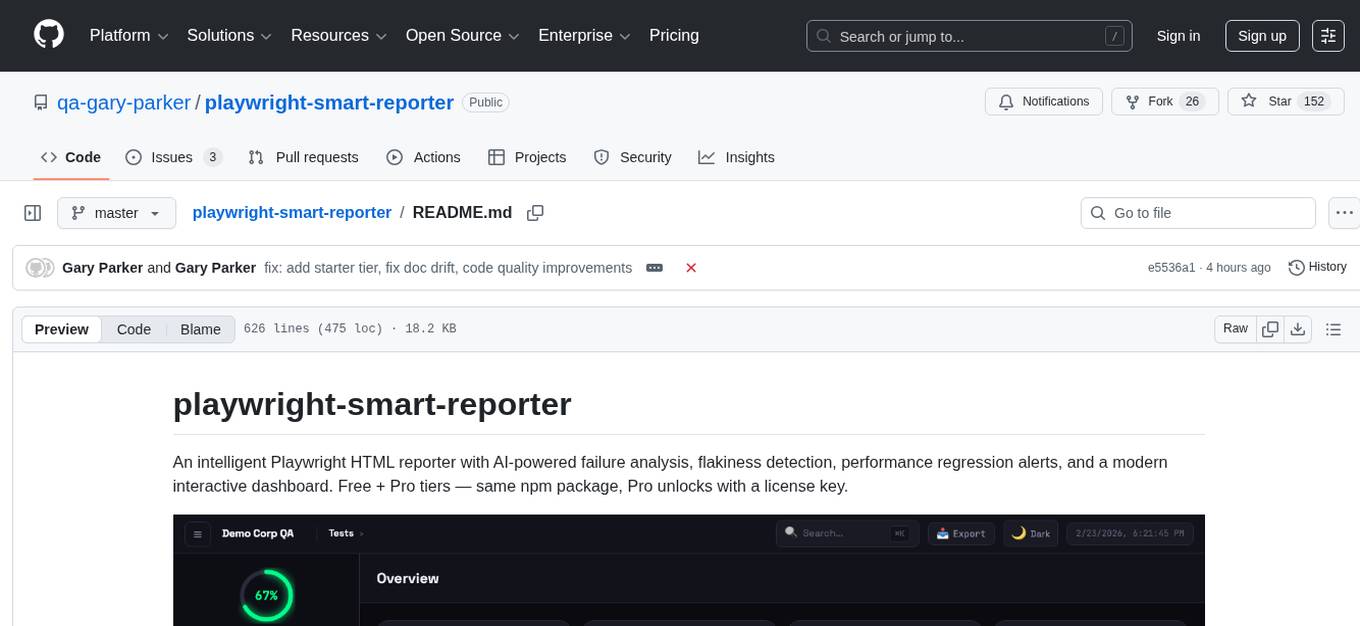
playwright-smart-reporter is an intelligent Playwright HTML reporter that offers AI-powered failure analysis, flakiness detection, performance regression alerts, and an interactive dashboard. It comes with both free and Pro tiers, with Pro unlocking additional features such as AI failure analysis, premium themes, PDF exports, quality gates, and more. The tool provides detailed insights into test stability, performance, and reliability, helping users identify and address issues in their test suites.
README:
An intelligent Playwright HTML reporter with AI-powered failure analysis, flakiness detection, performance regression alerts, and a modern interactive dashboard. Free + Pro tiers — same npm package, Pro unlocks with a license key.
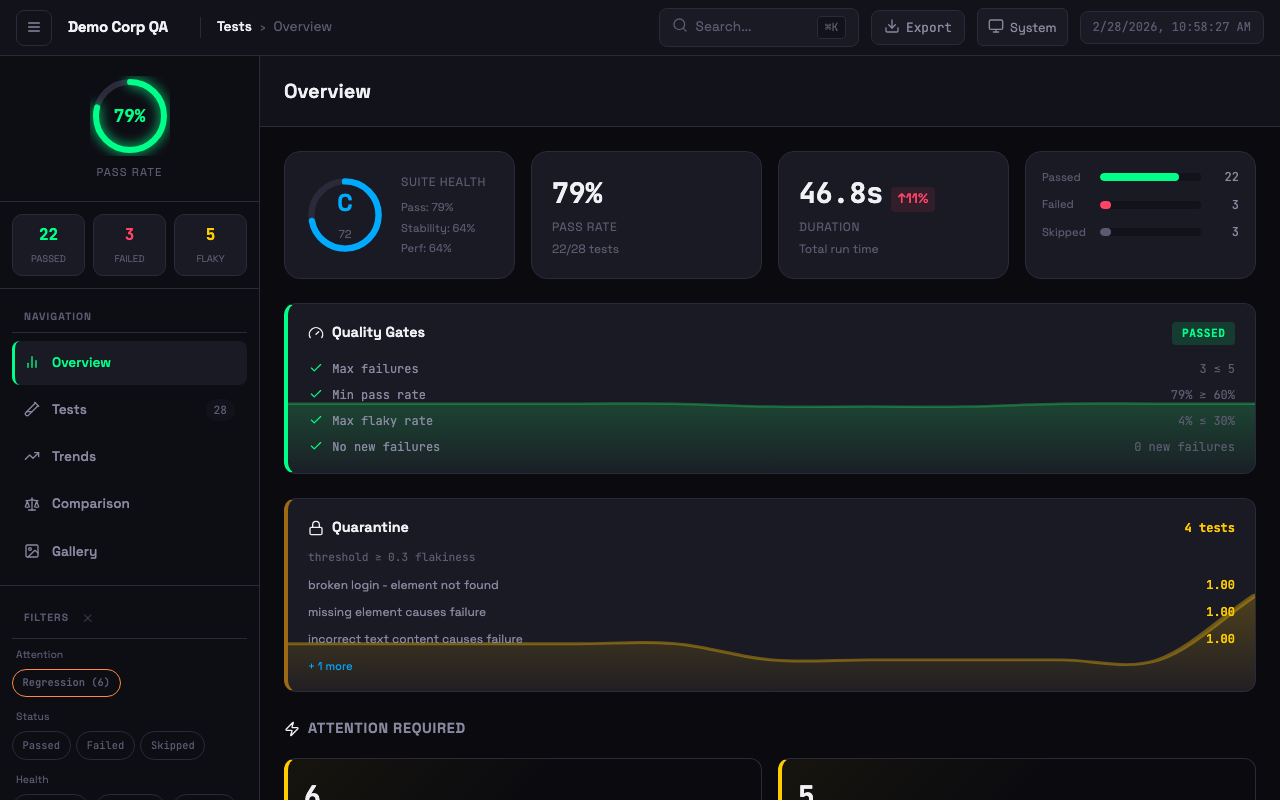 Dashboard with quality gates, quarantine, suite health grade, attention alerts, and failure clusters
npm install -D playwright-smart-reporterAdd to your playwright.config.ts:
import { defineConfig } from '@playwright/test';

export default defineConfig({
  reporter: [
    ['playwright-smart-reporter', {
      outputFile: 'smart-report.html',
      historyFile: 'test-history.json',
      maxHistoryRuns: 10,
    }],
  ],
});
Run your tests and open the generated smart-report.html.
The free tier includes everything you need for local test reporting. Paid plans add AI failure analysis, premium themes, PDF exports, quality gates, and more — activated with a license key.
| Feature | Free | Starter (£5/mo) | Pro (£9/mo) |
|---|---|---|---|
| Stability grades (A+ to F) | ✅ | ✅ | ✅ |
| Flakiness detection & history tracking | ✅ | ✅ | ✅ |
| Run comparison & trend analytics | ✅ | ✅ | ✅ |
| Artifact gallery & trace viewer | ✅ | ✅ | ✅ |
| Network logs & step timeline | ✅ | ✅ | ✅ |
| CI auto-detection & notifications | ✅ | ✅ | ✅ |
| 3 themes (System, Light, Dark) | ✅ | ✅ | ✅ |
| AI failure analysis (managed) | 2,000/mo | 5,000/mo | |
| 6 additional Pro themes | ✅ | ✅ | |
| Executive PDF export (3 variants) | ✅ | ✅ | |
| JSON + JUnit export | ✅ | ✅ | |
| Quality gates (fail builds on thresholds) | ✅ | ✅ | |
| Flaky test quarantine | ✅ | ✅ | |
| Custom report branding (title, footer, colours) | ✅ | ✅ | |
| Custom theme colours | ✅ | ||
| AI health digest | ✅ | ||
| Priority support | ✅ |
Get a license at stagewright.dev
Set your license key via environment variable or config:
# Environment variable
export SMART_REPORTER_LICENSE_KEY=your-license-key
// Or in playwright.config.ts
reporter: [
['playwright-smart-reporter', {
outputFile: 'smart-report.html',
licenseKey: 'your-license-key',
}],
]- AI Failure Analysis — Claude/OpenAI/Gemini-powered fix suggestions with batched analysis for large suites
- Flakiness Detection — Historical tracking to identify unreliable tests (not single-run retries)
- Performance Regression Alerts — Warns when tests get significantly slower than average
- Stability Scoring — Composite health metrics (0-100 with grades A+ to F)
- Failure Clustering — Group similar failures by error type with error previews and AI analysis
- Test Retry Analysis — Track tests that frequently need retries
- Sidebar Navigation — Overview, Tests, Trends, Comparison, Gallery views
- Theme Support — Light, dark, and system theme with persistent preference
-
Keyboard Shortcuts —
1-5switch views,j/knavigate tests,ffocus search,eexport summary - Virtual Scroll — Pagination for large test suites (500+ tests)
- Exportable Summary Card — One-click export of test run summary
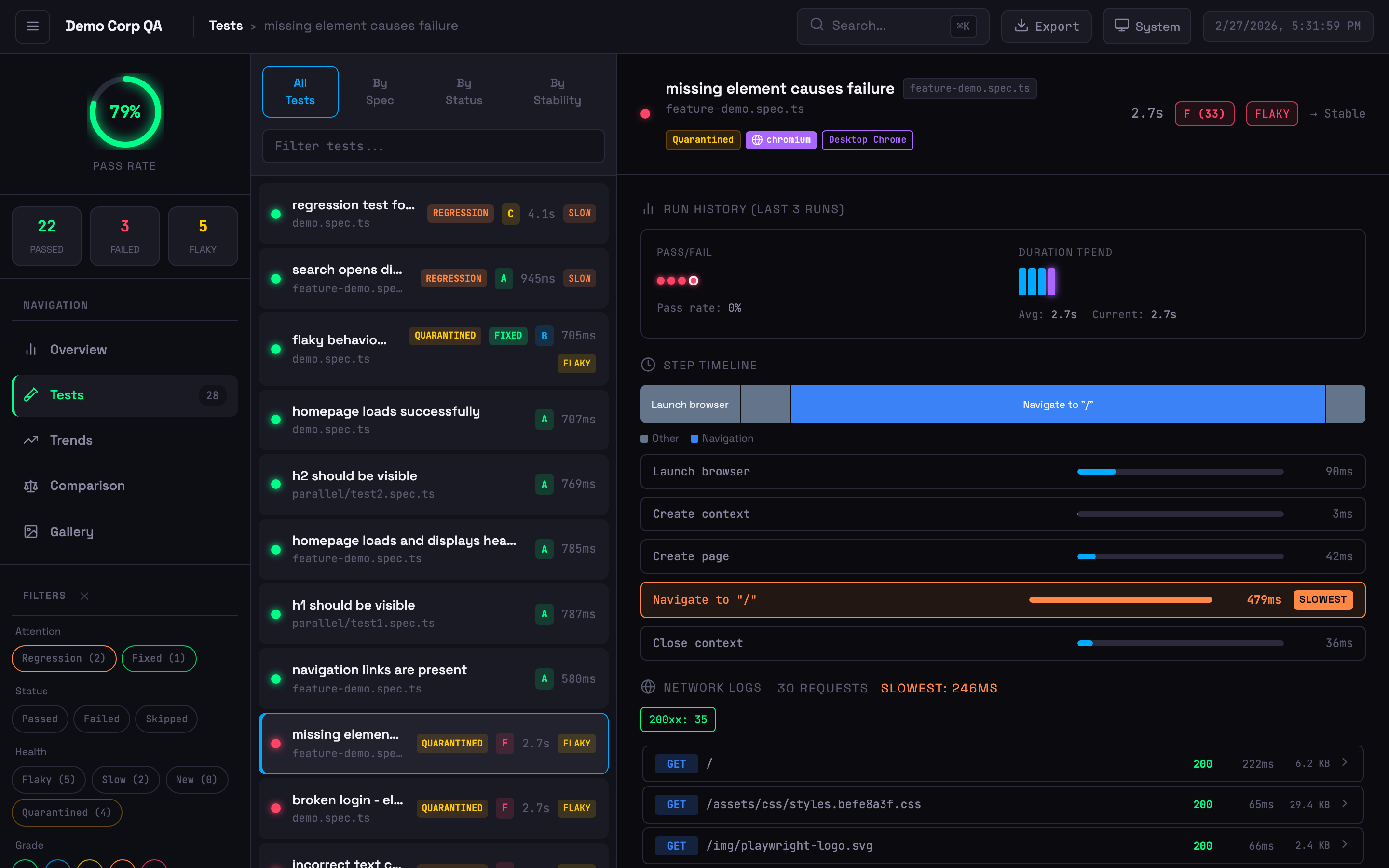 Expanded test card with step timeline, network logs, run history, and quarantine badge
- Step Timing Breakdown — Visual bars highlighting the slowest steps
- Flamechart Visualisation — Colour-coded timeline bars (navigation, assertion, action, API, wait)
- Network Logs — API calls with status codes, timing, and payload details (from trace files)
- Inline Trace Viewer — View traces directly in the dashboard
- Screenshot Embedding — Failure screenshots displayed inline
- Browser & Project Badges — Shows which browser/project each test ran against
-
Annotation Support —
@slow,@fixme,@skip,@issue, custom annotations with styled badges
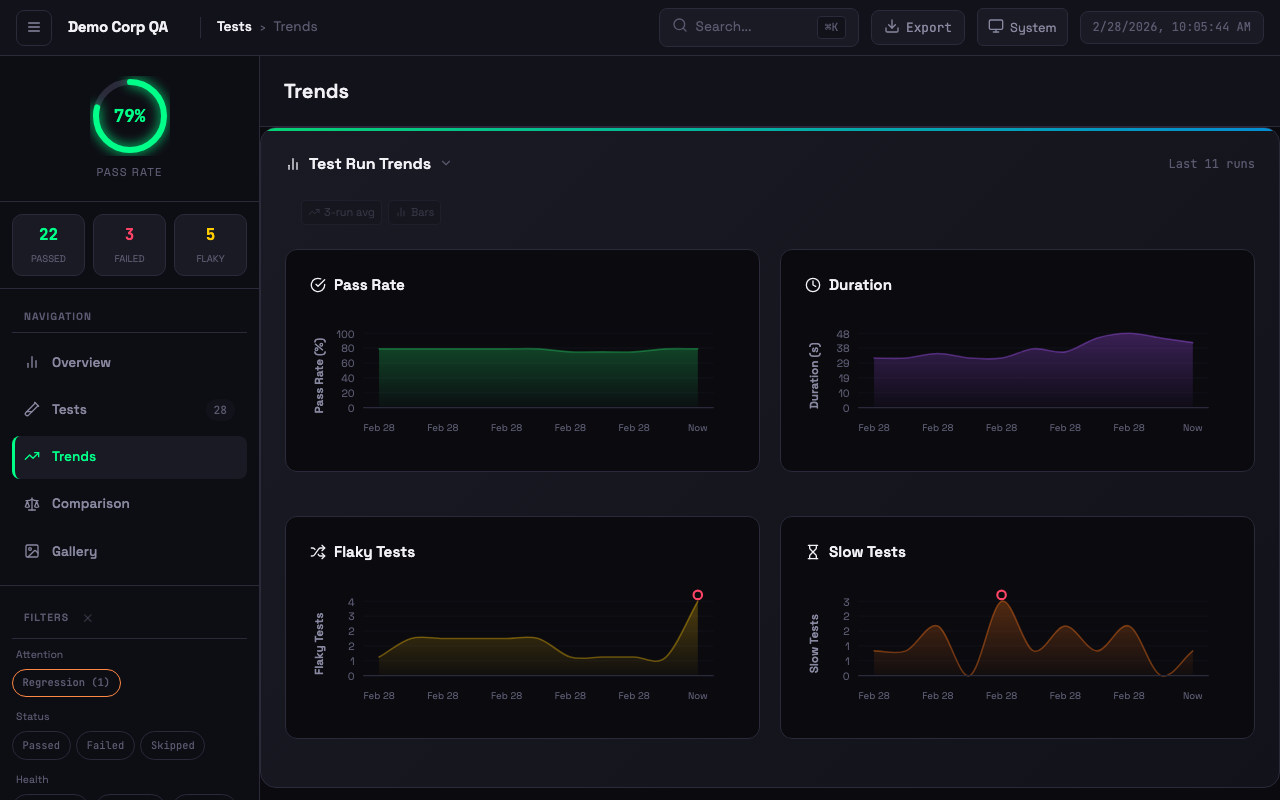 Interactive trend charts with pass rate, duration, flaky tests, and slow test tracking
- Moving Averages — Overlay on pass rate and duration trends
- Anomaly Detection — 2-sigma outlier detection with visual markers
- Clickable History — Click any chart bar to drill into that historical run
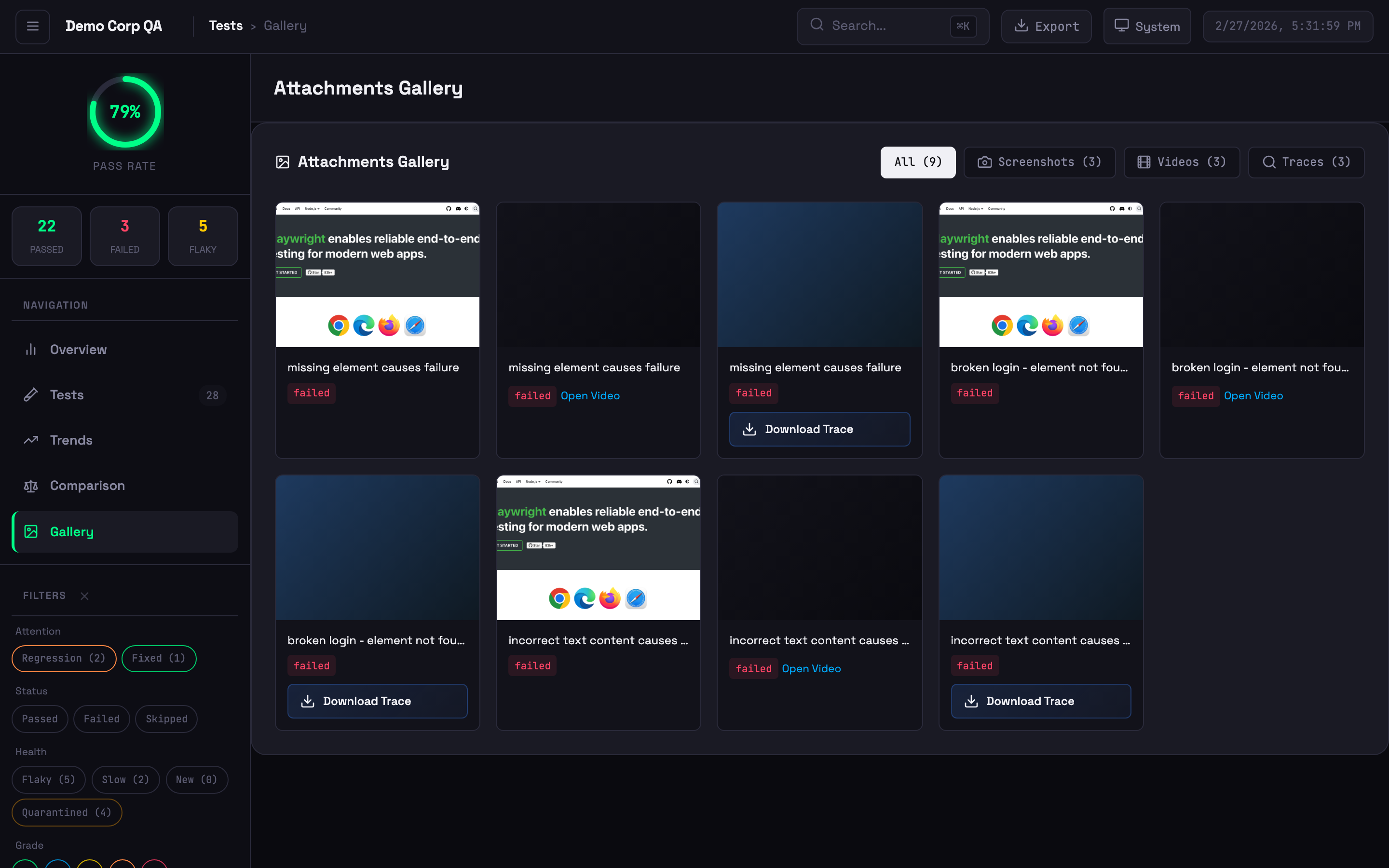 Visual grid of screenshots, videos, and trace files
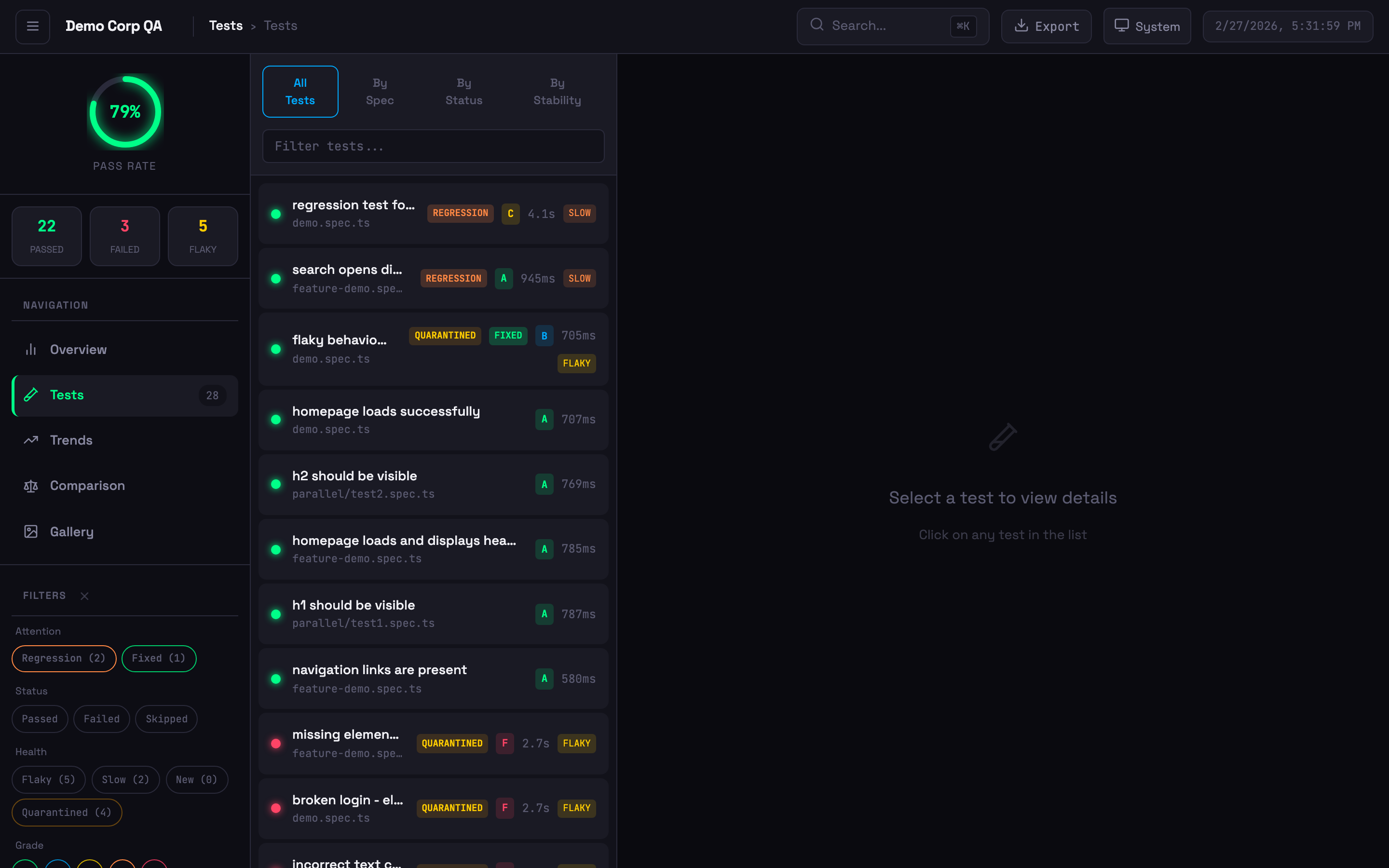 Test list with status badges, stability grades, quarantine indicators, and filtering
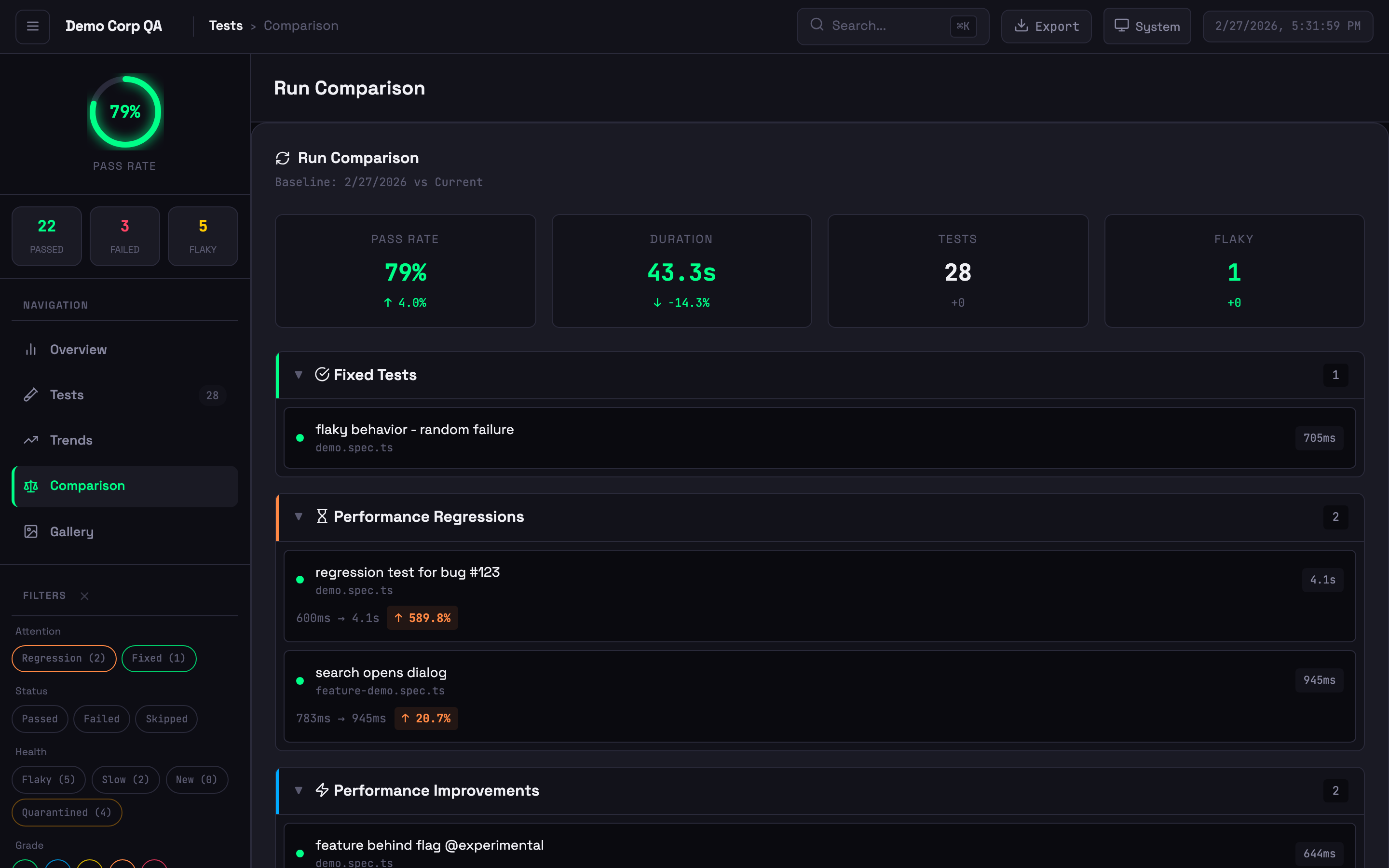 Run comparison showing new failures, performance changes, and baseline diffs
Smart Reporter tracks flakiness across runs, not within a single run:
| Playwright HTML Report | Smart Reporter | |
|---|---|---|
| Scope | Single test run | Historical across multiple runs |
| Criteria | Fails then passes on retry | Failed 30%+ of the time historically |
| Use Case | Immediate retry success | Chronically unreliable tests |
Indicators:
- Stable (<10% failure rate) — Unstable (10-30%) — Flaky (>30%) — New (no history)
6 additional themes beyond the 3 free ones: Ocean, Sunset, Dracula, Cyberpunk, Forest, and Rose. Set via config:
reporter: [
  ['playwright-smart-reporter', {
    outputFile: 'smart-report.html',
    licenseKey: process.env.SMART_REPORTER_LICENSE_KEY,
    theme: 'dracula',  // ocean, sunset, dracula, cyberpunk, forest, rose
  }],
]Generate professional PDF reports in 3 themed variants: Corporate, Minimal, and Dark. Includes a style picker modal in the HTML report.
reporter: [
  ['playwright-smart-reporter', {
    outputFile: 'smart-report.html',
    licenseKey: process.env.SMART_REPORTER_LICENSE_KEY,
    pdfExport: true,
    pdfStyle: 'corporate',  // corporate, minimal, dark
  }],
]Fail CI builds when test results don't meet your thresholds:
reporter: [
  ['playwright-smart-reporter', {
    outputFile: 'smart-report.html',
    licenseKey: process.env.SMART_REPORTER_LICENSE_KEY,
    qualityGates: {
      minPassRate: 95,
      maxFlakyRate: 5,
      maxDuration: 300,       // seconds
      minStabilityScore: 70,
    },
  }],
]
Or run as a standalone CLI check:
npx playwright-smart-reporter gate --pass-rate 95 --flaky-rate 5Exit codes: 0 = all gates passed, 1 = gate failed (use in CI to block deploys).
Automatically detect and quarantine chronically flaky tests. Quarantined tests are tracked in a JSON file and can be excluded from gate failures:
reporter: [
  ['playwright-smart-reporter', {
    outputFile: 'smart-report.html',
    licenseKey: process.env.SMART_REPORTER_LICENSE_KEY,
    quarantine: {
      enabled: true,
      file: '.smart-quarantine.json',
      autoQuarantine: true,
      threshold: 3,  // failures before auto-quarantine
    },
  }],
]Customise the report title, footer, and theme colours:
reporter: [
  ['playwright-smart-reporter', {
    outputFile: 'smart-report.html',
    licenseKey: process.env.SMART_REPORTER_LICENSE_KEY,
    branding: {
      title: 'Acme Corp Test Report',
      footer: 'Generated by QA Team',
      colors: {
        primary: '#6366f1',
        accent: '#8b5cf6',
        success: '#22c55e',
        error: '#ef4444',
        warning: '#f59e0b',
      },
    },
  }],
]Export test results in structured formats for external tools:
reporter: [
  ['playwright-smart-reporter', {
    outputFile: 'smart-report.html',
    licenseKey: process.env.SMART_REPORTER_LICENSE_KEY,
    jsonExport: 'smart-report-data.json',
    junitExport: 'smart-report-junit.xml',
  }],
]Get an AI-generated summary of your test suite health, trends, and recommendations:
reporter: [
  ['playwright-smart-reporter', {
    outputFile: 'smart-report.html',
    licenseKey: process.env.SMART_REPORTER_LICENSE_KEY,
    enableAIRecommendations: true,
    aiHealthDigest: true,
  }],
]reporter: [
['playwright-smart-reporter', {
// Core
outputFile: 'smart-report.html',
historyFile: 'test-history.json',
maxHistoryRuns: 10,
performanceThreshold: 0.2,
// Pro license
licenseKey: process.env.SMART_REPORTER_LICENSE_KEY,
// Notifications
slackWebhook: process.env.SLACK_WEBHOOK_URL,
teamsWebhook: process.env.TEAMS_WEBHOOK_URL,
// Feature flags (all default to true unless noted)
enableRetryAnalysis: true,
enableFailureClustering: true,
enableStabilityScore: true,
enableGalleryView: true,
enableComparison: true,
enableAIRecommendations: true,
enableTrendsView: true,
enableTraceViewer: true,
enableHistoryDrilldown: false,
enableNetworkLogs: true,
// Step and path options
filterPwApiSteps: false,
relativeToCwd: false,
// Multi-project
projectName: 'ui-tests',
runId: process.env.GITHUB_RUN_ID,
// Network logging
networkLogFilter: 'api.example.com',
networkLogExcludeAssets: true,
networkLogMaxEntries: 50,
// Thresholds
stabilityThreshold: 70,
retryFailureThreshold: 3,
baselineRunId: 'main-branch-baseline',
thresholds: {
flakinessStable: 0.1,
flakinessUnstable: 0.3,
performanceRegression: 0.2,
stabilityWeightFlakiness: 0.4,
stabilityWeightPerformance: 0.3,
stabilityWeightReliability: 0.3,
gradeA: 90,
gradeB: 80,
gradeC: 70,
gradeD: 60,
},
// Pro features
theme: 'system', // system, light, dark, ocean, sunset, dracula, cyberpunk, forest, rose
pdfExport: false,
pdfStyle: 'corporate', // corporate, minimal, dark
jsonExport: '', // path for JSON export
junitExport: '', // path for JUnit export
qualityGates: {}, // { minPassRate, maxFlakyRate, maxDuration, minStabilityScore }
quarantine: {}, // { enabled, file, autoQuarantine, threshold }
branding: {}, // { title, footer, colors }
aiHealthDigest: false,
// Advanced
cspSafe: false,
maxEmbeddedSize: 5 * 1024 * 1024,
}],
]Set one of these environment variables to enable AI-powered failure analysis:
export ANTHROPIC_API_KEY=your-key    # Claude (preferred)
export OPENAI_API_KEY=your-key       # OpenAI
export GEMINI_API_KEY=your-key       # Google Gemini
Provider priority: Anthropic > OpenAI > Gemini. The reporter analyses failures in batches and provides fix suggestions in the report.
Composite score (0-100) from three factors:
| Factor | Weight | Description |
|---|---|---|
| Flakiness | 40% | Inverse of flakiness score |
| Performance | 30% | Execution time consistency |
| Reliability | 30% | Pass rate from history |
Grades: A+ (95-100), A (90-94), B (80-89), C (70-79), D (60-69), F (<60). All weights and thresholds are configurable.
reporter: [
  ['playwright-smart-reporter', {
    filterPwApiSteps: true,  // Only show custom test.step() entries
  }],
]
With filtering on, verbose page.click(), page.fill() steps are hidden — only your named test.step() entries appear.
Isolate history per test suite to prevent metric contamination:
reporter: [
  ['playwright-smart-reporter', {
    projectName: 'api',
    historyFile: 'reports/{project}/history.json',
  }],
]Click View on any test with traces to open the built-in viewer with film strip, actions panel, before/after screenshots, network waterfall, console messages, and errors.
npx playwright-smart-reporter-serve smart-report.htmlServes the report locally with full trace viewer support — no file:// CORS issues.
npx playwright-smart-reporter-view-trace ./traces/my-test-trace-0.zipAutomatically extracted from Playwright trace files — no code changes required. Shows method, URL, status code, duration, and payload sizes. Requires tracing enabled:
use: {
  trace: 'retain-on-failure',  // or 'on'
}| Annotation | Badge | Annotation | Badge |
|---|---|---|---|
@slow |
Amber |
@fixme / @fix
|
Pink |
@skip |
Indigo | @fail |
Red |
@issue / @bug
|
Red | @flaky |
Orange |
@todo |
Blue | Custom | Grey |
test('payment flow', async ({ page }) => {
  test.slow();
  test.info().annotations.push({ type: 'issue', description: 'JIRA-123' });
});History must persist between runs for flakiness detection and trends to work.
- uses: actions/cache@v4
  with:
    path: test-history.json
    key: test-history-${{ github.ref }}
    restore-keys: test-history-

- run: npx playwright test

- uses: actions/cache/save@v4
  if: always()
  with:
    path: test-history.json
key: test-history-${{ github.ref }}-${{ github.run_id }}test:
cache:
key: test-history-$CI_COMMIT_REF_SLUG
paths: [test-history.json]
policy: pull-push
script: npx playwright test- restore_cache:
keys: [test-history-{{ .Branch }}, test-history-]
- run: npx playwright test
- save_cache:
key: test-history-{{ .Branch }}-{{ .Revision }}
paths: [test-history.json]steps:
- task: Cache@2
inputs:
key: 'test-history | "$(Build.SourceBranchName)"'
restoreKeys: 'test-history |'
path: test-history.json
- script: npx playwright test
continueOnError: true
- task: PublishPipelineArtifact@1
inputs:
targetPath: smart-report.html
artifact: playwright-smart-report
condition: always()The reporter automatically detects GitHub Actions, GitLab CI, CircleCI, Jenkins, Azure DevOps, and Buildkite. Branch, commit SHA, and build ID are displayed in the report header.
# GitHub Actions example
- run: npx playwright test
  continue-on-error: true

- run: npx playwright-smart-reporter gate --pass-rate 95 --flaky-rate 5
# Exits non-zero if gates fail — blocks the pipelineFor consistent history across parallel shards, set runId:
reporter: [
  ['playwright-smart-reporter', {
    runId: process.env.GITHUB_RUN_ID,
  }],
]npx playwright-smart-reporter-merge-history \
shard1/test-history.json \
shard2/test-history.json \
-o merged-history.json \
--max-runs 10For environments with strict Content Security Policy:
reporter: [
  ['playwright-smart-reporter', { cspSafe: true }],
]
Screenshots saved as separate files instead of base64, system fonts instead of Google Fonts, file references instead of embedded data.
Works with Playwright + Cucumber frameworks:
import { defineBddConfig } from 'playwright-bdd';

const testDir = defineBddConfig({
  features: 'features/**/*.feature',
  steps: 'steps/**/*.ts',
});

export default defineConfig({
  testDir,
  reporter: [['playwright-smart-reporter']],
});Visit stagewright.dev to purchase a Starter (£5/mo) or Pro (£9/mo) plan. Your license key is delivered via email immediately after purchase.
Yes. All core features (flakiness detection, stability grades, trend analytics, trace viewer, gallery, etc.) are free. AI failure analysis, premium themes, and other paid features unlock when you add a license key.
Fixed in v1.0.6. Update: npm install playwright-smart-reporter@latest
They use different methodologies — see Flakiness Detection above.
Enable cspSafe: true to save attachments as files instead of embedding, or reduce maxHistoryRuns. Use maxEmbeddedSize to control the inline trace threshold.
| Problem | Cause | Fix |
|---|---|---|
| No history data | History file missing or wrong path | Check historyFile path, use CI caching |
| No network logs | Tracing not enabled | Add trace: 'retain-on-failure' to config |
| No AI suggestions | Missing API key | Set ANTHROPIC_API_KEY, OPENAI_API_KEY, or GEMINI_API_KEY
|
| Mixed project metrics | Shared history file | Use projectName to isolate |
| Pro features not showing | License key missing or expired | Check SMART_REPORTER_LICENSE_KEY env var or licenseKey config |
| Quality gate not failing CI | Gate not run as separate step | Run npx playwright-smart-reporter gate as its own CI step |
npm install
npm run build
npm test        # 547 tests
npm run test:demo- Gary Parker — Creator and maintainer
- Filip Gajic — v1.0.0 UI redesign
- Liam Childs — Parameterized project support
MIT — free and Pro features in one package. Pro features require a valid license key from stagewright.dev.
For Tasks:
Click tags to check more tools for each tasksFor Jobs:
Alternative AI tools for playwright-smart-reporter
Similar Open Source Tools
playwright-smart-reporter
playwright-smart-reporter is an intelligent Playwright HTML reporter that offers AI-powered failure analysis, flakiness detection, performance regression alerts, and an interactive dashboard. It comes with both free and Pro tiers, with Pro unlocking additional features such as AI failure analysis, premium themes, PDF exports, quality gates, and more. The tool provides detailed insights into test stability, performance, and reliability, helping users identify and address issues in their test suites.
ruby_llm-agents
RubyLLM::Agents is a production-ready Rails engine for building, managing, and monitoring LLM-powered AI agents. It seamlessly integrates with Rails apps, providing features like automatic execution tracking, cost analytics, budget controls, and a real-time dashboard. Users can build intelligent AI agents in Ruby using a clean DSL and support various LLM providers like OpenAI GPT-4, Anthropic Claude, and Google Gemini. The engine offers features such as agent DSL configuration, execution tracking, cost analytics, reliability with retries and fallbacks, budget controls, multi-tenancy support, async execution with Ruby fibers, real-time dashboard, streaming, conversation history, image operations, alerts, and more.
ai-coders-context
The @ai-coders/context repository provides the Ultimate MCP for AI Agent Orchestration, Context Engineering, and Spec-Driven Development. It simplifies context engineering for AI by offering a universal process called PREVC, which consists of Planning, Review, Execution, Validation, and Confirmation steps. The tool aims to address the problem of context fragmentation by introducing a single `.context/` directory that works universally across different tools. It enables users to create structured documentation, generate agent playbooks, manage workflows, provide on-demand expertise, and sync across various AI tools. The tool follows a structured, spec-driven development approach to improve AI output quality and ensure reproducible results across projects.
augustus
Augustus is a Go-based LLM vulnerability scanner designed for security professionals to test large language models against a wide range of adversarial attacks. It integrates with 28 LLM providers, covers 210+ adversarial attacks including prompt injection, jailbreaks, encoding exploits, and data extraction, and produces actionable vulnerability reports. The tool is built for production security testing with features like concurrent scanning, rate limiting, retry logic, and timeout handling out of the box.
skylos
Skylos is a privacy-first SAST tool for Python, TypeScript, and Go that bridges the gap between traditional static analysis and AI agents. It detects dead code, security vulnerabilities (SQLi, SSRF, Secrets), and code quality issues with high precision. Skylos uses a hybrid engine (AST + optional Local/Cloud LLM) to eliminate false positives, verify via runtime, find logic bugs, and provide context-aware audits. It offers automated fixes, end-to-end remediation, and 100% local privacy. The tool supports taint analysis, secrets detection, vulnerability checks, dead code detection and cleanup, agentic AI and hybrid analysis, codebase optimization, operational governance, and runtime verification.
mengram
Mengram is an AI memory tool that goes beyond storing facts by also capturing episodic events and procedural workflows that evolve from failures. It offers multi-user isolation, a knowledge graph, and integrates with various tools like LangChain and CrewAI. Users can add conversations to automatically extract facts, events, and workflows. Mengram provides a cognitive profile based on all memories and allows importing existing data from tools like ChatGPT and Obsidian. It offers REST API for adding and searching memories, along with smart triggers and memory agents for personalized experiences. The tool is free for commercial use under the Apache 2.0 license.

llamafarm
LlamaFarm is a comprehensive AI framework that empowers users to build powerful AI applications locally, with full control over costs and deployment options. It provides modular components for RAG systems, vector databases, model management, prompt engineering, and fine-tuning. Users can create differentiated AI products without needing extensive ML expertise, using simple CLI commands and YAML configs. The framework supports local-first development, production-ready components, strategy-based configuration, and deployment anywhere from laptops to the cloud.
flyto-core
Flyto-core is a powerful Python library for geospatial analysis and visualization. It provides a wide range of tools for working with geographic data, including support for various file formats, spatial operations, and interactive mapping. With Flyto-core, users can easily load, manipulate, and visualize spatial data to gain insights and make informed decisions. Whether you are a GIS professional, a data scientist, or a developer, Flyto-core offers a versatile and user-friendly solution for geospatial tasks.
Code
A3S Code is an embeddable AI coding agent framework in Rust that allows users to build agents capable of reading, writing, and executing code with tool access, planning, and safety controls. It is production-ready with features like permission system, HITL confirmation, skill-based tool restrictions, and error recovery. The framework is extensible with 19 trait-based extension points and supports lane-based priority queue for scalable multi-machine task distribution.
zeroclaw
ZeroClaw is a fast, small, and fully autonomous AI assistant infrastructure built with Rust. It features a lean runtime, cost-efficient deployment, fast cold starts, and a portable architecture. It is secure by design, fully swappable, and supports OpenAI-compatible provider support. The tool is designed for low-cost boards and small cloud instances, with a memory footprint of less than 5MB. It is suitable for tasks like deploying AI assistants, swapping providers/channels/tools, and pluggable everything.
Conduit
Conduit is a unified Swift 6.2 SDK for local and cloud LLM inference, providing a single Swift-native API that can target Anthropic, OpenRouter, Ollama, MLX, HuggingFace, and Apple’s Foundation Models without rewriting your prompt pipeline. It allows switching between local, cloud, and system providers with minimal code changes, supports downloading models from HuggingFace Hub for local MLX inference, generates Swift types directly from LLM responses, offers privacy-first options for on-device running, and is built with Swift 6.2 concurrency features like actors, Sendable types, and AsyncSequence.

everything-claude-code
The 'Everything Claude Code' repository is a comprehensive collection of production-ready agents, skills, hooks, commands, rules, and MCP configurations developed over 10+ months. It includes guides for setup, foundations, and philosophy, as well as detailed explanations of various topics such as token optimization, memory persistence, continuous learning, verification loops, parallelization, and subagent orchestration. The repository also provides updates on bug fixes, multi-language rules, installation wizard, PM2 support, OpenCode plugin integration, unified commands and skills, and cross-platform support. It offers a quick start guide for installation, ecosystem tools like Skill Creator and Continuous Learning v2, requirements for CLI version compatibility, key concepts like agents, skills, hooks, and rules, running tests, contributing guidelines, OpenCode support, background information, important notes on context window management and customization, star history chart, and relevant links.
memorix
Memorix is a cross-agent memory bridge tool designed to prevent AI assistants from forgetting important information during chats or when switching between different agents. It allows users to store and retrieve architecture decisions, bug fixes, technical explanations, code changes, insights, design choices, and more across various agents seamlessly. With Memorix, users can avoid re-explaining concepts, prevent context loss when switching agents, collaborate effectively, sync workspaces, generate project skills, and utilize a knowledge graph for intelligent retrieval. The tool offers 24 MCP tools for smart memory management, cross-agent workspace sync, a knowledge graph compatible with MCP Official Memory Server, various observation types, a visual dashboard, auto-memory hooks, and optional vector search for semantic similarity. Memorix ensures project isolation, local data storage, and zero cross-contamination, making it a valuable tool for enhancing productivity and knowledge retention in AI-driven workflows.
agentscope
AgentScope is a multi-agent platform designed to empower developers to build multi-agent applications with large-scale models. It features three high-level capabilities: Easy-to-Use, High Robustness, and Actor-Based Distribution. AgentScope provides a list of `ModelWrapper` to support both local model services and third-party model APIs, including OpenAI API, DashScope API, Gemini API, and ollama. It also enables developers to rapidly deploy local model services using libraries such as ollama (CPU inference), Flask + Transformers, Flask + ModelScope, FastChat, and vllm. AgentScope supports various services, including Web Search, Data Query, Retrieval, Code Execution, File Operation, and Text Processing. Example applications include Conversation, Game, and Distribution. AgentScope is released under Apache License 2.0 and welcomes contributions.
nextclaw
NextClaw is a feature-rich, OpenClaw-compatible personal AI assistant designed for quick trials, secondary machines, or anyone who wants multi-channel + multi-provider capabilities with low maintenance overhead. It offers a UI-first workflow, lightweight codebase, and easy configuration through a built-in UI. The tool supports various providers like OpenRouter, OpenAI, MiniMax, Moonshot, and more, along with channels such as Telegram, Discord, WhatsApp, and others. Users can perform tasks like web search, command execution, memory management, and scheduling with Cron + Heartbeat. NextClaw aims to provide a user-friendly experience with minimal setup and maintenance requirements.
zeptoclaw
ZeptoClaw is an ultra-lightweight personal AI assistant that offers a compact Rust binary with 29 tools, 8 channels, 9 providers, and container isolation. It focuses on integrations, security, and size discipline without compromising on performance. With features like container isolation, prompt injection detection, secret leak scanner, policy engine, input validator, and more, ZeptoClaw ensures secure AI agent execution. It supports migration from OpenClaw, deployment on various platforms, and configuration of LLM providers. ZeptoClaw is designed for efficient AI assistance with minimal resource consumption and maximum security.
For similar tasks
playwright-smart-reporter
playwright-smart-reporter is an intelligent Playwright HTML reporter that offers AI-powered failure analysis, flakiness detection, performance regression alerts, and an interactive dashboard. It comes with both free and Pro tiers, with Pro unlocking additional features such as AI failure analysis, premium themes, PDF exports, quality gates, and more. The tool provides detailed insights into test stability, performance, and reliability, helping users identify and address issues in their test suites.
llamator
LLAMATOR is a Red Teaming python-framework designed for testing chatbots and LLM-systems. It provides support for custom attacks, a wide range of attacks on RAG/Agent/Prompt in English and Russian, custom configuration of chat clients, history of attack requests and responses in Excel and CSV format, and test report document generation in DOCX format. The tool is classified under OWASP for Prompt Injection, Prompt Leakage, and Misinformation. It is supported by AI Security Lab ITMO, Raft Security, and AI Talent Hub.

llamator
LLAMATOR is a Red Teaming Python framework designed for testing chatbots and LLM systems. It provides support for custom attacks, a wide range of attack options in English and Russian, custom configuration of chat clients, history tracking of attack requests and responses in Excel and CSV formats, and test report generation in DOCX format. The tool is classified under OWASP as addressing prompt injection, system prompt leakage, and misinformation. It is supported by the AI Security Lab ITMO, Raft Security, and AI Talent Hub, and is licensed under the Creative Commons Attribution-NonCommercial-ShareAlike 4.0 International license.
For similar jobs

kaito
Kaito is an operator that automates the AI/ML inference model deployment in a Kubernetes cluster. It manages large model files using container images, avoids tuning deployment parameters to fit GPU hardware by providing preset configurations, auto-provisions GPU nodes based on model requirements, and hosts large model images in the public Microsoft Container Registry (MCR) if the license allows. Using Kaito, the workflow of onboarding large AI inference models in Kubernetes is largely simplified.
ai-on-gke
This repository contains assets related to AI/ML workloads on Google Kubernetes Engine (GKE). Run optimized AI/ML workloads with Google Kubernetes Engine (GKE) platform orchestration capabilities. A robust AI/ML platform considers the following layers: Infrastructure orchestration that support GPUs and TPUs for training and serving workloads at scale Flexible integration with distributed computing and data processing frameworks Support for multiple teams on the same infrastructure to maximize utilization of resources

tidb
TiDB is an open-source distributed SQL database that supports Hybrid Transactional and Analytical Processing (HTAP) workloads. It is MySQL compatible and features horizontal scalability, strong consistency, and high availability.
nvidia_gpu_exporter
Nvidia GPU exporter for prometheus, using `nvidia-smi` binary to gather metrics.

tracecat
Tracecat is an open-source automation platform for security teams. It's designed to be simple but powerful, with a focus on AI features and a practitioner-obsessed UI/UX. Tracecat can be used to automate a variety of tasks, including phishing email investigation, evidence collection, and remediation plan generation.
openinference
OpenInference is a set of conventions and plugins that complement OpenTelemetry to enable tracing of AI applications. It provides a way to capture and analyze the performance and behavior of AI models, including their interactions with other components of the application. OpenInference is designed to be language-agnostic and can be used with any OpenTelemetry-compatible backend. It includes a set of instrumentations for popular machine learning SDKs and frameworks, making it easy to add tracing to your AI applications.

BricksLLM
BricksLLM is a cloud native AI gateway written in Go. Currently, it provides native support for OpenAI, Anthropic, Azure OpenAI and vLLM. BricksLLM aims to provide enterprise level infrastructure that can power any LLM production use cases. Here are some use cases for BricksLLM: * Set LLM usage limits for users on different pricing tiers * Track LLM usage on a per user and per organization basis * Block or redact requests containing PIIs * Improve LLM reliability with failovers, retries and caching * Distribute API keys with rate limits and cost limits for internal development/production use cases * Distribute API keys with rate limits and cost limits for students
kong
Kong, or Kong API Gateway, is a cloud-native, platform-agnostic, scalable API Gateway distinguished for its high performance and extensibility via plugins. It also provides advanced AI capabilities with multi-LLM support. By providing functionality for proxying, routing, load balancing, health checking, authentication (and more), Kong serves as the central layer for orchestrating microservices or conventional API traffic with ease. Kong runs natively on Kubernetes thanks to its official Kubernetes Ingress Controller.