


dbt-mcp
A MCP (Model Context Protocol) server for interacting with dbt.
Stars: 494
The dbt MCP Server is a Model Context Protocol server that provides tools to interact with dbt. It allows users to provide AI agents with context of their project in dbt Core, dbt Fusion, and dbt Platform. The server architecture enables agents to connect to various tools, and users can refer to the documentation for more details on its capabilities. Users can also contribute to the project by following the instructions in the CONTRIBUTING.md file.
README:
This MCP (Model Context Protocol) server provides various tools to interact with dbt. You can use this MCP server to provide AI agents with context of your project in dbt Core, dbt Fusion, and dbt Platform.
Read our documentation here to learn more. This blog post provides more details for what is possible with the dbt MCP server.
We publish an experimental Model Context Protocol Bundle (dbt-mcp.mcpb) with each release so that MCPB-aware clients can import this server without additional setup. Download the bundle from the latest release assets and follow Anthropic's mcpb CLI docs to install or inspect it.
If you have comments or questions, create a GitHub Issue or join us in the community Slack in the #tools-dbt-mcp channel.
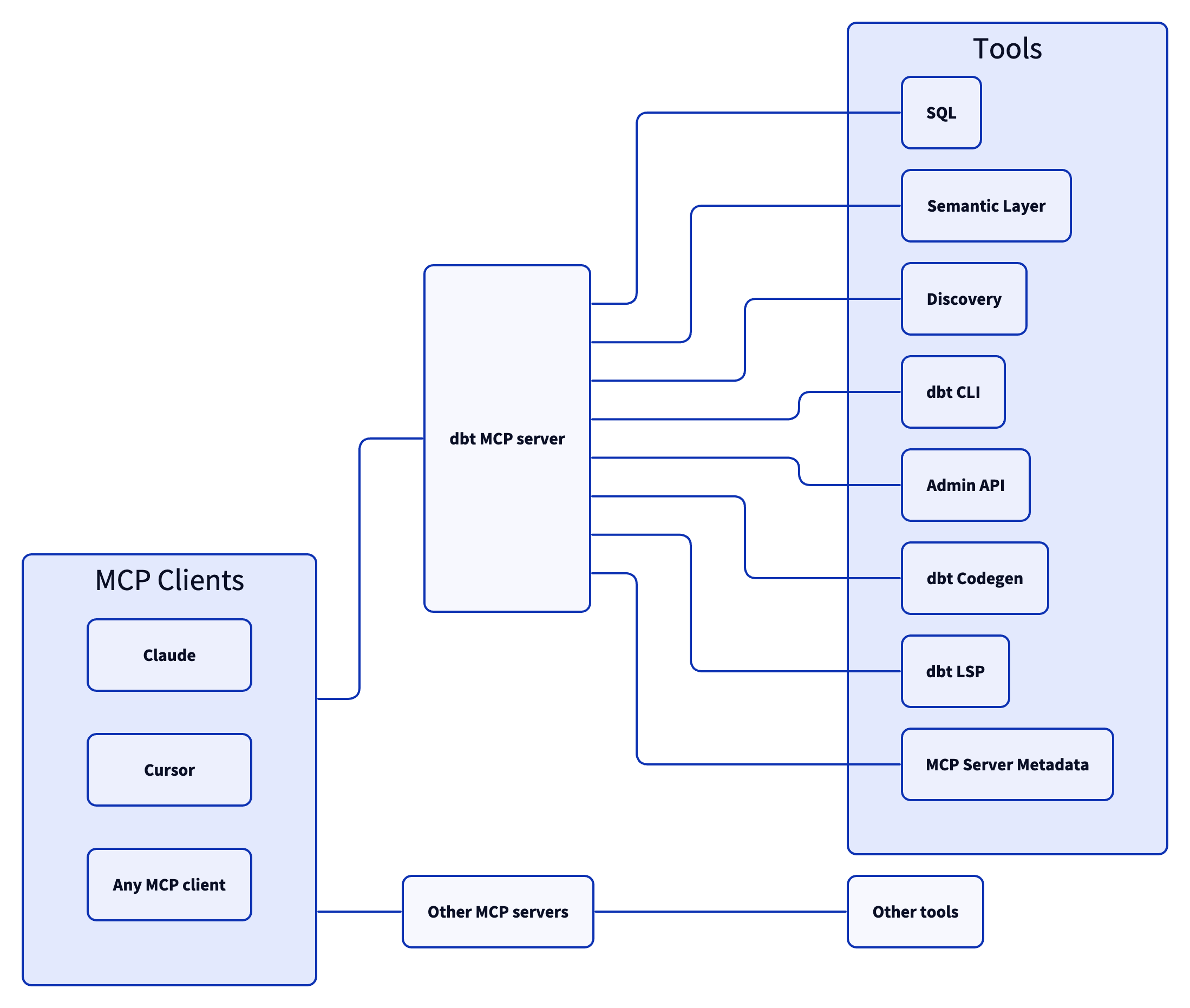
The dbt MCP server architecture allows for your agent to connect to a variety of tools.
-
execute_sql: Executes SQL on dbt Platform infrastructure with Semantic Layer support. -
text_to_sql: Generates SQL from natural language using project context.
-
get_dimensions: Gets dimensions for specified metrics. -
get_entities: Gets entities for specified metrics. -
get_metrics_compiled_sql: Returns compiled SQL for metrics without executing the query. -
list_metrics: Retrieves all defined metrics. -
list_saved_queries: Retrieves all saved queries. -
query_metrics: Executes metric queries with filtering and grouping options.
-
get_all_macros: Retrieves macros; option to filter by package or return package names only. -
get_all_models: Retrieves name and description of all models. -
get_all_sources: Gets all sources with freshness status; option to filter by source name. -
get_exposure_details: Gets exposure details including owner, parents, and freshness status. -
get_exposures: Gets all exposures (downstream dashboards, apps, or analyses). -
get_lineage: Gets full lineage graph (ancestors and descendants) with type and depth filtering. -
get_macro_details: Gets details for a specific macro. -
get_mart_models: Retrieves all mart models. -
get_model_children: Gets downstream dependents of a model. -
get_model_details: Gets model details including compiled SQL, columns, and schema. -
get_model_health: Gets health signals: run status, test results, and upstream source freshness. -
get_model_parents: Gets upstream dependencies of a model. -
get_model_performance: Gets execution history for a model; option to include test results. -
get_related_models: Finds similar models using semantic search. -
get_seed_details: Gets details for a specific seed. -
get_semantic_model_details: Gets details for a specific semantic model. -
get_snapshot_details: Gets details for a specific snapshot. -
get_source_details: Gets source details including columns and freshness. -
get_test_details: Gets details for a specific test. -
search: [Alpha] Searches for resources across the dbt project (not generally available).
-
build: Executes models, tests, snapshots, and seeds in DAG order. -
compile: Generates executable SQL from models/tests/analyses; useful for validating Jinja logic. -
docs: Generates documentation for the dbt project. -
get_lineage_dev: Retrieves lineage from local manifest.json with type and depth filtering. -
get_node_details_dev: Retrieves node details from local manifest.json (models, seeds, snapshots, sources). -
list: Lists resources in the dbt project by type with selector support. -
parse: Parses and validates project files for syntax correctness. -
run: Executes models to materialize them in the database. -
show: Executes SQL against the database and returns results. -
test: Runs tests to validate data and model integrity.
-
cancel_job_run: Cancels a running job. -
get_job_details: Gets job configuration including triggers, schedule, and dbt commands. -
get_job_run_artifact: Downloads a specific artifact file from a job run. -
get_job_run_details: Gets run details including status, timing, steps, and artifacts. -
get_job_run_error: Gets error and/or warning details for a job run; option to include or show warnings only. -
get_project_details: Gets project information for a specific dbt project. -
list_job_run_artifacts: Lists available artifacts from a job run. -
list_jobs: Lists jobs in a dbt Platform account; option to filter by project or environment. -
list_jobs_runs: Lists job runs; option to filter by job, status, or order by field. -
retry_job_run: Retries a failed job run. -
trigger_job_run: Triggers a job run; option to override git branch, schema, or other settings.
-
generate_model_yaml: Generates model YAML with columns; option to inherit upstream descriptions. -
generate_source: Generates source YAML by introspecting database schemas; option to include columns. -
generate_staging_model: Generates staging model SQL from a source table.
-
fusion.compile_sql: Compiles SQL in project context via dbt Platform. -
fusion.get_column_lineage: Traces column-level lineage via dbt Platform. -
get_column_lineage: Traces column-level lineage locally (requires dbt-lsp via dbt Labs VSCE).
-
get_mcp_server_version: Returns the current version of the dbt MCP server.
Commonly, you will connect the dbt MCP server to an agent product like Claude or Cursor. However, if you are interested in creating your own agent, check out the examples directory for how to get started.
Read CONTRIBUTING.md for instructions on how to get involved!
For Tasks:
Click tags to check more tools for each tasksFor Jobs:
Alternative AI tools for dbt-mcp
Similar Open Source Tools
dbt-mcp
The dbt MCP Server is a Model Context Protocol server that provides tools to interact with dbt. It allows users to provide AI agents with context of their project in dbt Core, dbt Fusion, and dbt Platform. The server architecture enables agents to connect to various tools, and users can refer to the documentation for more details on its capabilities. Users can also contribute to the project by following the instructions in the CONTRIBUTING.md file.
mcphost
MCPHost is a CLI host application that enables Large Language Models (LLMs) to interact with external tools through the Model Context Protocol (MCP). It acts as a host in the MCP client-server architecture, allowing language models to access external tools and data sources, maintain consistent context across interactions, and execute commands safely. The tool supports interactive conversations with Claude 3.5 Sonnet and Ollama models, multiple concurrent MCP servers, dynamic tool discovery and integration, configurable server locations and arguments, and a consistent command interface across model types.
Acontext
Acontext is a context data platform designed for production AI agents, offering unified storage, built-in context management, and observability features. It helps agents scale from local demos to production without the need to rebuild context infrastructure. The platform provides solutions for challenges like scattered context data, long-running agents requiring context management, and tracking states from multi-modal agents. Acontext offers core features such as context storage, session management, disk storage, agent skills management, and sandbox for code execution and analysis. Users can connect to Acontext, install SDKs, initialize clients, store and retrieve messages, perform context engineering, and utilize agent storage tools. The platform also supports building agents using end-to-end scripts in Python and Typescript, with various templates available. Acontext's architecture includes client layer, backend with API and core components, infrastructure with PostgreSQL, S3, Redis, and RabbitMQ, and a web dashboard. Join the Acontext community on Discord and follow updates on GitHub.
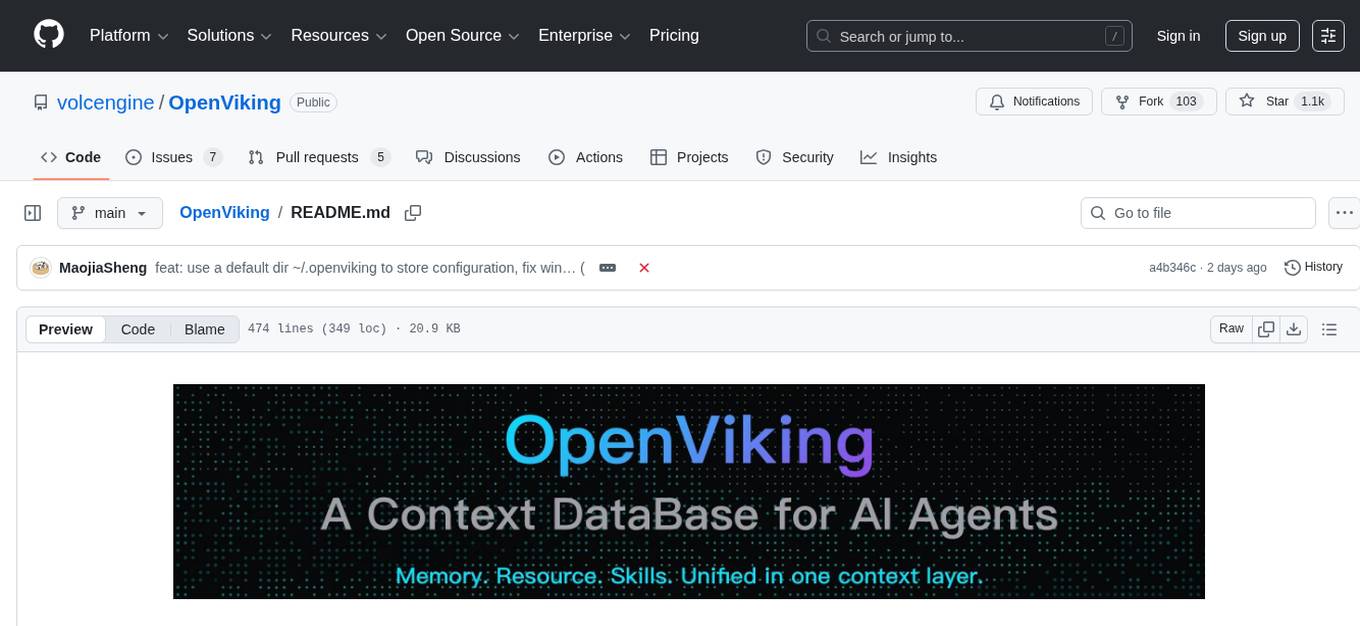
OpenViking
OpenViking is an open-source Context Database designed specifically for AI Agents. It aims to solve challenges in agent development by unifying memories, resources, and skills in a filesystem management paradigm. The tool offers tiered context loading, directory recursive retrieval, visualized retrieval trajectory, and automatic session management. Developers can interact with OpenViking like managing local files, enabling precise context manipulation and intuitive traceable operations. The tool supports various model services like OpenAI and Volcengine, enhancing semantic retrieval and context understanding for AI Agents.
arcade-ai
Arcade AI is a developer-focused tooling and API platform designed to enhance the capabilities of LLM applications and agents. It simplifies the process of connecting agentic applications with user data and services, allowing developers to concentrate on building their applications. The platform offers prebuilt toolkits for interacting with various services, supports multiple authentication providers, and provides access to different language models. Users can also create custom toolkits and evaluate their tools using Arcade AI. Contributions are welcome, and self-hosting is possible with the provided documentation.
generator
ctx is a tool designed to automatically generate organized context files from code files, GitHub repositories, Git commits, web pages, and plain text. It aims to efficiently provide necessary context to AI language models like ChatGPT and Claude, enabling users to streamline code refactoring, multiple iteration development, documentation generation, and seamless AI integration. With ctx, users can create structured markdown documents, save context files, and serve context through an MCP server for real-time assistance. The tool simplifies the process of sharing project information with AI assistants, making AI conversations smarter and easier.
neurons.me
Neurons.me is an open-source tool designed for creating and managing neural network models. It provides a user-friendly interface for building, training, and deploying deep learning models. With Neurons.me, users can easily experiment with different architectures, hyperparameters, and datasets to optimize their neural networks for various tasks. The tool simplifies the process of developing AI applications by abstracting away the complexities of model implementation and training.
any-llm
The `any-llm` repository provides a unified API to access different LLM (Large Language Model) providers. It offers a simple and developer-friendly interface, leveraging official provider SDKs for compatibility and maintenance. The tool is framework-agnostic, actively maintained, and does not require a proxy or gateway server. It addresses challenges in API standardization and aims to provide a consistent interface for various LLM providers, overcoming limitations of existing solutions like LiteLLM, AISuite, and framework-specific integrations.
sdk-python
Strands Agents is a lightweight and flexible SDK that takes a model-driven approach to building and running AI agents. It supports various model providers, offers advanced capabilities like multi-agent systems and streaming support, and comes with built-in MCP server support. Users can easily create tools using Python decorators, integrate MCP servers seamlessly, and leverage multiple model providers for different AI tasks. The SDK is designed to scale from simple conversational assistants to complex autonomous workflows, making it suitable for a wide range of AI development needs.
langchain
LangChain is a framework for building LLM-powered applications that simplifies AI application development by chaining together interoperable components and third-party integrations. It helps developers connect LLMs to diverse data sources, swap models easily, and future-proof decisions as technology evolves. LangChain's ecosystem includes tools like LangSmith for agent evals, LangGraph for complex task handling, and LangGraph Platform for deployment and scaling. Additional resources include tutorials, how-to guides, conceptual guides, a forum, API reference, and chat support.
DB-GPT
DB-GPT is an open source AI native data app development framework with AWEL(Agentic Workflow Expression Language) and agents. It aims to build infrastructure in the field of large models, through the development of multiple technical capabilities such as multi-model management (SMMF), Text2SQL effect optimization, RAG framework and optimization, Multi-Agents framework collaboration, AWEL (agent workflow orchestration), etc. Which makes large model applications with data simpler and more convenient.
odoo-llm
This repository provides a comprehensive framework for integrating Large Language Models (LLMs) into Odoo. It enables seamless interaction with AI providers like OpenAI, Anthropic, Ollama, and Replicate for chat completions, text embeddings, and more within the Odoo environment. The architecture includes external AI clients connecting via `llm_mcp_server` and Odoo AI Chat with built-in chat interface. The core module `llm` offers provider abstraction, model management, and security, along with tools for CRUD operations and domain-specific tool packs. Various AI providers, infrastructure components, and domain-specific tools are available for different tasks such as content generation, knowledge base management, and AI assistants creation.
vivaria
Vivaria is a web application tool designed for running evaluations and conducting agent elicitation research. Users can interact with Vivaria using a web UI and a command-line interface. It allows users to start task environments based on METR Task Standard definitions, run AI agents, perform agent elicitation research, view API requests and responses, add tags and comments to runs, store results in a PostgreSQL database, sync data to Airtable, test prompts against LLMs, and authenticate using Auth0.
llama_index
LlamaIndex is a data framework for building LLM applications. It provides tools for ingesting, structuring, and querying data, as well as integrating with LLMs and other tools. LlamaIndex is designed to be easy to use for both beginner and advanced users, and it provides a comprehensive set of features for building LLM applications.
kilo
Kilo CLI is an open source AI coding agent that provides a command-line interface for developers. It includes built-in agents for different tasks like development work and code analysis. Users can switch between agents using the Tab key. The tool also offers a general subagent for complex searches and multi-step tasks. Kilo CLI supports autonomous mode for CI/CD pipelines, allowing fully automated operation without user interaction. It provides migration support for users transitioning from the Kilo Code VS Code extension. The tool is designed to enhance the agentic engineering platform and offers detailed documentation for configuration. Contributors are welcome to join the community and contribute to the project.
agent-pod
Agent POD is a project focused on capturing and storing personal digital data in a user-controlled environment, with the goal of enabling agents to interact with the data. It explores questions related to structuring information, creating an efficient data capture system, integrating with protocols like SOLID, and enabling data storage for groups. The project aims to transition from traditional data-storing apps to a system where personal data is owned and controlled by the user, facilitating the creation of 'solid-first' apps.
For similar tasks
dbt-mcp
The dbt MCP Server is a Model Context Protocol server that provides tools to interact with dbt. It allows users to provide AI agents with context of their project in dbt Core, dbt Fusion, and dbt Platform. The server architecture enables agents to connect to various tools, and users can refer to the documentation for more details on its capabilities. Users can also contribute to the project by following the instructions in the CONTRIBUTING.md file.
hass-ollama-conversation
The Ollama Conversation integration adds a conversation agent powered by Ollama in Home Assistant. This agent can be used in automations to query information provided by Home Assistant about your house, including areas, devices, and their states. Users can install the integration via HACS and configure settings such as API timeout, model selection, context size, maximum tokens, and other parameters to fine-tune the responses generated by the AI language model. Contributions to the project are welcome, and discussions can be held on the Home Assistant Community platform.

rclip
rclip is a command-line photo search tool powered by the OpenAI's CLIP neural network. It allows users to search for images using text queries, similar image search, and combining multiple queries. The tool extracts features from photos to enable searching and indexing, with options for previewing results in supported terminals or custom viewers. Users can install rclip on Linux, macOS, and Windows using different installation methods. The repository follows the Conventional Commits standard and welcomes contributions from the community.
honcho
Honcho is a platform for creating personalized AI agents and LLM powered applications for end users. The repository is a monorepo containing the server/API for managing database interactions and storing application state, along with a Python SDK. It utilizes FastAPI for user context management and Poetry for dependency management. The API can be run using Docker or manually by setting environment variables. The client SDK can be installed using pip or Poetry. The project is open source and welcomes contributions, following a fork and PR workflow. Honcho is licensed under the AGPL-3.0 License.
core
OpenSumi is a framework designed to help users quickly build AI Native IDE products. It provides a set of tools and templates for creating Cloud IDEs, Desktop IDEs based on Electron, CodeBlitz web IDE Framework, Lite Web IDE on the Browser, and Mini-App liked IDE. The framework also offers documentation for users to refer to and a detailed guide on contributing to the project. OpenSumi encourages contributions from the community and provides a platform for users to report bugs, contribute code, or improve documentation. The project is licensed under the MIT license and contains third-party code under other open source licenses.
yolo-ios-app
The Ultralytics YOLO iOS App GitHub repository offers an advanced object detection tool leveraging YOLOv8 models for iOS devices. Users can transform their devices into intelligent detection tools to explore the world in a new and exciting way. The app provides real-time detection capabilities with multiple AI models to choose from, ranging from 'nano' to 'x-large'. Contributors are welcome to participate in this open-source project, and licensing options include AGPL-3.0 for open-source use and an Enterprise License for commercial integration. Users can easily set up the app by following the provided steps, including cloning the repository, adding YOLOv8 models, and running the app on their iOS devices.
PyAirbyte
PyAirbyte brings the power of Airbyte to every Python developer by providing a set of utilities to use Airbyte connectors in Python. It enables users to easily manage secrets, work with various connectors like GitHub, Shopify, and Postgres, and contribute to the project. PyAirbyte is not a replacement for Airbyte but complements it, supporting data orchestration frameworks like Airflow and Snowpark. Users can develop ETL pipelines and import connectors from local directories. The tool simplifies data integration tasks for Python developers.
md-agent
MD-Agent is a LLM-agent based toolset for Molecular Dynamics. It uses Langchain and a collection of tools to set up and execute molecular dynamics simulations, particularly in OpenMM. The tool assists in environment setup, installation, and usage by providing detailed steps. It also requires API keys for certain functionalities, such as OpenAI and paper-qa for literature searches. Contributions to the project are welcome, with a detailed Contributor's Guide available for interested individuals.
For similar jobs
vscode-dbt-power-user
The vscode-dbt-power-user is an open-source extension that enhances the functionality of Visual Studio Code to seamlessly work with dbt™. It provides features such as auto-complete for dbt™ code, previewing query results, column lineage visualization, generating dbt™ models, documentation generation, deferring model builds, running parent/child models and tests with a click, compiled query preview and explanation, project health check, SQL validation, BigQuery cost estimation, and other features like dbt™ logs viewer. The extension is fully compatible with dev containers, code spaces, and remote extensions, supporting dbt™ versions above 1.0.
SheetCopilot
SheetCopilot is an assistant agent that manipulates spreadsheets by following user commands. It leverages Large Language Models (LLMs) to interact with spreadsheets like a human expert, enabling non-expert users to complete tasks on complex software such as Google Sheets and Excel via a language interface. The tool observes spreadsheet states, polishes generated solutions based on external action documents and error feedback, and aims to improve success rate and efficiency. SheetCopilot offers a dataset with diverse task categories and operations, supporting operations like entry & manipulation, management, formatting, charts, and pivot tables. Users can interact with SheetCopilot in Excel or Google Sheets, executing tasks like calculating revenue, creating pivot tables, and plotting charts. The tool's evaluation includes performance comparisons with leading LLMs and VBA-based methods on specific datasets, showcasing its capabilities in controlling various aspects of a spreadsheet.
wren-engine
Wren Engine is a semantic engine designed to serve as the backbone of the semantic layer for LLMs. It simplifies the user experience by translating complex data structures into a business-friendly format, enabling end-users to interact with data using familiar terminology. The engine powers the semantic layer with advanced capabilities to define and manage modeling definitions, metadata, schema, data relationships, and logic behind calculations and aggregations through an analytics-as-code design approach. By leveraging Wren Engine, organizations can ensure a developer-friendly semantic layer that reflects nuanced data relationships and dynamics, facilitating more informed decision-making and strategic insights.
mslearn-knowledge-mining
The mslearn-knowledge-mining repository contains lab files for Azure AI Knowledge Mining modules. It provides resources for learning and implementing knowledge mining techniques using Azure AI services. The repository is designed to help users explore and understand how to leverage AI for knowledge mining purposes within the Azure ecosystem.
extension-gen-ai
The Looker GenAI Extension provides code examples and resources for building a Looker Extension that integrates with Vertex AI Large Language Models (LLMs). Users can leverage the power of LLMs to enhance data exploration and analysis within Looker. The extension offers generative explore functionality to ask natural language questions about data and generative insights on dashboards to analyze data by asking questions. It leverages components like BQML Remote Models, BQML Remote UDF with Vertex AI, and Custom Fine Tune Model for different integration options. Deployment involves setting up infrastructure with Terraform and deploying the Looker Extension by creating a Looker project, copying extension files, configuring BigQuery connection, connecting to Git, and testing the extension. Users can save example prompts and configure user settings for the extension. Development of the Looker Extension environment includes installing dependencies, starting the development server, and building for production.
postgres-new
Postgres.new is an in-browser Postgres sandbox with AI assistance that allows users to spin up unlimited Postgres databases directly in the browser. Each database comes with a large language model (LLM) enabling features like drag-and-drop CSV import, report generation, chart creation, and database diagram building. The tool utilizes PGlite, a WASM version of Postgres, to run databases in the browser and store data in IndexedDB for persistence. The monorepo includes a frontend built with Next.js and a backend serving S3-backed PGlite databases over the PG wire protocol using pg-gateway.
text-to-sql-bedrock-workshop
This repository focuses on utilizing generative AI to bridge the gap between natural language questions and SQL queries, aiming to improve data consumption in enterprise data warehouses. It addresses challenges in SQL query generation, such as foreign key relationships and table joins, and highlights the importance of accuracy metrics like Execution Accuracy (EX) and Exact Set Match Accuracy (EM). The workshop content covers advanced prompt engineering, Retrieval Augmented Generation (RAG), fine-tuning models, and security measures against prompt and SQL injections.
airflow-provider-great-expectations
The 'airflow-provider-great-expectations' repository contains a set of Airflow operators for Great Expectations, a Python library used for testing and validating data. The operators enable users to run Great Expectations validations and checks within Apache Airflow workflows. The package requires Airflow 2.1.0+ and Great Expectations >=v0.13.9. It provides functionalities to work with Great Expectations V3 Batch Request API, Checkpoints, and allows passing kwargs to Checkpoints at runtime. The repository includes modules for a base operator and examples of DAGs with sample tasks demonstrating the operator's functionality.