


Taskosaur
Open Source Project Management with Conversational AI Task Execution. Built for teams who want conversational workflow management alongside traditional PM features. Self-hostable with modular architecture.
Stars: 416
Taskosaur is an open source project management platform with conversational AI for task execution in-app. The AI assistant handles project management tasks through natural conversation, from creating tasks to managing workflows directly within the application. It combines traditional project management features with Conversational AI Task Execution, allowing users to manage projects through natural conversation instead of navigating menus and forms. Key features include Conversational AI for Task Execution, Natural Language Commands, Self-Hosted option, Bring Your Own LLM for AI models, In-App Browser Automation, Full Project Management capabilities, and being Open Source under Business Source License (BSL). Taskosaur enables users to execute project tasks through natural conversation directly in the application, making project management more intuitive and efficient.
README:

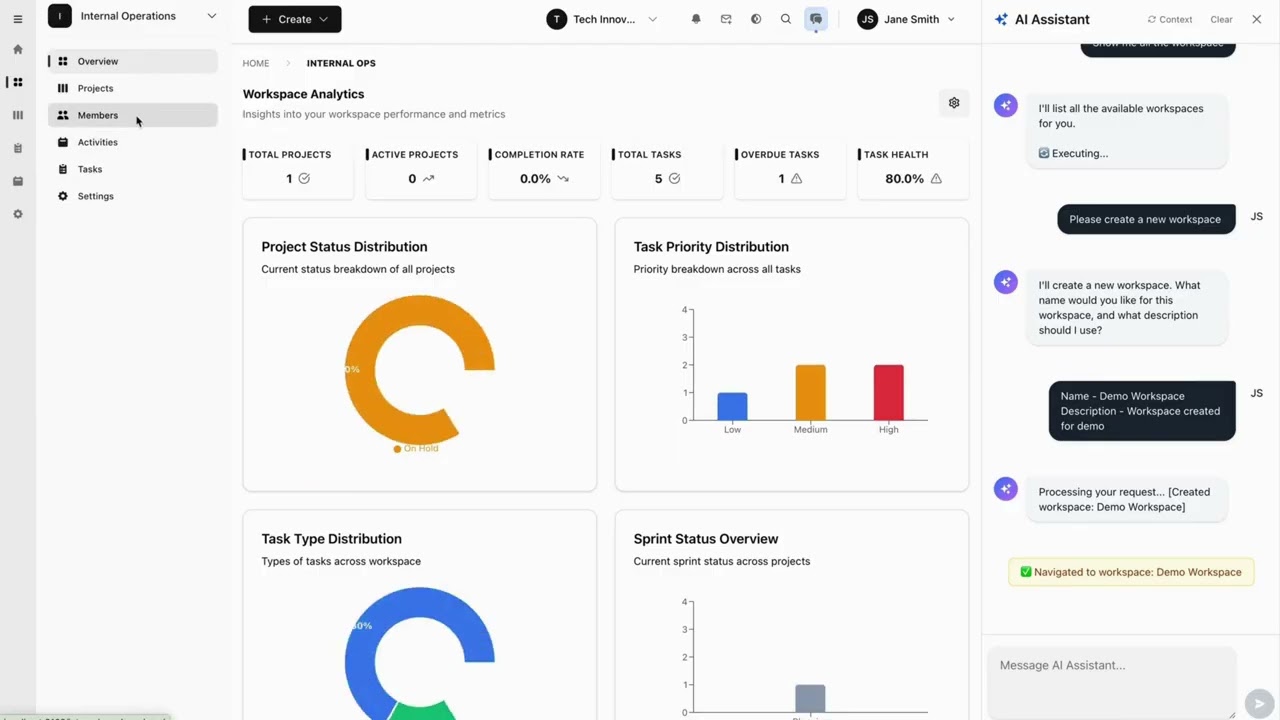
Click to watch: See how Conversational AI Task Execution works in Taskosaur
Taskosaur is an open source project management platform with conversational AI for task execution in-app. The AI assistant handles project management tasks through natural conversation, from creating tasks to managing workflows directly within the application.




Taskosaur combines traditional project management features with Conversational AI Task Execution, allowing you to manage projects through natural conversation. Instead of navigating menus and forms, you can create tasks, assign work, and manage workflows by simply describing what you need.
- 🤖 Conversational AI for Task Execution - Execute project tasks through natural conversation directly in-app
- 💬 Natural Language Commands - "Create sprint with high-priority bugs from last week" executes automatically
- 🏠 Self-Hosted - Your data stays on your infrastructure
- 💰 Bring Your Own LLM - Use your own API key with OpenAI, Anthropic, OpenRouter, or local models
- 🔧 In-App Browser Automation - AI navigates the interface and performs actions directly within the application
- 📊 Full Project Management - Kanban boards, sprints, task dependencies, time tracking
- 🌐 Open Source - Available under Business Source License (BSL)
- Key Features
- Quick Start
- Development
- Project Structure
- Deployment
- API Documentation
- Contributing
- License
- Support
- Node.js 22+ and npm 10+
- PostgreSQL 16+ (or Docker)
- Redis 7+ (or Docker)
The fastest way to get started with Taskosaur is using Docker Compose:
-
Clone the repository
git clone https://github.com/Taskosaur/Taskosaur.git taskosaur cd taskosaur -
Set up environment variables
cp .env.example .env
This creates the .env file used for the app, you may customize the values, if you need.
-
Start with Docker Compose
docker compose -f docker-compose.dev.yml up
This automatically:
- ✅ Starts PostgreSQL and Redis
- ✅ Installs all dependencies
- ✅ Generates Prisma client
- ✅ Runs database migrations
- ✅ Seeds the database with sample data
- ✅ Starts both backend and frontend
-
Access the application
- Frontend: http://localhost:3001
- Backend API: http://localhost:3000
- API Documentation: http://localhost:3000/api/docs
See DOCKER_DEV_SETUP.md for detailed Docker documentation.
If you prefer to run services locally:
-
Clone the repository
git clone https://github.com/Taskosaur/Taskosaur.git taskosaur cd taskosaur -
Install dependencies
npm install
-
Environment Setup
Create a
.envfile in the root directory:# Database Configuration DATABASE_URL="postgresql://taskosaur:taskosaur@localhost:5432/taskosaur" # Application NODE_ENV=development # Authentication & Security JWT_SECRET="your-jwt-secret-key-change-this" JWT_REFRESH_SECRET="your-refresh-secret-key-change-this-too" JWT_EXPIRES_IN="15m" JWT_REFRESH_EXPIRES_IN="7d" # Encryption for sensitive data ENCRYPTION_KEY="your-64-character-hex-encryption-key-change-this-to-random-value" # Redis Configuration (for Bull Queue) REDIS_HOST=localhost REDIS_PORT=6379 REDIS_PASSWORD= # Email Configuration (optional, for notifications) SMTP_HOST=smtp.example.com SMTP_PORT=587 SMTP_USER=[email protected] SMTP_PASS=your-app-password SMTP_FROM=[email protected] EMAIL_DOMAIN="taskosaur.com" # Frontend URL (for email links and CORS) FRONTEND_URL=http://localhost:3001 CORS_ORIGIN="http://localhost:3001" # Backend API URL (for frontend to connect to backend) NEXT_PUBLIC_API_BASE_URL=http://localhost:3000/api # File Upload UPLOAD_DEST="./uploads" MAX_FILE_SIZE=10485760 # Queue Configuration MAX_CONCURRENT_JOBS=5 JOB_RETRY_ATTEMPTS=3
-
Setup Database
# Run database migrations
npm run db:migrate

# Seed the database (idempotent - safe to run multiple times)
npm run db:seed

# Or seed with admin user only
npm run db:seed:admin
-
Start the Application
# Development mode (runs both frontend and backend)
npm run dev

# Or start individually
npm run dev:frontend    # Start frontend only (port 3001)
npm run dev:backend     # Start backend only (port 3000)
-
Access the Application
- Frontend: http://localhost:3001
- Backend API: http://localhost:3000
- API Documentation: http://localhost:3000/api/docs
All commands are run from the root directory:
npm run dev              # Start both frontend and backend concurrently
npm run dev:frontend     # Start frontend only (Next.js on port 3001)
npm run dev:backend # Start backend only (NestJS on port 3000)npm run build # Build all workspaces (frontend + backend)
npm run build:frontend # Build frontend for production
npm run build:backend # Build backend for production
npm run build:dist # Build complete distribution packageAll seed commands are idempotent and safe to run multiple times:
npm run db:migrate         # Run database migrations
npm run db:migrate:deploy  # Deploy migrations (production)
npm run db:reset           # Reset database (deletes all data!)
npm run db:seed            # Seed database with sample data
npm run db:seed:admin      # Seed database with admin user only
npm run db:generate        # Generate Prisma client
npm run db:studio          # Open Prisma Studio (database GUI)
npm run prisma # Run Prisma CLI commands directlynpm run test # Run all tests
npm run test:frontend # Run frontend tests
npm run test:backend # Run backend unit tests
npm run test:watch # Run backend tests in watch mode
npm run test:cov # Run backend tests with coverage
npm run test:e2e # Run backend end-to-end testsnpm run lint # Lint all workspaces
npm run lint:frontend # Lint frontend code
npm run lint:backend # Lint backend code
npm run format # Format backend code with Prettiernpm run clean # Clean all build artifacts
npm run clean:frontend # Clean frontend build artifacts
npm run clean:backend # Clean backend build artifactsAutomatic code quality checks with Husky:
- Pre-commit: Runs linters on all workspaces before each commit
- Ensures code quality and consistency
- Bypass with
--no-verify(emergencies only)
git commit -m "feat: add feature" # Runs checks automaticallytaskosaur/
├── backend/ # NestJS Backend (Port 3000)
│ ├── src/
│ │ ├── modules/ # Feature modules
│ │ ├── common/ # Shared utilities
│ │ ├── config/ # Configuration
│ │ └── gateway/ # WebSocket gateway
│ ├── prisma/ # Database schema and migrations
│ ├── public/ # Static files
│ └── uploads/ # File uploads
├── frontend/ # Next.js Frontend (Port 3001)
│ ├── src/
│ │ ├── app/ # App Router pages
│ │ ├── components/ # React components
│ │ ├── contexts/ # React contexts
│ │ ├── hooks/ # Custom hooks
│ │ ├── lib/ # Utilities
│ │ └── types/ # TypeScript types
│ └── public/ # Static assets
├── docker/ # Docker configuration
│ └── entrypoint-dev.sh # Development entrypoint script
├── scripts/ # Build and utility scripts
├── .env.example # Environment variables template
├── docker-compose.dev.yml # Docker Compose for development
└── package.json # Root package configuration
-
Navigate to Organization Settings
Go to Settings → Organization Settings → AI Assistant Settings -
Add Your LLM API Key
- Toggle "Enable AI Chat" to ON
- Add your API key from any compatible provider:
-
OpenRouter (100+ models, free options):
https://openrouter.ai/api/v1 -
OpenAI (GPT models):
https://api.openai.com/v1 -
Anthropic (Claude models):
https://api.anthropic.com/v1 - Local AI (Ollama, etc.): Your local endpoint
-
OpenRouter (100+ models, free options):
-
Start Managing with AI
- Open the AI chat panel (sparkles icon)
- Type: "Create a new project called Website Redesign with 5 tasks"
- The AI executes the workflow automatically
Taskosaur's Conversational AI Task Execution features conversational AI for task execution in-app, performing actions directly instead of just providing suggestions:
- In-App Conversational Execution - Chat naturally with AI to execute tasks directly within the application
- Direct Browser Automation - AI navigates your interface and clicks buttons in real-time
- Complex Workflow Execution - Multi-step operations handled seamlessly through conversation
- Context-Aware Actions - Understands your current project/workspace context
- Natural Language Interface - No commands to memorize, just speak naturally
Example Conversational AI Task Execution Commands:
"Set up a new marketing workspace with Q1 campaign project"
"Move all high-priority bugs to in-progress and assign to John"
"Create a sprint with tasks from last week's backlog"
"Generate a report of Sarah's completed tasks this month"
"Set up automated workflow: when task is marked done, create review subtask"
Taskosaur is actively under development. The following features represent our planned capabilities, with many already implemented and others in progress.
🎯 Conversational Task Execution In-App
- In-App Chat Interface: Converse with AI directly within Taskosaur to execute tasks
- Browser-Based Task Execution: AI navigates the interface, fills forms, and completes tasks in real-time
- Multi-Step Workflow Processing: Execute complex workflows with a single conversational command
- Context Understanding: AI recognizes your current workspace, project, and team context
- Proactive Suggestions: AI identifies bottlenecks and suggests improvements through conversation
🧠 Natural Language Processing
- Understands complex project management requests
- Extracts actions, parameters, and context from conversational inputs
- Infers missing details from current context
⚡ Action Execution
- Live browser automation in real-time
- Bulk operations on multiple tasks at once
- Works within your existing workflows
🚀 Project Workflow Support
- Sprint planning with task analysis
- Task assignment based on team capacity
- Project timeline forecasting
Conversational AI Task Execution Examples:
- "Set up Q1 marketing campaign: create workspace, add team, set up 3 projects with standard templates"
- "Analyze all overdue tasks and reschedule based on team capacity and priorities"
- "Create automated workflow: high-priority bugs → assign to senior dev → notify team lead"
- "Generate sprint retrospective with team velocity analysis and improvement suggestions"
- "Migrate all design tasks from old project to new workspace with updated assignments"
- Multi-tenant Architecture: Planned support for multiple organizations with isolated data
- Workspace Organization: Group projects within workspaces for better organization
- Role-based Access Control: Implementing granular permissions (Admin, Manager, Member, Viewer)
- Team Management: Invite and manage team members across organizations
- Flexible Project Structure: Create and manage projects with custom workflows
- Sprint Planning: Planned agile sprint management with planning and tracking
- Task Dependencies: Working on relationships between tasks with various dependency types
- Custom Workflows: Implementing custom status workflows for different project needs
- Rich Task Types: Support for Tasks, Bugs, Epics, Stories, and Subtasks
- Priority Management: Set task priorities from Lowest to Highest
- Custom Fields: Add custom fields to capture project-specific data
- Labels & Tags: Organize tasks with customizable labels
- Time Tracking: Track time spent on tasks with detailed logging
- File Attachments: Attach files and documents to tasks
- Comments & Mentions: Collaborate through task comments with @mentions
- Task Watchers: Subscribe to task updates and notifications
- Kanban Board: Visual task management with drag-and-drop
- Calendar View: Planned schedule and timeline visualization
- Gantt Charts: Planned project timeline and dependency visualization
- List View: Traditional table-based task listing
- Analytics Dashboard: Working toward project metrics, burndown charts, and team velocity
- Automation Rules: Planned custom automation workflows
- Email Notifications: Automated email alerts for task updates
- Real-time Updates: Live updates using WebSocket connections
- Activity Logging: Comprehensive audit trail of all changes
- Search Functionality: Working toward global search across projects and tasks
- Sprint Burndown Charts: Planned sprint progress tracking
- Team Velocity: Planned team performance monitoring over time
- Task Distribution: Working toward task allocation and workload analysis
- Custom Reports: Planned project-specific report generation
- Node.js 22+ and npm
- PostgreSQL 13+
- Redis 6+ (for background jobs)
-
Clone the repository
git clone https://github.com/Taskosaur/Taskosaur.git taskosaur cd taskosaur -
Install dependencies
npm install
This will automatically:
- Install all workspace dependencies (frontend and backend)
- Set up Husky git hooks for code quality
-
Environment Setup
Create a
.envfile in the root directory with the following configuration:# Database Configuration DATABASE_URL="postgresql://your-db-username:your-db-password@localhost:5432/taskosaur" # Authentication JWT_SECRET="your-jwt-secret-key-change-this" JWT_REFRESH_SECRET="your-refresh-secret-key-change-this-too" JWT_EXPIRES_IN="15m" JWT_REFRESH_EXPIRES_IN="7d" # Redis Configuration (for Bull Queue) REDIS_HOST=localhost REDIS_PORT=6379 REDIS_PASSWORD= # Email Configuration (for notifications) SMTP_HOST=smtp.gmail.com SMTP_PORT=587 SMTP_USER=[email protected] SMTP_PASS=your-app-password SMTP_FROM=[email protected] # Frontend URL (for email links) FRONTEND_URL=http://localhost:3000 # File Upload UPLOAD_DEST="./uploads" MAX_FILE_SIZE=10485760 # Queue Configuration MAX_CONCURRENT_JOBS=5 JOB_RETRY_ATTEMPTS=3 # Frontend Configuration NEXT_PUBLIC_API_BASE_URL=http://localhost:3001/api
-
Setup Database
# Run database migrations
npm run db:migrate

# Seed the database with core data
npm run db:seed
-
Start the Application
# Development mode (with hot reload for both frontend and backend)
npm run dev

# Or start individually
npm run dev:frontend    # Start frontend only
npm run dev:backend     # Start backend only
-
Access the Application
- Frontend: http://localhost:3000
- Backend API: http://localhost:3001/api
- API Documentation: http://localhost:3001/api/docs
All commands are run from the root directory. Environment variables are automatically loaded from the root .env file.
# Start both frontend and backend
npm run dev

# Start individually
npm run dev:frontend       # Start frontend dev server
npm run dev:backend # Start backend dev server with hot reload# Build all workspaces
npm run build
# Build individually
npm run build:frontend # Build frontend for production
npm run build:backend # Build backend for production
npm run build:dist # Build complete distribution packagenpm run db:migrate # Run database migrations
npm run db:migrate:deploy # Deploy migrations (production)
npm run db:reset # Reset database (deletes all data!)
npm run db:seed # Seed database with core data
npm run db:seed:admin # Seed database with admin user
npm run db:generate # Generate Prisma client
npm run db:studio # Open Prisma Studio
npm run prisma # Run Prisma CLI commandsnpm run test # Run all tests
npm run test:frontend # Run frontend tests
npm run test:backend # Run backend unit tests
npm run test:watch # Run backend tests in watch mode
npm run test:cov # Run backend tests with coverage
npm run test:e2e # Run backend end-to-end testsnpm run lint # Lint all workspaces
npm run lint:frontend # Lint frontend code
npm run lint:backend # Lint backend code
npm run format # Format backend code with Prettiernpm run clean # Clean all workspaces and root
npm run clean:frontend # Clean frontend build artifacts
npm run clean:backend # Clean backend build artifactsAutomatic code formatting and linting with Prettier, ESLint, and Husky.
# Lint all workspaces
npm run lint                # Lint all workspaces

# Lint individually
npm run lint:frontend       # Frontend only
npm run lint:backend        # Backend only

# Format backend code
npm run format              # Format backend code with Prettier
Pre-commit Hook: Automatically formats, lints, and validates code on every commit via Husky.
# Commits run checks automatically
git commit -m "feat: add feature"

# Bypass checks in emergencies only
git commit -m "fix: urgent hotfix" --no-verifytaskosaur/
├── backend/ # NestJS Backend
│ ├── src/
│ │ ├── modules/ # Feature modules
│ │ ├── config/ # Configuration files
│ │ ├── gateway/ # WebSocket gateway
│ │ └── prisma/ # Database service
│ ├── prisma/ # Database schema and migrations
│ └── uploads/ # File uploads
├── frontend/ # Next.js Frontend
│ ├── src/
│ │ ├── app/ # App Router pages
│ │ ├── components/ # React components
│ │ ├── contexts/ # React contexts
│ │ ├── hooks/ # Custom hooks
│ │ ├── styles/ # CSS styles
│ │ ├── types/ # TypeScript types
│ │ └── utils/ # Utility functions
│ └── public/ # Static assets
└── README.md
# Clone the repository
git clone https://github.com/Taskosaur/Taskosaur.git taskosaur
cd taskosaur

# Setup environment variables
cp .env.example .env.env and update with secure production values:
- Generate strong unique secrets for
JWT_SECRET,JWT_REFRESH_SECRET,ENCRYPTION_KEY - Set secure database credentials
- Configure your domain URLs (
FRONTEND_URL,CORS_ORIGIN,NEXT_PUBLIC_API_BASE_URL) - Configure SMTP settings for email notifications
- Never use the example/default values in production
# Build and run with Docker Compose
docker-compose -f docker-compose.prod.yml up -dPrerequisites for Production:
- Node.js 22+ LTS
- PostgreSQL 13+
- Redis 6+
- Reverse proxy (Nginx recommended)
Deployment Steps:
# From root directory
npm install

# Run database migrations
npm run db:migrate:deploy

# Generate Prisma client
npm run db:generate

# Build distribution package
npm run build:dist

# Start the application
# Backend: dist/main.js
# Frontend: dist/public/
# Serve with your preferred Node.js process manager (PM2, systemd, etc.)Update your .env file for production:
NODE_ENV=production

# Database Configuration
DATABASE_URL="postgresql://username:password@your-db-host:5432/taskosaur"

# Authentication
JWT_SECRET="your-secure-production-jwt-secret"
JWT_REFRESH_SECRET="your-secure-production-refresh-secret"

# Redis Configuration
REDIS_HOST="your-redis-host"
REDIS_PORT=6379
REDIS_PASSWORD="your-redis-password"

# CORS Configuration
CORS_ORIGIN="https://your-domain.com"

# Frontend Configuration
NEXT_PUBLIC_API_BASE_URL=https://api.your-domain.com/api
FRONTEND_URL=https://your-domain.comRecommended platforms:
- Backend: Railway, Render, DigitalOcean App Platform
- Frontend: Vercel, Netlify, Railway
- Database: Railway PostgreSQL, Supabase, AWS RDS
- Redis: Railway Redis, Redis Cloud, AWS ElastiCache
The API documentation is automatically generated using Swagger:
- Development: http://localhost:3000/api/docs
- Production:
https://api.your-domain.com/api/docs
We welcome contributions! Please see our Contributing Guidelines for details.
- Fork the repository
- Create a feature branch (
git checkout -b feature/amazing-feature) - Commit your changes (
git commit -m 'feat: add amazing feature') - Push to the branch (
git push origin feature/amazing-feature) - Open a Pull Request
- Code Style: Follow the existing code style, linters run automatically on commit
- TypeScript: Use strict TypeScript with proper type annotations
- Testing: Write tests for new features and bug fixes
- Documentation: Update documentation for any API changes
- Commit Messages: Use conventional commit messages (feat, fix, docs, etc.)
This project is licensed under the Business Source License - see the LICENSE file for details.
- NestJS - Backend framework
- Next.js - Frontend framework
- Prisma - Database ORM
- Tailwind CSS - CSS framework
- Email: [email protected]
- Discord: Join our community
- Issues: GitHub Issues
- Discussions: GitHub Discussions
Built with love by the Taskosaur team
For Tasks:
Click tags to check more tools for each tasksFor Jobs:
Alternative AI tools for Taskosaur
Similar Open Source Tools
Taskosaur
Taskosaur is an open source project management platform with conversational AI for task execution in-app. The AI assistant handles project management tasks through natural conversation, from creating tasks to managing workflows directly within the application. It combines traditional project management features with Conversational AI Task Execution, allowing users to manage projects through natural conversation instead of navigating menus and forms. Key features include Conversational AI for Task Execution, Natural Language Commands, Self-Hosted option, Bring Your Own LLM for AI models, In-App Browser Automation, Full Project Management capabilities, and being Open Source under Business Source License (BSL). Taskosaur enables users to execute project tasks through natural conversation directly in the application, making project management more intuitive and efficient.
opcode
opcode is a powerful desktop application built with Tauri 2 that serves as a command center for interacting with Claude Code. It offers a visual GUI for managing Claude Code sessions, creating custom agents, tracking usage, and more. Users can navigate projects, create specialized AI agents, monitor usage analytics, manage MCP servers, create session checkpoints, edit CLAUDE.md files, and more. The tool bridges the gap between command-line tools and visual experiences, making AI-assisted development more intuitive and productive.
routilux
Routilux is a powerful event-driven workflow orchestration framework designed for building complex data pipelines and workflows effortlessly. It offers features like event queue architecture, flexible connections, built-in state management, robust error handling, concurrent execution, persistence & recovery, and simplified API. Perfect for tasks such as data pipelines, API orchestration, event processing, workflow automation, microservices coordination, and LLM agent workflows.
lyraios
LYRAIOS (LLM-based Your Reliable AI Operating System) is an advanced AI assistant platform built with FastAPI and Streamlit, designed to serve as an operating system for AI applications. It offers core features such as AI process management, memory system, and I/O system. The platform includes built-in tools like Calculator, Web Search, Financial Analysis, File Management, and Research Tools. It also provides specialized assistant teams for Python and research tasks. LYRAIOS is built on a technical architecture comprising FastAPI backend, Streamlit frontend, Vector Database, PostgreSQL storage, and Docker support. It offers features like knowledge management, process control, and security & access control. The roadmap includes enhancements in core platform, AI process management, memory system, tools & integrations, security & access control, open protocol architecture, multi-agent collaboration, and cross-platform support.
open-gamma
Open Gamma is a production-ready AI Chat application that features tool integration with Google Slides, Vercel AI SDK for chat streaming, and NextAuth v5 for authentication. It utilizes PostgreSQL with Drizzle ORM for database management and is built on Next.js 16 with Tailwind CSS for styling. The application provides AI chat functionality powered by Vercel AI SDK supporting OpenAI, Anthropic, and Google. It offers custom authentication flows and ensures security through request validation and environment validation. Open Gamma is designed to streamline chat interactions, tool integrations, and authentication processes in a secure and efficient manner.
chat-ollama
ChatOllama is an open-source chatbot based on LLMs (Large Language Models). It supports a wide range of language models, including Ollama served models, OpenAI, Azure OpenAI, and Anthropic. ChatOllama supports multiple types of chat, including free chat with LLMs and chat with LLMs based on a knowledge base. Key features of ChatOllama include Ollama models management, knowledge bases management, chat, and commercial LLMs API keys management.
openwhispr
OpenWhispr is an open source desktop dictation application that converts speech to text using OpenAI Whisper. It features both local and cloud processing options for maximum flexibility and privacy. The application supports multiple AI providers, customizable hotkeys, agent naming, and various AI processing models. It offers a modern UI built with React 19, TypeScript, and Tailwind CSS v4, and is optimized for speed using Vite and modern tooling. Users can manage settings, view history, configure API keys, and download/manage local Whisper models. The application is cross-platform, supporting macOS, Windows, and Linux, and offers features like automatic pasting, draggable interface, global hotkeys, and compound hotkeys.
TranslateBookWithLLM
TranslateBookWithLLM is a Python application designed for large-scale text translation, such as entire books (.EPUB), subtitle files (.SRT), and plain text. It leverages local LLMs via the Ollama API or Gemini API. The tool offers both a web interface for ease of use and a command-line interface for advanced users. It supports multiple format translations, provides a user-friendly browser-based interface, CLI support for automation, multiple LLM providers including local Ollama models and Google Gemini API, and Docker support for easy deployment.
buster
Buster is a modern analytics platform designed with AI in mind, focusing on self-serve experiences powered by Large Language Models. It addresses pain points in existing tools by advocating for AI-centric app development, cost-effective data warehousing, improved CI/CD processes, and empowering data teams to create powerful, user-friendly data experiences. The platform aims to revolutionize AI analytics by enabling data teams to build deep integrations and own their entire analytics stack.
astrsk
astrsk is a tool that pushes the boundaries of AI storytelling by offering advanced AI agents, customizable response formatting, and flexible prompt editing for immersive roleplaying experiences. It provides complete AI agent control, a visual flow editor for conversation flows, and ensures 100% local-first data storage. The tool is true cross-platform with support for various AI providers and modern technologies like React, TypeScript, and Tailwind CSS. Coming soon features include cross-device sync, enhanced session customization, and community features.
conduit
Conduit is an open-source, cross-platform mobile application for Open-WebUI, providing a native mobile experience for interacting with your self-hosted AI infrastructure. It supports real-time chat, model selection, conversation management, markdown rendering, theme support, voice input, file uploads, multi-modal support, secure storage, folder management, and tools invocation. Conduit offers multiple authentication flows and follows a clean architecture pattern with Riverpod for state management, Dio for HTTP networking, WebSocket for real-time streaming, and Flutter Secure Storage for credential management.
photo-ai
100xPhoto is a powerful AI image platform that enables users to generate stunning images and train custom AI models. It provides an intuitive interface for creating unique AI-generated artwork and training personalized models on image datasets. The platform is built with cutting-edge technology and offers robust capabilities for AI image generation and model training.
AgriTech
AgriTech is an AI-powered smart agriculture platform designed to assist farmers with crop recommendations, yield prediction, plant disease detection, and community-driven collaboration—enabling sustainable and data-driven farming practices. It offers AI-driven decision support for modern agriculture, early-stage plant disease detection, crop yield forecasting using machine learning models, and a collaborative ecosystem for farmers and stakeholders. The platform includes features like crop recommendation, yield prediction, disease detection, an AI chatbot for platform guidance and agriculture support, a farmer community, and shopkeeper listings. AgriTech's AI chatbot provides comprehensive support for farmers with features like platform guidance, agriculture support, decision making, image analysis, and 24/7 support. The tech stack includes frontend technologies like HTML5, CSS3, JavaScript, backend technologies like Python (Flask) and optional Node.js, machine learning libraries like TensorFlow, Scikit-learn, OpenCV, and database & DevOps tools like MySQL, MongoDB, Firebase, Docker, and GitHub Actions.
zcf
ZCF (Zero-Config Claude-Code Flow) is a tool that provides zero-configuration, one-click setup for Claude Code with bilingual support, intelligent agent system, and personalized AI assistant. It offers an interactive menu for easy operations and direct commands for quick execution. The tool supports bilingual operation with automatic language switching and customizable AI output styles. ZCF also includes features like BMad Workflow for enterprise-grade workflow system, Spec Workflow for structured feature development, CCR (Claude Code Router) support for proxy routing, and CCometixLine for real-time usage tracking. It provides smart installation, complete configuration management, and core features like professional agents, command system, and smart configuration. ZCF is cross-platform compatible, supports Windows and Termux environments, and includes security features like dangerous operation confirmation mechanism.
vibesdk
Cloudflare VibeSDK is an open source full-stack AI webapp generator built on Cloudflare's developer platform. It allows companies to build AI-powered platforms, enables internal development for non-technical teams, and supports SaaS platforms to extend product functionality. The platform features AI code generation, live previews, interactive chat, modern stack generation, one-click deploy, and GitHub integration. It is built on Cloudflare's platform with frontend in React + Vite, backend in Workers with Durable Objects, database in D1 (SQLite) with Drizzle ORM, AI integration via multiple LLM providers, sandboxed app previews and execution in containers, and deployment to Workers for Platforms with dispatch namespaces. The platform also offers an SDK for programmatic access to build apps programmatically using TypeScript SDK.
pgedge-postgres-mcp
The pgedge-postgres-mcp repository contains a set of tools and scripts for managing and monitoring PostgreSQL databases in an edge computing environment. It provides functionalities for automating database tasks, monitoring database performance, and ensuring data integrity in edge computing scenarios. The tools are designed to be lightweight and efficient, making them suitable for resource-constrained edge devices. With pgedge-postgres-mcp, users can easily deploy and manage PostgreSQL databases in edge computing environments with minimal overhead.
For similar tasks
Taskosaur
Taskosaur is an open source project management platform with conversational AI for task execution in-app. The AI assistant handles project management tasks through natural conversation, from creating tasks to managing workflows directly within the application. It combines traditional project management features with Conversational AI Task Execution, allowing users to manage projects through natural conversation instead of navigating menus and forms. Key features include Conversational AI for Task Execution, Natural Language Commands, Self-Hosted option, Bring Your Own LLM for AI models, In-App Browser Automation, Full Project Management capabilities, and being Open Source under Business Source License (BSL). Taskosaur enables users to execute project tasks through natural conversation directly in the application, making project management more intuitive and efficient.
ciso-assistant-community
CISO Assistant is a tool that helps organizations manage their cybersecurity posture and compliance. It provides a centralized platform for managing security controls, threats, and risks. CISO Assistant also includes a library of pre-built frameworks and tools to help organizations quickly and easily implement best practices.
supersonic
SuperSonic is a next-generation BI platform that integrates Chat BI (powered by LLM) and Headless BI (powered by semantic layer) paradigms. This integration ensures that Chat BI has access to the same curated and governed semantic data models as traditional BI. Furthermore, the implementation of both paradigms benefits from the integration: * Chat BI's Text2SQL gets augmented with context-retrieval from semantic models. * Headless BI's query interface gets extended with natural language API. SuperSonic provides a Chat BI interface that empowers users to query data using natural language and visualize the results with suitable charts. To enable such experience, the only thing necessary is to build logical semantic models (definition of metric/dimension/tag, along with their meaning and relationships) through a Headless BI interface. Meanwhile, SuperSonic is designed to be extensible and composable, allowing custom implementations to be added and configured with Java SPI. The integration of Chat BI and Headless BI has the potential to enhance the Text2SQL generation in two dimensions: 1. Incorporate data semantics (such as business terms, column values, etc.) into the prompt, enabling LLM to better understand the semantics and reduce hallucination. 2. Offload the generation of advanced SQL syntax (such as join, formula, etc.) from LLM to the semantic layer to reduce complexity. With these ideas in mind, we develop SuperSonic as a practical reference implementation and use it to power our real-world products. Additionally, to facilitate further development we decide to open source SuperSonic as an extensible framework.
DB-GPT
DB-GPT is an open source AI native data app development framework with AWEL(Agentic Workflow Expression Language) and agents. It aims to build infrastructure in the field of large models, through the development of multiple technical capabilities such as multi-model management (SMMF), Text2SQL effect optimization, RAG framework and optimization, Multi-Agents framework collaboration, AWEL (agent workflow orchestration), etc. Which makes large model applications with data simpler and more convenient.
Chat2DB
Chat2DB is an AI-driven data development and analysis platform that enables users to communicate with databases using natural language. It supports a wide range of databases, including MySQL, PostgreSQL, Oracle, SQLServer, SQLite, MariaDB, ClickHouse, DM, Presto, DB2, OceanBase, Hive, KingBase, MongoDB, Redis, and Snowflake. Chat2DB provides a user-friendly interface that allows users to query databases, generate reports, and explore data using natural language commands. It also offers a variety of features to help users improve their productivity, such as auto-completion, syntax highlighting, and error checking.
aide
AIDE (Advanced Intrusion Detection Environment) is a tool for monitoring file system changes. It can be used to detect unauthorized changes to monitored files and directories. AIDE was written to be a simple and free alternative to Tripwire. Features currently included in AIDE are as follows: o File attributes monitored: permissions, inode, user, group file size, mtime, atime, ctime, links and growing size. o Checksums and hashes supported: SHA1, MD5, RMD160, and TIGER. CRC32, HAVAL and GOST if Mhash support is compiled in. o Plain text configuration files and database for simplicity. o Rules, variables and macros that can be customized to local site or system policies. o Powerful regular expression support to selectively include or exclude files and directories to be monitored. o gzip database compression if zlib support is compiled in. o Free software licensed under the GNU General Public License v2.
OpsPilot
OpsPilot is an AI-powered operations navigator developed by the WeOps team. It leverages deep learning and LLM technologies to make operations plans interactive and generalize and reason about local operations knowledge. OpsPilot can be integrated with web applications in the form of a chatbot and primarily provides the following capabilities: 1. Operations capability precipitation: By depositing operations knowledge, operations skills, and troubleshooting actions, when solving problems, it acts as a navigator and guides users to solve operations problems through dialogue. 2. Local knowledge Q&A: By indexing local knowledge and Internet knowledge and combining the capabilities of LLM, it answers users' various operations questions. 3. LLM chat: When the problem is beyond the scope of OpsPilot's ability to handle, it uses LLM's capabilities to solve various long-tail problems.
aimeos-typo3
Aimeos is a professional, full-featured, and high-performance e-commerce extension for TYPO3. It can be installed in an existing TYPO3 website within 5 minutes and can be adapted, extended, overwritten, and customized to meet specific needs.
For similar jobs

Azure-Analytics-and-AI-Engagement
The Azure-Analytics-and-AI-Engagement repository provides packaged Industry Scenario DREAM Demos with ARM templates (Containing a demo web application, Power BI reports, Synapse resources, AML Notebooks etc.) that can be deployed in a customer’s subscription using the CAPE tool within a matter of few hours. Partners can also deploy DREAM Demos in their own subscriptions using DPoC.
skyvern
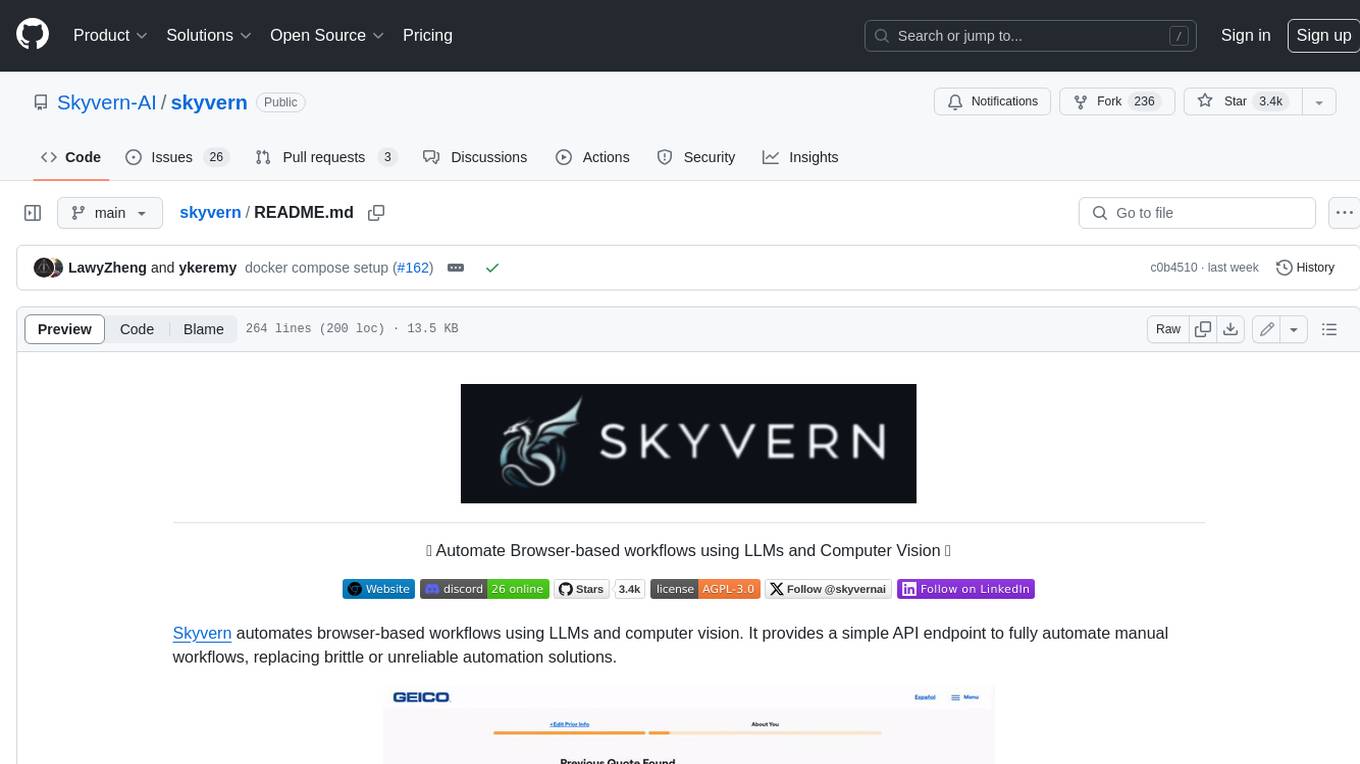
Skyvern automates browser-based workflows using LLMs and computer vision. It provides a simple API endpoint to fully automate manual workflows, replacing brittle or unreliable automation solutions. Traditional approaches to browser automations required writing custom scripts for websites, often relying on DOM parsing and XPath-based interactions which would break whenever the website layouts changed. Instead of only relying on code-defined XPath interactions, Skyvern adds computer vision and LLMs to the mix to parse items in the viewport in real-time, create a plan for interaction and interact with them. This approach gives us a few advantages: 1. Skyvern can operate on websites it’s never seen before, as it’s able to map visual elements to actions necessary to complete a workflow, without any customized code 2. Skyvern is resistant to website layout changes, as there are no pre-determined XPaths or other selectors our system is looking for while trying to navigate 3. Skyvern leverages LLMs to reason through interactions to ensure we can cover complex situations. Examples include: 1. If you wanted to get an auto insurance quote from Geico, the answer to a common question “Were you eligible to drive at 18?” could be inferred from the driver receiving their license at age 16 2. If you were doing competitor analysis, it’s understanding that an Arnold Palmer 22 oz can at 7/11 is almost definitely the same product as a 23 oz can at Gopuff (even though the sizes are slightly different, which could be a rounding error!) Want to see examples of Skyvern in action? Jump to #real-world-examples-of- skyvern

pandas-ai
PandasAI is a Python library that makes it easy to ask questions to your data in natural language. It helps you to explore, clean, and analyze your data using generative AI.
vanna
Vanna is an open-source Python framework for SQL generation and related functionality. It uses Retrieval-Augmented Generation (RAG) to train a model on your data, which can then be used to ask questions and get back SQL queries. Vanna is designed to be portable across different LLMs and vector databases, and it supports any SQL database. It is also secure and private, as your database contents are never sent to the LLM or the vector database.

databend
Databend is an open-source cloud data warehouse that serves as a cost-effective alternative to Snowflake. With its focus on fast query execution and data ingestion, it's designed for complex analysis of the world's largest datasets.
Avalonia-Assistant
Avalonia-Assistant is an open-source desktop intelligent assistant that aims to provide a user-friendly interactive experience based on the Avalonia UI framework and the integration of Semantic Kernel with OpenAI or other large LLM models. By utilizing Avalonia-Assistant, you can perform various desktop operations through text or voice commands, enhancing your productivity and daily office experience.
marvin
Marvin is a lightweight AI toolkit for building natural language interfaces that are reliable, scalable, and easy to trust. Each of Marvin's tools is simple and self-documenting, using AI to solve common but complex challenges like entity extraction, classification, and generating synthetic data. Each tool is independent and incrementally adoptable, so you can use them on their own or in combination with any other library. Marvin is also multi-modal, supporting both image and audio generation as well using images as inputs for extraction and classification. Marvin is for developers who care more about _using_ AI than _building_ AI, and we are focused on creating an exceptional developer experience. Marvin users should feel empowered to bring tightly-scoped "AI magic" into any traditional software project with just a few extra lines of code. Marvin aims to merge the best practices for building dependable, observable software with the best practices for building with generative AI into a single, easy-to-use library. It's a serious tool, but we hope you have fun with it. Marvin is open-source, free to use, and made with 💙 by the team at Prefect.

activepieces
Activepieces is an open source replacement for Zapier, designed to be extensible through a type-safe pieces framework written in Typescript. It features a user-friendly Workflow Builder with support for Branches, Loops, and Drag and Drop. Activepieces integrates with Google Sheets, OpenAI, Discord, and RSS, along with 80+ other integrations. The list of supported integrations continues to grow rapidly, thanks to valuable contributions from the community. Activepieces is an open ecosystem; all piece source code is available in the repository, and they are versioned and published directly to npmjs.com upon contributions. If you cannot find a specific piece on the pieces roadmap, please submit a request by visiting the following link: Request Piece Alternatively, if you are a developer, you can quickly build your own piece using our TypeScript framework. For guidance, please refer to the following guide: Contributor's Guide