


shadcn-ui-mcp-server
A mcp server to allow LLMS gain context about shadcn ui component structure,usage and installation,compaitable with react,svelte 5,vue & React Native
Stars: 2648
A Model Context Protocol (MCP) server that provides AI assistants with comprehensive access to shadcn/ui v4 components, blocks, demos, and metadata. It allows users to seamlessly retrieve React, Svelte, Vue, and React Native implementations for AI-powered development workflows. The server supports multi-frameworks, component source code, demos, blocks, metadata access, directory browsing, smart caching, SSE transport, and Docker containerization. Users can quickly start the server, integrate with Claude Desktop, deploy with SSE transport or Docker, and access documentation for installation, configuration, integration, usage, frameworks, troubleshooting, and API reference. The server supports React, Svelte, Vue, and React Native implementations, with options for UI library selection. It enables AI-powered development, multi-client deployments, production environments, component discovery, multi-framework learning, rapid prototyping, and code generation.
README:


🚀 The fastest way to integrate shadcn/ui components into your AI workflow
A Model Context Protocol (MCP) server that provides AI assistants with comprehensive access to shadcn/ui v4 components, blocks, demos, and metadata. Seamlessly retrieve React, Svelte, Vue, and React Native implementations for your AI-powered development workflow.
- 🎯 Multi-Framework Support - React, Svelte, Vue, and React Native implementations
- 📦 Component Source Code - Latest shadcn/ui v4 TypeScript source
- 🎨 Component Demos - Example implementations and usage patterns
- 🏗️ Blocks Support - Complete block implementations (dashboards, calendars, forms)
- 📋 Metadata Access - Dependencies, descriptions, and configuration details
- 🔍 Directory Browsing - Explore repository structures
- ⚡ Smart Caching - Efficient GitHub API integration with rate limit handling
- 🌐 SSE Transport - Server-Sent Events support for multi-client deployments
- 🐳 Docker Ready - Production-ready containerization with Docker Compose
# Basic usage (60 requests/hour)
npx @jpisnice/shadcn-ui-mcp-server

# With GitHub token (5000 requests/hour) - Recommended
npx @jpisnice/shadcn-ui-mcp-server --github-api-key ghp_your_token_here

# Switch frameworks
npx @jpisnice/shadcn-ui-mcp-server --framework svelte
npx @jpisnice/shadcn-ui-mcp-server --framework vue
npx @jpisnice/shadcn-ui-mcp-server --framework react-native

# Use Base UI instead of Radix (React only)
npx @jpisnice/shadcn-ui-mcp-server --ui-library base
🎯 Get your GitHub token in 2 minutes: docs/getting-started/github-token.md
Download and double-click the .mcpb file for instant installation:
- Download
shadcn-ui-mcp-server.mcpbfrom Releases - Double-click the file - Claude Desktop opens automatically
- Enter your GitHub token (optional, for higher rate limits)
- Click Install - tools are available immediately
Manual install: Claude Desktop → Settings → MCP → Add Server → Browse → Select .mcpb file
References: Anthropic Desktop Extensions | Building MCPB
Run the server with Server-Sent Events (SSE) transport for multi-client support and production deployments:
# SSE mode (supports multiple concurrent connections)
node build/index.js --mode sse --port 7423

# Docker Compose (production ready)
docker-compose up -d

# Connect with Claude Code
claude mcp add --scope user --transport sse shadcn-mcp-server http://localhost:7423/sse-
stdio(default) - Standard input/output for CLI usage -
sse- Server-Sent Events for HTTP-based connections -
dual- Both stdio and SSE simultaneously
# Basic container
docker run -p 7423:7423 shadcn-ui-mcp-server

# With GitHub API token
docker run -p 7423:7423 -e GITHUB_PERSONAL_ACCESS_TOKEN=ghp_your_token shadcn-ui-mcp-server

# Docker Compose (recommended)
docker-compose up -d
curl http://localhost:7423/health-
MCP_TRANSPORT_MODE- Transport mode (stdio|sse|dual) -
MCP_PORT- SSE server port (default: 7423 - SHADCN on keypad!) -
MCP_HOST- Host binding (default: 0.0.0.0) -
MCP_CORS_ORIGINS- CORS origins (comma-separated) -
GITHUB_PERSONAL_ACCESS_TOKEN- GitHub API token -
UI_LIBRARY- UI primitive library:radix(default) orbase(React only)
| Section | Description |
|---|---|
| 🚀 Getting Started | Installation, setup, and first steps |
| ⚙️ Configuration | Framework selection, tokens, and options |
| 🔌 Integration | Editor and tool integrations |
| 📖 Usage | Examples, tutorials, and use cases |
| 🎨 Frameworks | Framework-specific documentation |
| 🐛 Troubleshooting | Common issues and solutions |
| 🔧 API Reference | Tool reference and technical details |
This MCP server supports four popular shadcn implementations:
| Framework | Repository | Maintainer | Description |
|---|---|---|---|
| React (default) | shadcn/ui | shadcn | React components from shadcn/ui v4 |
| Svelte | shadcn-svelte | huntabyte | Svelte components from shadcn-svelte |
| Vue | shadcn-vue | unovue | Vue components from shadcn-vue |
| React Native | react-native-reusables | Founded Labs | React Native components from react-native-reusables |
shadcn/ui v4 supports two primitive libraries for React: Radix UI (default) and Base UI.
# Radix UI (default)
npx @jpisnice/shadcn-ui-mcp-server --framework react --ui-library radix

# Base UI
npx @jpisnice/shadcn-ui-mcp-server --framework react --ui-library base

# Or via environment variable
UI_LIBRARY=base npx @jpisnice/shadcn-ui-mcp-server
Claude Desktop config example:
{
  "args": ["--framework", "react", "--ui-library", "base"]
}# Visit: https://github.com/settings/tokens
# Generate token with no scopes needed
export GITHUB_PERSONAL_ACCESS_TOKEN=ghp_your_token_here# React (default)
npx @jpisnice/shadcn-ui-mcp-server
# Svelte
npx @jpisnice/shadcn-ui-mcp-server --framework svelte
# Vue
npx @jpisnice/shadcn-ui-mcp-server --framework vue
# React Native
npx @jpisnice/shadcn-ui-mcp-server --framework react-native- Claude Code: See Claude Code Integration below
- VS Code: docs/integration/vscode.md
- Cursor: docs/integration/cursor.md
- Claude Desktop: docs/integration/claude-desktop.md
- Continue.dev: docs/integration/continue.md
# Add the shadcn-ui MCP server
claude mcp add shadcn -- bunx -y @jpisnice/shadcn-ui-mcp-server --github-api-key YOUR_TOKENFor production deployments with SSE transport:
# Start server in SSE mode
node build/index.js --mode sse --port 7423

# Connect with Claude Code
claude mcp add --scope user --transport sse shadcn-mcp-server http://localhost:7423/sseSee Claude Code Integration Guide for framework-specific commands (React, Svelte, Vue, React Native).
Reference: Claude Code MCP Documentation
- AI-Powered Development - Let AI assistants build UIs with shadcn/ui
- Multi-Client Deployments - SSE transport supports multiple concurrent connections
- Production Environments - Docker Compose ready with health checks and monitoring
- Component Discovery - Explore available components and their usage
- Multi-Framework Learning - Compare React, Svelte, Vue, and React Native implementations
- Rapid Prototyping - Get complete block implementations for dashboards, forms, etc.
- Code Generation - Generate component code with proper dependencies
# Global installation (optional)
npm install -g @jpisnice/shadcn-ui-mcp-server

# Or use npx (recommended)
npx @jpisnice/shadcn-ui-mcp-server- Node.js >= 18.0.0
- npm or pnpm
# Clone the repository
git clone https://github.com/Jpisnice/shadcn-ui-mcp-server.git
cd shadcn-ui-mcp-server

# Install dependencies
npm install

# Build the project
npm run build

# Run the server
node build/index.js --github-api-key YOUR_TOKEN# After building, run with options
node build/index.js --github-api-key YOUR_TOKEN
node build/index.js --framework svelteThe project includes a manifest.json following the MCPB specification. The .mcpb file is a ZIP archive containing the server, dependencies, and configuration.
See CONTRIBUTING.md for detailed packaging instructions.
Reference: Building Desktop Extensions with MCPB
- 📖 Full Documentation
- 🚀 Getting Started Guide
- 🌐 SSE Transport & Docker Guide
- 🎨 Framework Comparison
- 🔧 API Reference
- 🐛 Troubleshooting
- 💬 Issues & Discussions
MIT License - see LICENSE for details.
- shadcn - For the amazing React UI component library
- huntabyte - For the excellent Svelte implementation
- unovue - For the comprehensive Vue implementation
- Founded Labs - For the React Native implementation
- Anthropic - For the Model Context Protocol specification
Made with ❤️ by Janardhan Polle
Star ⭐ this repo if you find it helpful!
For Tasks:
Click tags to check more tools for each tasksFor Jobs:
Alternative AI tools for shadcn-ui-mcp-server
Similar Open Source Tools
shadcn-ui-mcp-server
A Model Context Protocol (MCP) server that provides AI assistants with comprehensive access to shadcn/ui v4 components, blocks, demos, and metadata. It allows users to seamlessly retrieve React, Svelte, Vue, and React Native implementations for AI-powered development workflows. The server supports multi-frameworks, component source code, demos, blocks, metadata access, directory browsing, smart caching, SSE transport, and Docker containerization. Users can quickly start the server, integrate with Claude Desktop, deploy with SSE transport or Docker, and access documentation for installation, configuration, integration, usage, frameworks, troubleshooting, and API reference. The server supports React, Svelte, Vue, and React Native implementations, with options for UI library selection. It enables AI-powered development, multi-client deployments, production environments, component discovery, multi-framework learning, rapid prototyping, and code generation.
CrewAI-GUI
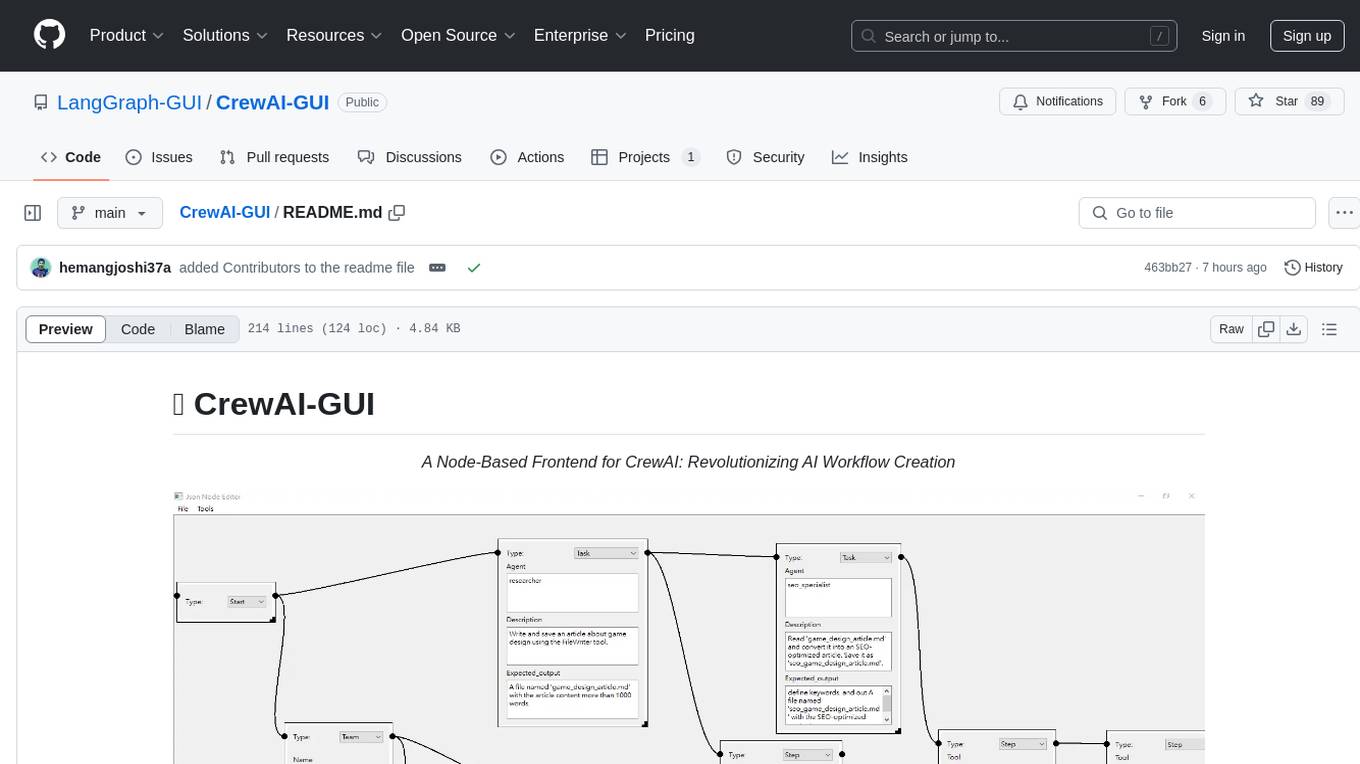
CrewAI-GUI is a Node-Based Frontend tool designed to revolutionize AI workflow creation. It empowers users to design complex AI agent interactions through an intuitive drag-and-drop interface, export designs to JSON for modularity and reusability, and supports both GPT-4 API and Ollama for flexible AI backend. The tool ensures cross-platform compatibility, allowing users to create AI workflows on Windows, Linux, or macOS efficiently.
OpenSandbox
OpenSandbox is a general-purpose sandbox platform for AI applications, offering multi-language SDKs, unified sandbox APIs, and Docker/Kubernetes runtimes for scenarios like Coding Agents, GUI Agents, Agent Evaluation, AI Code Execution, and RL Training. It provides features such as multi-language SDKs, sandbox protocol, sandbox runtime, sandbox environments, and network policy. Users can perform basic sandbox operations like installing and configuring the sandbox server, starting the sandbox server, creating a code interpreter, and executing commands. The platform also offers examples for coding agent integrations, browser and desktop environments, and ML and training tasks.
mistral.rs
Mistral.rs is a fast LLM inference platform written in Rust. We support inference on a variety of devices, quantization, and easy-to-use application with an Open-AI API compatible HTTP server and Python bindings.
ai-real-estate-assistant
AI Real Estate Assistant is a modern platform that uses AI to assist real estate agencies in helping buyers and renters find their ideal properties. It features multiple AI model providers, intelligent query processing, advanced search and retrieval capabilities, and enhanced user experience. The tool is built with a FastAPI backend and Next.js frontend, offering semantic search, hybrid agent routing, and real-time analytics.
inspector
A developer tool for testing and debugging Model Context Protocol (MCP) servers. It allows users to test the compliance of their MCP servers with the latest MCP specs, supports various transports like STDIO, SSE, and Streamable HTTP, features an LLM Playground for testing server behavior against different models, provides comprehensive logging and error reporting for MCP server development, and offers a modern developer experience with multiple server connections and saved configurations. The tool is built using Next.js and integrates MCP capabilities, AI SDKs from OpenAI, Anthropic, and Ollama, and various technologies like Node.js, TypeScript, and Next.js.
flashinfer
FlashInfer is a library for Language Languages Models that provides high-performance implementation of LLM GPU kernels such as FlashAttention, PageAttention and LoRA. FlashInfer focus on LLM serving and inference, and delivers state-the-art performance across diverse scenarios.
aegra
Aegra is a self-hosted AI agent backend platform that provides LangGraph power without vendor lock-in. Built with FastAPI + PostgreSQL, it offers complete control over agent orchestration for teams looking to escape vendor lock-in, meet data sovereignty requirements, enable custom deployments, and optimize costs. Aegra is Agent Protocol compliant and perfect for teams seeking a free, self-hosted alternative to LangGraph Platform with zero lock-in, full control, and compatibility with existing LangGraph Client SDK.
auto-engineer
Auto Engineer is a tool designed to automate the Software Development Life Cycle (SDLC) by building production-grade applications with a combination of human and AI agents. It offers a plugin-based architecture that allows users to install only the necessary functionality for their projects. The tool guides users through key stages including Flow Modeling, IA Generation, Deterministic Scaffolding, AI Coding & Testing Loop, and Comprehensive Quality Checks. Auto Engineer follows a command/event-driven architecture and provides a modular plugin system for specific functionalities. It supports TypeScript with strict typing throughout and includes a built-in message bus server with a web dashboard for monitoring commands and events.
conduit
Conduit is an open-source, cross-platform mobile application for Open-WebUI, providing a native mobile experience for interacting with your self-hosted AI infrastructure. It supports real-time chat, model selection, conversation management, markdown rendering, theme support, voice input, file uploads, multi-modal support, secure storage, folder management, and tools invocation. Conduit offers multiple authentication flows and follows a clean architecture pattern with Riverpod for state management, Dio for HTTP networking, WebSocket for real-time streaming, and Flutter Secure Storage for credential management.

dexto
Dexto is a lightweight runtime for creating and running AI agents that turn natural language into real-world actions. It serves as the missing intelligence layer for building AI applications, standalone chatbots, or as the reasoning engine inside larger products. Dexto features a powerful CLI and Web UI for running AI agents, supports multiple interfaces, allows hot-swapping of LLMs from various providers, connects to remote tool servers via the Model Context Protocol, is config-driven with version-controlled YAML, offers production-ready core features, extensibility for custom services, and enables multi-agent collaboration via MCP and A2A.

ClaudeBar
ClaudeBar is a macOS menu bar application that monitors AI coding assistant usage quotas. It allows users to keep track of their usage of Claude, Codex, Gemini, GitHub Copilot, Antigravity, and Z.ai at a glance. The application offers multi-provider support, real-time quota tracking, multiple themes, visual status indicators, system notifications, auto-refresh feature, and keyboard shortcuts for quick access. Users can customize monitoring by toggling individual providers on/off and receive alerts when quota status changes. The tool requires macOS 15+, Swift 6.2+, and CLI tools installed for the providers to be monitored.
botserver
General Bots is a self-hosted AI automation platform and LLM conversational platform focused on convention over configuration and code-less approaches. It serves as the core API server handling LLM orchestration, business logic, database operations, and multi-channel communication. The platform offers features like multi-vendor LLM API, MCP + LLM Tools Generation, Semantic Caching, Web Automation Engine, Enterprise Data Connectors, and Git-like Version Control. It enforces a ZERO TOLERANCE POLICY for code quality and security, with strict guidelines for error handling, performance optimization, and code patterns. The project structure includes modules for core functionalities like Rhai BASIC interpreter, security, shared types, tasks, auto task system, file operations, learning system, and LLM assistance.
opcode
opcode is a powerful desktop application built with Tauri 2 that serves as a command center for interacting with Claude Code. It offers a visual GUI for managing Claude Code sessions, creating custom agents, tracking usage, and more. Users can navigate projects, create specialized AI agents, monitor usage analytics, manage MCP servers, create session checkpoints, edit CLAUDE.md files, and more. The tool bridges the gap between command-line tools and visual experiences, making AI-assisted development more intuitive and productive.
claude-code-settings
A repository collecting best practices for Claude Code settings and customization. It provides configuration files for customizing Claude Code's behavior and building an efficient development environment. The repository includes custom agents and skills for specific domains, interactive development workflow features, efficient development rules, and team workflow with Codex MCP. Users can leverage the provided configuration files and tools to enhance their development process and improve code quality.
chat-ollama
ChatOllama is an open-source chatbot based on LLMs (Large Language Models). It supports a wide range of language models, including Ollama served models, OpenAI, Azure OpenAI, and Anthropic. ChatOllama supports multiple types of chat, including free chat with LLMs and chat with LLMs based on a knowledge base. Key features of ChatOllama include Ollama models management, knowledge bases management, chat, and commercial LLMs API keys management.
For similar tasks
shadcn-ui-mcp-server
A Model Context Protocol (MCP) server that provides AI assistants with comprehensive access to shadcn/ui v4 components, blocks, demos, and metadata. It allows users to seamlessly retrieve React, Svelte, Vue, and React Native implementations for AI-powered development workflows. The server supports multi-frameworks, component source code, demos, blocks, metadata access, directory browsing, smart caching, SSE transport, and Docker containerization. Users can quickly start the server, integrate with Claude Desktop, deploy with SSE transport or Docker, and access documentation for installation, configuration, integration, usage, frameworks, troubleshooting, and API reference. The server supports React, Svelte, Vue, and React Native implementations, with options for UI library selection. It enables AI-powered development, multi-client deployments, production environments, component discovery, multi-framework learning, rapid prototyping, and code generation.

ai-guide
This guide is dedicated to Large Language Models (LLMs) that you can run on your home computer. It assumes your PC is a lower-end, non-gaming setup.

onnxruntime-genai
ONNX Runtime Generative AI is a library that provides the generative AI loop for ONNX models, including inference with ONNX Runtime, logits processing, search and sampling, and KV cache management. Users can call a high level `generate()` method, or run each iteration of the model in a loop. It supports greedy/beam search and TopP, TopK sampling to generate token sequences, has built in logits processing like repetition penalties, and allows for easy custom scoring.
mistral.rs
Mistral.rs is a fast LLM inference platform written in Rust. We support inference on a variety of devices, quantization, and easy-to-use application with an Open-AI API compatible HTTP server and Python bindings.
generative-ai-python
The Google AI Python SDK is the easiest way for Python developers to build with the Gemini API. The Gemini API gives you access to Gemini models created by Google DeepMind. Gemini models are built from the ground up to be multimodal, so you can reason seamlessly across text, images, and code.
jetson-generative-ai-playground
This repo hosts tutorial documentation for running generative AI models on NVIDIA Jetson devices. The documentation is auto-generated and hosted on GitHub Pages using their CI/CD feature to automatically generate/update the HTML documentation site upon new commits.
chat-ui
A chat interface using open source models, eg OpenAssistant or Llama. It is a SvelteKit app and it powers the HuggingChat app on hf.co/chat.
MetaGPT
MetaGPT is a multi-agent framework that enables GPT to work in a software company, collaborating to tackle more complex tasks. It assigns different roles to GPTs to form a collaborative entity for complex tasks. MetaGPT takes a one-line requirement as input and outputs user stories, competitive analysis, requirements, data structures, APIs, documents, etc. Internally, MetaGPT includes product managers, architects, project managers, and engineers. It provides the entire process of a software company along with carefully orchestrated SOPs. MetaGPT's core philosophy is "Code = SOP(Team)", materializing SOP and applying it to teams composed of LLMs.
For similar jobs

promptflow
**Prompt flow** is a suite of development tools designed to streamline the end-to-end development cycle of LLM-based AI applications, from ideation, prototyping, testing, evaluation to production deployment and monitoring. It makes prompt engineering much easier and enables you to build LLM apps with production quality.

deepeval
DeepEval is a simple-to-use, open-source LLM evaluation framework specialized for unit testing LLM outputs. It incorporates various metrics such as G-Eval, hallucination, answer relevancy, RAGAS, etc., and runs locally on your machine for evaluation. It provides a wide range of ready-to-use evaluation metrics, allows for creating custom metrics, integrates with any CI/CD environment, and enables benchmarking LLMs on popular benchmarks. DeepEval is designed for evaluating RAG and fine-tuning applications, helping users optimize hyperparameters, prevent prompt drifting, and transition from OpenAI to hosting their own Llama2 with confidence.

MegaDetector
MegaDetector is an AI model that identifies animals, people, and vehicles in camera trap images (which also makes it useful for eliminating blank images). This model is trained on several million images from a variety of ecosystems. MegaDetector is just one of many tools that aims to make conservation biologists more efficient with AI. If you want to learn about other ways to use AI to accelerate camera trap workflows, check out our of the field, affectionately titled "Everything I know about machine learning and camera traps".

leapfrogai
LeapfrogAI is a self-hosted AI platform designed to be deployed in air-gapped resource-constrained environments. It brings sophisticated AI solutions to these environments by hosting all the necessary components of an AI stack, including vector databases, model backends, API, and UI. LeapfrogAI's API closely matches that of OpenAI, allowing tools built for OpenAI/ChatGPT to function seamlessly with a LeapfrogAI backend. It provides several backends for various use cases, including llama-cpp-python, whisper, text-embeddings, and vllm. LeapfrogAI leverages Chainguard's apko to harden base python images, ensuring the latest supported Python versions are used by the other components of the stack. The LeapfrogAI SDK provides a standard set of protobuffs and python utilities for implementing backends and gRPC. LeapfrogAI offers UI options for common use-cases like chat, summarization, and transcription. It can be deployed and run locally via UDS and Kubernetes, built out using Zarf packages. LeapfrogAI is supported by a community of users and contributors, including Defense Unicorns, Beast Code, Chainguard, Exovera, Hypergiant, Pulze, SOSi, United States Navy, United States Air Force, and United States Space Force.

llava-docker
This Docker image for LLaVA (Large Language and Vision Assistant) provides a convenient way to run LLaVA locally or on RunPod. LLaVA is a powerful AI tool that combines natural language processing and computer vision capabilities. With this Docker image, you can easily access LLaVA's functionalities for various tasks, including image captioning, visual question answering, text summarization, and more. The image comes pre-installed with LLaVA v1.2.0, Torch 2.1.2, xformers 0.0.23.post1, and other necessary dependencies. You can customize the model used by setting the MODEL environment variable. The image also includes a Jupyter Lab environment for interactive development and exploration. Overall, this Docker image offers a comprehensive and user-friendly platform for leveraging LLaVA's capabilities.

carrot
The 'carrot' repository on GitHub provides a list of free and user-friendly ChatGPT mirror sites for easy access. The repository includes sponsored sites offering various GPT models and services. Users can find and share sites, report errors, and access stable and recommended sites for ChatGPT usage. The repository also includes a detailed list of ChatGPT sites, their features, and accessibility options, making it a valuable resource for ChatGPT users seeking free and unlimited GPT services.

TrustLLM
TrustLLM is a comprehensive study of trustworthiness in LLMs, including principles for different dimensions of trustworthiness, established benchmark, evaluation, and analysis of trustworthiness for mainstream LLMs, and discussion of open challenges and future directions. Specifically, we first propose a set of principles for trustworthy LLMs that span eight different dimensions. Based on these principles, we further establish a benchmark across six dimensions including truthfulness, safety, fairness, robustness, privacy, and machine ethics. We then present a study evaluating 16 mainstream LLMs in TrustLLM, consisting of over 30 datasets. The document explains how to use the trustllm python package to help you assess the performance of your LLM in trustworthiness more quickly. For more details about TrustLLM, please refer to project website.

AI-YinMei
AI-YinMei is an AI virtual anchor Vtuber development tool (N card version). It supports fastgpt knowledge base chat dialogue, a complete set of solutions for LLM large language models: [fastgpt] + [one-api] + [Xinference], supports docking bilibili live broadcast barrage reply and entering live broadcast welcome speech, supports Microsoft edge-tts speech synthesis, supports Bert-VITS2 speech synthesis, supports GPT-SoVITS speech synthesis, supports expression control Vtuber Studio, supports painting stable-diffusion-webui output OBS live broadcast room, supports painting picture pornography public-NSFW-y-distinguish, supports search and image search service duckduckgo (requires magic Internet access), supports image search service Baidu image search (no magic Internet access), supports AI reply chat box [html plug-in], supports AI singing Auto-Convert-Music, supports playlist [html plug-in], supports dancing function, supports expression video playback, supports head touching action, supports gift smashing action, supports singing automatic start dancing function, chat and singing automatic cycle swing action, supports multi scene switching, background music switching, day and night automatic switching scene, supports open singing and painting, let AI automatically judge the content.