


worktrunk
Worktrunk is a CLI for Git worktree management, designed for parallel AI agent workflows
Stars: 1926
Worktrunk is a CLI tool designed for managing git worktrees efficiently, especially for running AI agents in parallel. It simplifies the process of creating, switching, and managing worktrees, providing quality-of-life features like workflow automation through hooks. Worktrunk aims to streamline the experience of working with multiple parallel changes in a git repository, making it easier for users to handle tasks involving AI agents and git worktree management.
README:







February 2026: Worktrunk was released over the holidays, and lots of folks seem to be using it. It's built with love (there's no slop!). If social proof is helpful: I also created PRQL (10k stars) and am a maintainer of Xarray (4k stars), Insta, & Numbagg. Please let me know any frictions at all; I'm intensely focused on making Worktrunk excellent, and the biggest gap is understanding how others experience using it.
Worktrunk is a CLI for git worktree management, designed for running AI agents in parallel.
Worktrunk's three core commands make worktrees as easy as branches. Plus, Worktrunk has a bunch of quality-of-life features to simplify working with many parallel changes, including hooks to automate local workflows.
Scaling agents becomes trivial. A quick demo:

📚 Full documentation at worktrunk.dev 📚
AI agents like Claude Code and Codex can handle longer tasks without supervision, such that it's possible to manage 5-10+ in parallel. Git's native worktree feature give each agent its own working directory, so they don't step on each other's changes.
But the git worktree UX is clunky. Even a task as small as starting a new
worktree requires typing the branch name three times: git worktree add -b feat ../repo.feat, then cd ../repo.feat.
Worktrees are addressed by branch name; paths are computed from a configurable template.
Start with the core commands
Core commands:
| Task | Worktrunk | Plain git |
|---|---|---|
| Switch worktrees | wt switch feat |
cd ../repo.feat |
| Create + start Claude | wt switch -c -x claude feat |
git worktree add -b feat ../repo.feat && \ cd ../repo.feat && \ claude |
| Clean up | wt remove |
cd ../repo && \ git worktree remove ../repo.feat && \ git branch -d feat |
| List with status | wt list |
git worktree list(paths only) |
Workflow automation:
Expand into the more advanced commands as needed
- Hooks — run commands on create, pre-merge, post-merge, etc
- LLM commit messages — generate commit messages from diffs
- Merge workflow — squash, rebase, merge, clean up in one command
- ...and lots more
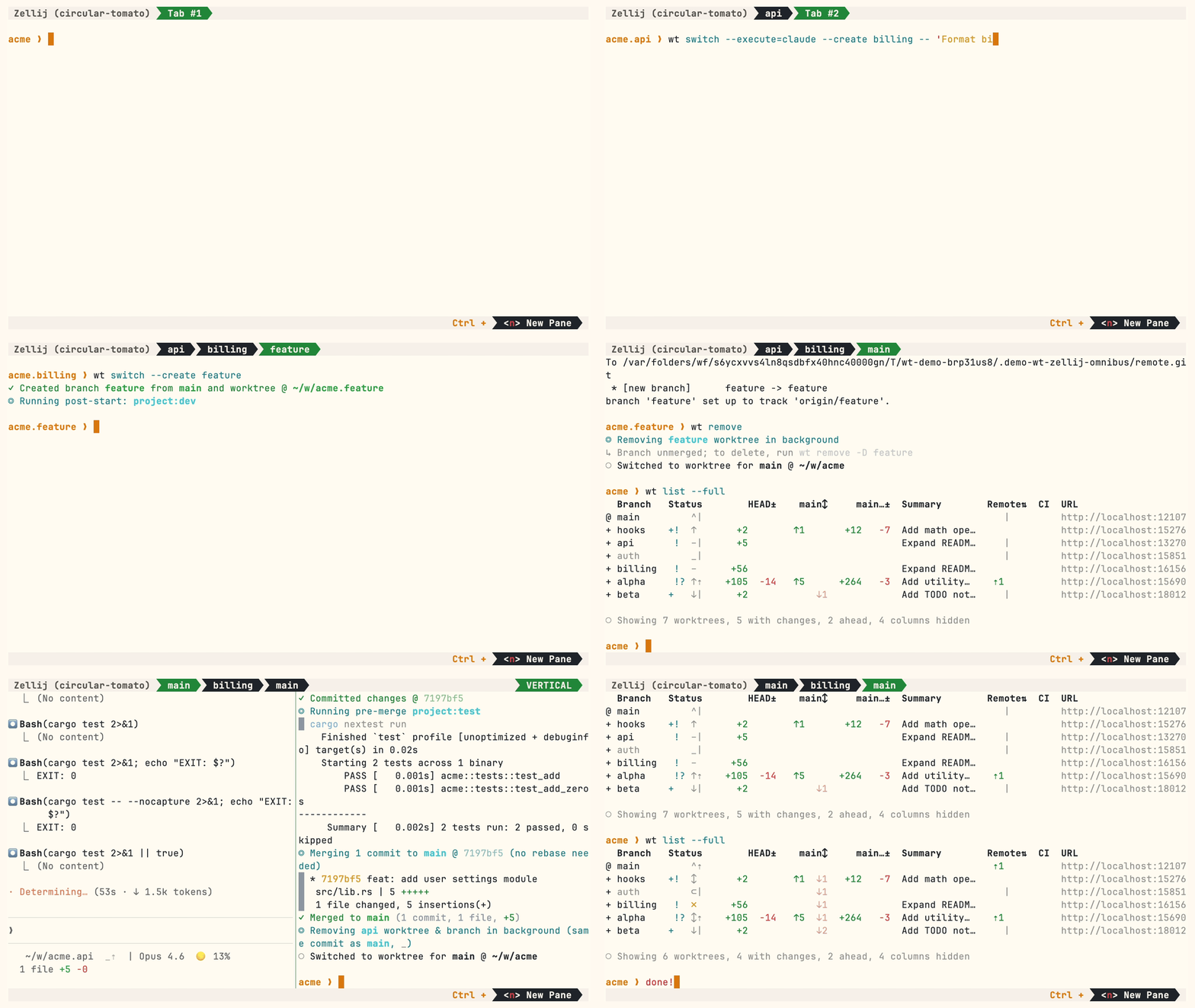
A demo with some advanced features:
Homebrew (macOS & Linux):
brew install worktrunk && wt config shell installShell integration allows commands to change directories.
Cargo:
cargo install worktrunk && wt config shell installWindows
On Windows, wt defaults to Windows Terminal's command. Winget additionally installs Worktrunk as git-wt to avoid the conflict:
winget install max-sixty.worktrunk
git-wt config shell install
Alternatively, disable Windows Terminal's alias (Settings → Privacy & security → For developers → App Execution Aliases → disable "Windows Terminal") to use wt directly.
Arch Linux:
paru worktrunk-bin && wt config shell installCreate a worktree for a new feature:
$ wt switch --create feature-auth
✓ Created branch feature-auth from main and worktree @ repo.feature-auth
This creates a new branch and worktree, then switches to it. Do your work, then check all worktrees with wt list:
$ wt list
  Branch        Status        HEAD±    main↕  Remote⇅  Commit    Age   Message
@ feature-auth  +   –      +53                         0e631add  1d    Initial commit
^ main              ^⇡                         ⇡1      0e631add  1d    Initial commit

○ Showing 2 worktrees, 1 with changes, 1 column hidden
The @ marks the current worktree. + means uncommitted changes, ↕ means unpushed commits.
When done, either:
PR workflow — commit, push, open a PR, merge via GitHub/GitLab, then clean up:
wt step commit                    # commit staged changes
gh pr create                      # or glab mr create
wt remove                         # after PR is merged
Local merge — squash, rebase onto main, fast-forward merge, clean up:
$ wt merge main
◎ Generating commit message and committing changes... (2 files, +53, no squashing needed)
  Add authentication module
✓ Committed changes @ a1b2c3d
◎ Merging 1 commit to main @ a1b2c3d (no rebase needed)
  * a1b2c3d Add authentication module
   auth.rs | 51 +++++++++++++++++++++++++++++++++++++++++++++++++++
   lib.rs  |  2 ++
   2 files changed, 53 insertions(+)
✓ Merged to main (1 commit, 2 files, +53)
◎ Removing feature-auth worktree & branch in background (same commit as main, _)
○ Switched to worktree for main @ repo
For parallel agents, create multiple worktrees and launch an agent in each:
wt switch -x claude -c feature-a -- 'Add user authentication'
wt switch -x claude -c feature-b -- 'Fix the pagination bug'
wt switch -x claude -c feature-c -- 'Write tests for the API'
The -x flag runs a command after switching; arguments after -- are passed to it. Configure post-start hooks to automate setup (install deps, start dev servers).
- Learn the core commands:
wt switch,wt list,wt merge,wt remove - Set up project hooks for automated setup
- Explore LLM commit messages, interactive picker, Claude Code integration, CI status & PR links
- Run
wt --helporwt <command> --helpfor quick CLI reference
- Claude Code: Best practices for agentic coding — Anthropic's official guide, including the worktree pattern
- Shipping faster with Claude Code and Git Worktrees — incident.io's workflow for parallel agents
- Git worktree pattern discussion — Community discussion in the Claude Code repo
- git-worktree documentation — Official git reference
- ⭐ Star the repo
- Tell a friend about Worktrunk
- Open an issue — feedback, feature requests, even a small friction or imperfect user message, or a worktree pain not yet solved
- Share: X · Reddit · LinkedIn
📚 Full documentation at worktrunk.dev 📚
For Tasks:
Click tags to check more tools for each tasksFor Jobs:
Alternative AI tools for worktrunk
Similar Open Source Tools
For similar tasks
autogen
AutoGen is a framework that enables the development of LLM applications using multiple agents that can converse with each other to solve tasks. AutoGen agents are customizable, conversable, and seamlessly allow human participation. They can operate in various modes that employ combinations of LLMs, human inputs, and tools.

tracecat
Tracecat is an open-source automation platform for security teams. It's designed to be simple but powerful, with a focus on AI features and a practitioner-obsessed UI/UX. Tracecat can be used to automate a variety of tasks, including phishing email investigation, evidence collection, and remediation plan generation.
ciso-assistant-community
CISO Assistant is a tool that helps organizations manage their cybersecurity posture and compliance. It provides a centralized platform for managing security controls, threats, and risks. CISO Assistant also includes a library of pre-built frameworks and tools to help organizations quickly and easily implement best practices.
ck
Collective Mind (CM) is a collection of portable, extensible, technology-agnostic and ready-to-use automation recipes with a human-friendly interface (aka CM scripts) to unify and automate all the manual steps required to compose, run, benchmark and optimize complex ML/AI applications on any platform with any software and hardware: see online catalog and source code. CM scripts require Python 3.7+ with minimal dependencies and are continuously extended by the community and MLCommons members to run natively on Ubuntu, MacOS, Windows, RHEL, Debian, Amazon Linux and any other operating system, in a cloud or inside automatically generated containers while keeping backward compatibility - please don't hesitate to report encountered issues here and contact us via public Discord Server to help this collaborative engineering effort! CM scripts were originally developed based on the following requirements from the MLCommons members to help them automatically compose and optimize complex MLPerf benchmarks, applications and systems across diverse and continuously changing models, data sets, software and hardware from Nvidia, Intel, AMD, Google, Qualcomm, Amazon and other vendors: * must work out of the box with the default options and without the need to edit some paths, environment variables and configuration files; * must be non-intrusive, easy to debug and must reuse existing user scripts and automation tools (such as cmake, make, ML workflows, python poetry and containers) rather than substituting them; * must have a very simple and human-friendly command line with a Python API and minimal dependencies; * must require minimal or zero learning curve by using plain Python, native scripts, environment variables and simple JSON/YAML descriptions instead of inventing new workflow languages; * must have the same interface to run all automations natively, in a cloud or inside containers. CM scripts were successfully validated by MLCommons to modularize MLPerf inference benchmarks and help the community automate more than 95% of all performance and power submissions in the v3.1 round across more than 120 system configurations (models, frameworks, hardware) while reducing development and maintenance costs.
zenml
ZenML is an extensible, open-source MLOps framework for creating portable, production-ready machine learning pipelines. By decoupling infrastructure from code, ZenML enables developers across your organization to collaborate more effectively as they develop to production.
clearml
ClearML is a suite of tools designed to streamline the machine learning workflow. It includes an experiment manager, MLOps/LLMOps, data management, and model serving capabilities. ClearML is open-source and offers a free tier hosting option. It supports various ML/DL frameworks and integrates with Jupyter Notebook and PyCharm. ClearML provides extensive logging capabilities, including source control info, execution environment, hyper-parameters, and experiment outputs. It also offers automation features, such as remote job execution and pipeline creation. ClearML is designed to be easy to integrate, requiring only two lines of code to add to existing scripts. It aims to improve collaboration, visibility, and data transparency within ML teams.
devchat
DevChat is an open-source workflow engine that enables developers to create intelligent, automated workflows for engaging with users through a chat panel within their IDEs. It combines script writing flexibility, latest AI models, and an intuitive chat GUI to enhance user experience and productivity. DevChat simplifies the integration of AI in software development, unlocking new possibilities for developers.
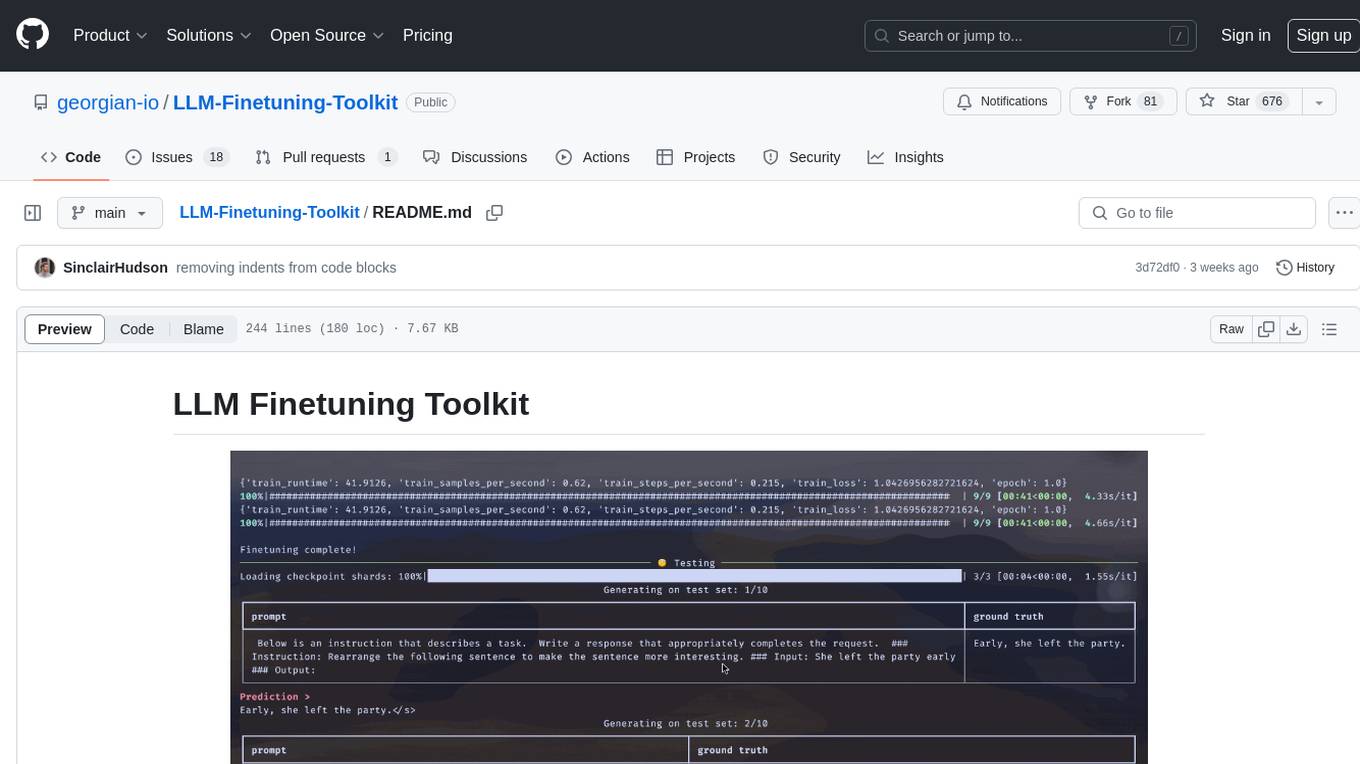
LLM-Finetuning-Toolkit
LLM Finetuning toolkit is a config-based CLI tool for launching a series of LLM fine-tuning experiments on your data and gathering their results. It allows users to control all elements of a typical experimentation pipeline - prompts, open-source LLMs, optimization strategy, and LLM testing - through a single YAML configuration file. The toolkit supports basic, intermediate, and advanced usage scenarios, enabling users to run custom experiments, conduct ablation studies, and automate fine-tuning workflows. It provides features for data ingestion, model definition, training, inference, quality assurance, and artifact outputs, making it a comprehensive tool for fine-tuning large language models.
For similar jobs

sweep
Sweep is an AI junior developer that turns bugs and feature requests into code changes. It automatically handles developer experience improvements like adding type hints and improving test coverage.

teams-ai
The Teams AI Library is a software development kit (SDK) that helps developers create bots that can interact with Teams and Microsoft 365 applications. It is built on top of the Bot Framework SDK and simplifies the process of developing bots that interact with Teams' artificial intelligence capabilities. The SDK is available for JavaScript/TypeScript, .NET, and Python.

ai-guide
This guide is dedicated to Large Language Models (LLMs) that you can run on your home computer. It assumes your PC is a lower-end, non-gaming setup.

classifai
Supercharge WordPress Content Workflows and Engagement with Artificial Intelligence. Tap into leading cloud-based services like OpenAI, Microsoft Azure AI, Google Gemini and IBM Watson to augment your WordPress-powered websites. Publish content faster while improving SEO performance and increasing audience engagement. ClassifAI integrates Artificial Intelligence and Machine Learning technologies to lighten your workload and eliminate tedious tasks, giving you more time to create original content that matters.

chatbot-ui
Chatbot UI is an open-source AI chat app that allows users to create and deploy their own AI chatbots. It is easy to use and can be customized to fit any need. Chatbot UI is perfect for businesses, developers, and anyone who wants to create a chatbot.

BricksLLM
BricksLLM is a cloud native AI gateway written in Go. Currently, it provides native support for OpenAI, Anthropic, Azure OpenAI and vLLM. BricksLLM aims to provide enterprise level infrastructure that can power any LLM production use cases. Here are some use cases for BricksLLM: * Set LLM usage limits for users on different pricing tiers * Track LLM usage on a per user and per organization basis * Block or redact requests containing PIIs * Improve LLM reliability with failovers, retries and caching * Distribute API keys with rate limits and cost limits for internal development/production use cases * Distribute API keys with rate limits and cost limits for students

uAgents
uAgents is a Python library developed by Fetch.ai that allows for the creation of autonomous AI agents. These agents can perform various tasks on a schedule or take action on various events. uAgents are easy to create and manage, and they are connected to a fast-growing network of other uAgents. They are also secure, with cryptographically secured messages and wallets.

griptape
Griptape is a modular Python framework for building AI-powered applications that securely connect to your enterprise data and APIs. It offers developers the ability to maintain control and flexibility at every step. Griptape's core components include Structures (Agents, Pipelines, and Workflows), Tasks, Tools, Memory (Conversation Memory, Task Memory, and Meta Memory), Drivers (Prompt and Embedding Drivers, Vector Store Drivers, Image Generation Drivers, Image Query Drivers, SQL Drivers, Web Scraper Drivers, and Conversation Memory Drivers), Engines (Query Engines, Extraction Engines, Summary Engines, Image Generation Engines, and Image Query Engines), and additional components (Rulesets, Loaders, Artifacts, Chunkers, and Tokenizers). Griptape enables developers to create AI-powered applications with ease and efficiency.