


airbrussh
Airbrussh pretties up your SSHKit and Capistrano output
Stars: 512
Airbrussh is a Capistrano plugin that enhances the output of Capistrano's deploy command. It provides a more detailed and structured view of the deployment process, including color-coded output, timestamps, and improved formatting. Airbrussh aims to make the deployment logs easier to read and understand, helping developers troubleshoot issues and monitor deployments more effectively. It is a useful tool for teams working with Capistrano to streamline their deployment workflows and improve visibility into the deployment process.
README:



Airbrussh is a concise log formatter for Capistrano and SSHKit. It displays well-formatted, useful log output that is easy to read. Airbrussh also saves Capistrano's verbose output to a separate log file just in case you need additional details for troubleshooting.
As of April 2016, Airbrussh is bundled with Capistrano 3.5, and is Capistrano's default formatter! There is nothing additional to install or enable. Continue reading to learn more about Airbrussh's features and configuration options.
If you aren't yet using Capistrano 3.5 (or wish to use Airbrussh with SSHKit directly), refer to the advanced/legacy usage section for installation instructions.
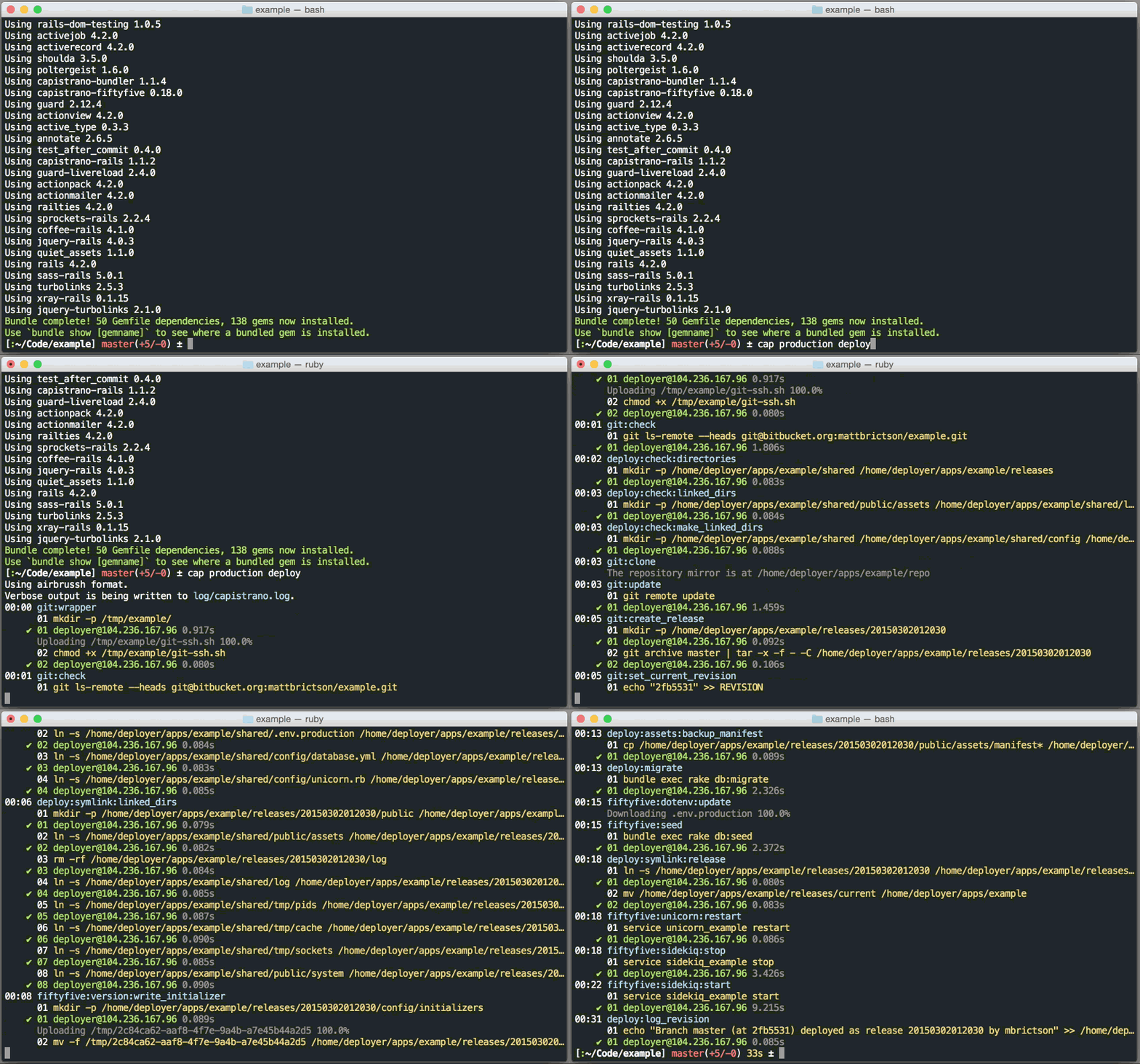
For more details on how exactly Airbrussh affects Capistrano's output and the reasoning behind it, check out the blog post: Introducing Airbrussh.
Airbrussh is enabled by default in Capistrano 3.5 and newer. To manually enable Airbrussh (for example, when upgrading an existing project), set the Capistrano format like this:
# In deploy.rb
set :format, :airbrusshWhen you run a Capistrano command, Airbrussh provides the following information in its output:
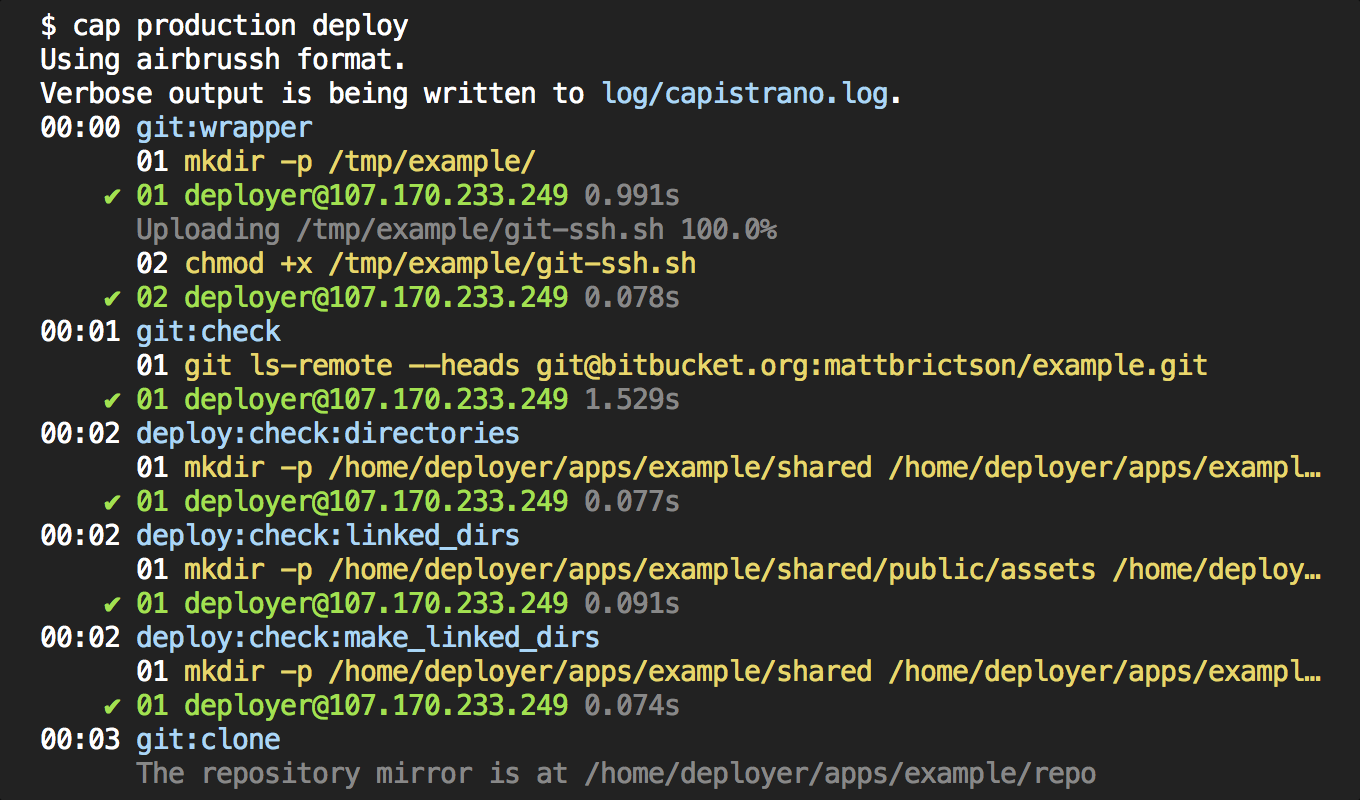
- Name of Capistrano task being executed
- When each task started (minutes:seconds elapsed since the deploy began)
- The SSH command-line strings that are executed; for Capistrano tasks that involve running multiple commands, the numeric prefix indicates the command in the sequence, starting from
01 - Stdout and stderr output from each command
- The duration of each command execution, per server
For brevity, Airbrussh does not show everything that Capistrano is doing. For example, it will omit Capistrano's test commands, which can be noisy and confusing. Airbrussh also hides things like environment variables, as well as cd and env invocations. To see a full audit of Capistrano's execution, including exactly what commands were run on each server, look at log/capistrano.log.
You can customize many aspects of Airbrussh's output. In Capistrano 3.5 and newer, this is done via the :format_options variable, like this:
# Pass options to Airbrussh
set :format_options, color: false, truncate: 80
Here are the options you can use, and their effects (note that the defaults may be different depending on where Airbrussh is used; these are the defaults used by Capistrano 3.5):
| Option | Default | Usage |
|---|---|---|
banner |
nil |
Provide a string (e.g. "Capistrano started!") that will be printed when Capistrano starts up. |
color |
:auto |
Use true or false to enable or disable ansi color. If set to :auto, Airbrussh automatically uses color based on whether the output is a TTY, or if the SSHKIT_COLOR environment variable is set. |
command_output |
true |
Set to :stdout, :stderr, or true to display the SSH output received via stdout, stderr, or both, respectively. Set to false to not show any SSH output, for a minimal look. |
context |
Airbrussh::Rake::Context |
Defines the execution context. Targeted towards uses of Airbrussh outside of Rake/Capistrano. Alternate implementations should provide the definition for current_task_name, register_new_command, and position. |
log_file |
log/capistrano.log |
Capistrano's verbose output is saved to this file to facilitate debugging. Set to nil to disable completely. |
truncate |
:auto |
Set to a number (e.g. 80) to truncate the width of the output to that many characters, or false to disable truncation. If :auto, output is automatically truncated to the width of the terminal window, if it can be determined. |
task_prefix |
nil |
A string to prefix to task output. Handy for output collapsing like buildkite's --- prefix |
Airbrussh is not displaying the output of my commands! For example, I run tail in one of my capistrano tasks and airbrussh doesn't show anything. How do I fix this?
Make sure Airbrussh is configured to show SSH output.
set :format_options, command_output: trueI haven't upgraded to Capistrano 3.5 yet. Can I still use Airbrussh?
Yes! Capistrano 3.4.x is also supported. Refer to the advanced/legacy usage section for installation instructions.
Does Airbrussh work with Capistrano 2?
No, Capistrano 3 is required. We recommend Capistrano 3.4.0 or higher. Capistrano 3.5.0 and higher have Airbrussh enabled by default, with no installation needed.
Does Airbrussh work with JRuby?
JRuby is not officially supported or tested, but may work. You must disable automatic truncation to work around a known bug in the JRuby 9.0 standard library. See #62 for more details.
set :format_options, truncate: falseI have a question that’s not answered here or elsewhere in the README.
Please open a GitHub issue and we’ll be happy to help!
Although Airbrussh is built into Capistrano 3.5.0 and higher, it is also available as a plug-in for older versions. Airbrussh has been tested with MRI 1.9+, Capistrano 3.4.0+, and SSHKit 1.6.1+.
Add this line to your application's Gemfile:
gem "airbrussh", require: falseAnd then execute:
$ bundle
Finally, add this line to your application's Capfile:
require "airbrussh/capistrano"Important: explicitly setting Capistrano's :format option in your deploy.rb will override airbrussh. Remove this line if you have it:
# Remove this
set :format, :pretty
Capistrano 3.4.x doesn't have the :format_options configuration system, so you will need to configure Airbrussh using this technique:
Airbrussh.configure do |config|
  config.color = false
  config.command_output = true
  # etc.
end
Refer to the configuration section above for the list of supported options.
If you are using SSHKit directly (i.e. without Capistrano), you can use Airbrussh like this:
require "airbrussh"
SSHKit.config.output = Airbrussh::Formatter.new($stdout)

# You can also pass configuration options like this
SSHKit.config.output = Airbrussh::Formatter.new($stdout, color: false)Airbrussh started life as custom logging code within the capistrano-mb collection of opinionated Capistrano recipes. In February 2015, the logging code was refactored into a standalone gem with its own configuration and documentation, and renamed airbrussh. In February 2016, Airbrussh was added as the default formatter in Capistrano 3.5.0.
Airbrussh now has a stable feature set, excellent test coverage, is being used for production deployments, and has reached 1.0.0! If you have ideas for improvements to Airbrussh, please open a GitHub issue.
Contributions are welcome! Read CONTRIBUTING.md to get started.
For Tasks:
Click tags to check more tools for each tasksFor Jobs:
Alternative AI tools for airbrussh
Similar Open Source Tools
airbrussh
Airbrussh is a Capistrano plugin that enhances the output of Capistrano's deploy command. It provides a more detailed and structured view of the deployment process, including color-coded output, timestamps, and improved formatting. Airbrussh aims to make the deployment logs easier to read and understand, helping developers troubleshoot issues and monitor deployments more effectively. It is a useful tool for teams working with Capistrano to streamline their deployment workflows and improve visibility into the deployment process.
action_mcp
Action MCP is a powerful tool for managing and automating your cloud infrastructure. It provides a user-friendly interface to easily create, update, and delete resources on popular cloud platforms. With Action MCP, you can streamline your deployment process, reduce manual errors, and improve overall efficiency. The tool supports various cloud providers and offers a wide range of features to meet your infrastructure management needs. Whether you are a developer, system administrator, or DevOps engineer, Action MCP can help you simplify and optimize your cloud operations.
rover
Rover is a command-line tool for managing and deploying Docker containers. It provides a simple and intuitive interface to interact with Docker images and containers, allowing users to easily build, run, and manage their containerized applications. With Rover, users can streamline their development workflow by automating container deployment and management tasks. The tool is designed to be lightweight and easy to use, making it ideal for developers and DevOps professionals looking to simplify their container management processes.

airflow
Apache Airflow (or simply Airflow) is a platform to programmatically author, schedule, and monitor workflows. When workflows are defined as code, they become more maintainable, versionable, testable, and collaborative. Use Airflow to author workflows as directed acyclic graphs (DAGs) of tasks. The Airflow scheduler executes your tasks on an array of workers while following the specified dependencies. Rich command line utilities make performing complex surgeries on DAGs a snap. The rich user interface makes it easy to visualize pipelines running in production, monitor progress, and troubleshoot issues when needed.
ais-k8s
AIStore on Kubernetes is a toolkit for deploying a lightweight, scalable object storage solution designed for AI applications in a Kubernetes environment. It includes documentation, Ansible playbooks, Kubernetes operator, Helm charts, and Terraform definitions for deployment on public cloud platforms. The system overview shows deployment across nodes with proxy and target pods utilizing Persistent Volumes. The AIStore Operator automates cluster management tasks. The repository focuses on production deployments but offers different deployment options. Thorough planning and configuration decisions are essential for successful multi-node deployment. The AIStore Operator simplifies tasks like starting, deploying, adjusting size, and updating AIStore resources within Kubernetes.
contextgem
Contextgem is a Ruby gem that provides a simple way to manage context-specific configurations in your Ruby applications. It allows you to define different configurations based on the context in which your application is running, such as development, testing, or production. This helps you keep your configuration settings organized and easily accessible, making it easier to maintain and update your application. With Contextgem, you can easily switch between different configurations without having to modify your code, making it a valuable tool for managing complex applications with multiple environments.
pilot
Pilot is an AI tool designed to streamline the process of handling tickets from GitHub, Linear, Jira, or Asana. It plans the implementation, writes the code, runs tests, and opens a PR for you to review and merge. With features like Autopilot, Epic Decomposition, Self-Review, and more, Pilot aims to automate the ticket handling process and reduce the time spent on prioritizing and completing tasks. It integrates with various platforms, offers intelligence features, and provides real-time visibility through a dashboard. Pilot is free to use, with costs associated with Claude API usage. It is designed for bug fixes, small features, refactoring, tests, docs, and dependency updates, but may not be suitable for large architectural changes or security-critical code.
Gito
Gito is a lightweight and user-friendly tool for managing and organizing your GitHub repositories. It provides a simple and intuitive interface for users to easily view, clone, and manage their repositories. With Gito, you can quickly access important information about your repositories, such as commit history, branches, and pull requests. The tool also allows you to perform common Git operations, such as pushing changes and creating new branches, directly from the interface. Gito is designed to streamline your GitHub workflow and make repository management more efficient and convenient.
pullfrog
Pullfrog is a versatile tool for managing and automating GitHub pull requests. It provides a simple and intuitive interface for developers to streamline their workflow and collaborate more efficiently. With Pullfrog, users can easily create, review, merge, and manage pull requests, all within a single platform. The tool offers features such as automated testing, code review, and notifications to help teams stay organized and productive. Whether you are a solo developer or part of a large team, Pullfrog can help you simplify the pull request process and improve code quality.
verl-tool
The verl-tool is a versatile command-line utility designed to streamline various tasks related to version control and code management. It provides a simple yet powerful interface for managing branches, merging changes, resolving conflicts, and more. With verl-tool, users can easily track changes, collaborate with team members, and ensure code quality throughout the development process. Whether you are a beginner or an experienced developer, verl-tool offers a seamless experience for version control operations.
WorkflowAI
WorkflowAI is a powerful tool designed to streamline and automate various tasks within the workflow process. It provides a user-friendly interface for creating custom workflows, automating repetitive tasks, and optimizing efficiency. With WorkflowAI, users can easily design, execute, and monitor workflows, allowing for seamless integration of different tools and systems. The tool offers advanced features such as conditional logic, task dependencies, and error handling to ensure smooth workflow execution. Whether you are managing project tasks, processing data, or coordinating team activities, WorkflowAI simplifies the workflow management process and enhances productivity.
n8n-docs
n8n is an extendable workflow automation tool that enables you to connect anything to everything. It is open-source and can be self-hosted or used as a service. n8n provides a visual interface for creating workflows, which can be used to automate tasks such as data integration, data transformation, and data analysis. n8n also includes a library of pre-built nodes that can be used to connect to a variety of applications and services. This makes it easy to create complex workflows without having to write any code.
Awesome-Repo-Level-Code-Generation
This repository contains a collection of tools and scripts for generating code at the repository level. It provides a set of utilities to automate the process of creating and managing code across multiple files and directories. The tools included in this repository aim to improve code generation efficiency and maintainability by streamlining the development workflow. With a focus on enhancing productivity and reducing manual effort, this collection offers a variety of code generation options and customization features to suit different project requirements.
agent-o-rama
Agent-O-Rama is a powerful open-source tool designed for automating repetitive tasks in the field of software development. It provides a user-friendly interface to create and manage automated agents that can perform various tasks such as code deployment, testing, and monitoring. With Agent-O-Rama, developers can save time and effort by automating routine processes and focusing on more critical aspects of their projects. The tool is highly customizable and extensible, allowing users to tailor it to their specific needs and integrate it with other tools and services. Agent-O-Rama is suitable for both individual developers and teams working on projects of any size, providing a scalable solution for improving productivity and efficiency in software development.
qwen-code
Qwen Code is an open-source AI agent optimized for Qwen3-Coder, designed to help users understand large codebases, automate tedious work, and expedite the shipping process. It offers an agentic workflow with rich built-in tools, a terminal-first approach with optional IDE integration, and supports both OpenAI-compatible API and Qwen OAuth authentication methods. Users can interact with Qwen Code in interactive mode, headless mode, IDE integration, and through a TypeScript SDK. The tool can be configured via settings.json, environment variables, and CLI flags, and offers benchmark results for performance evaluation. Qwen Code is part of an ecosystem that includes AionUi and Gemini CLI Desktop for graphical interfaces, and troubleshooting guides are available for issue resolution.
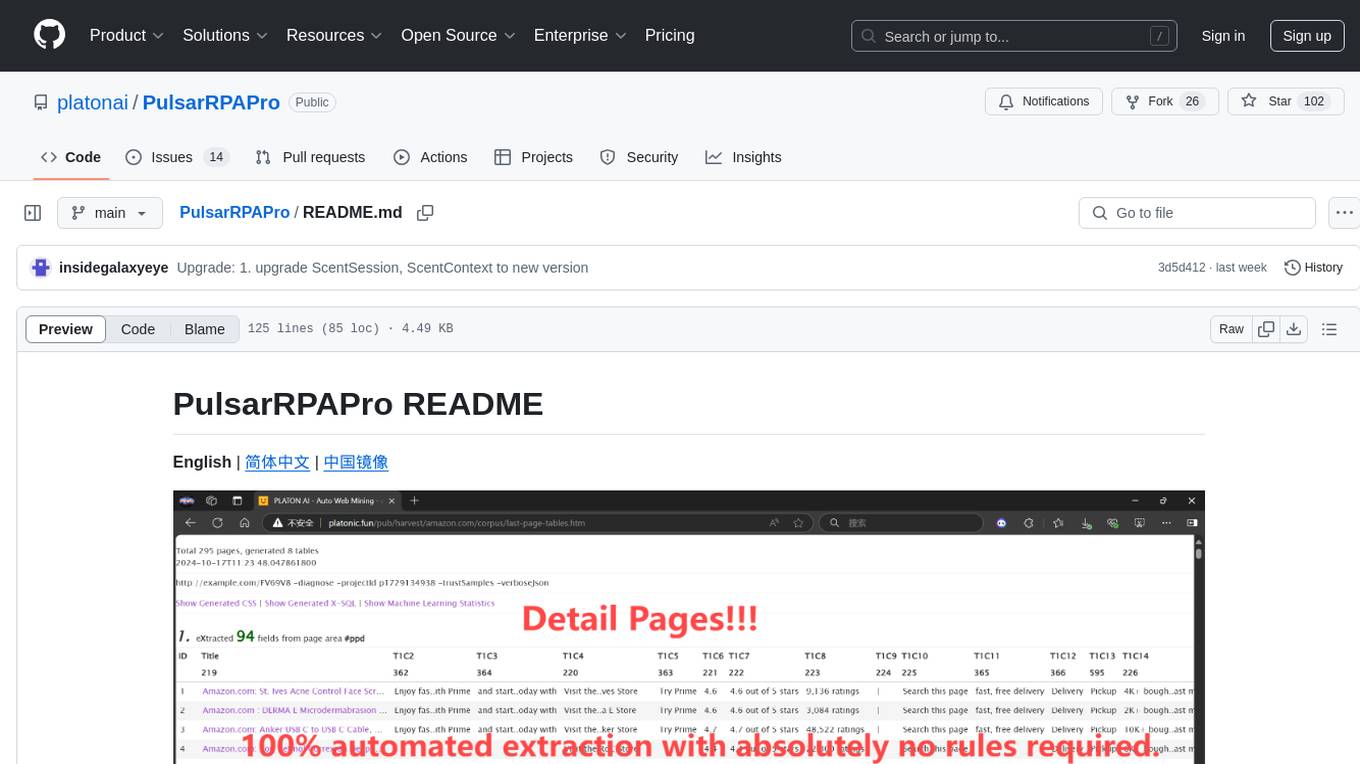
PulsarRPAPro
PulsarRPAPro is a powerful robotic process automation (RPA) tool designed to automate repetitive tasks and streamline business processes. It offers a user-friendly interface for creating and managing automation workflows, allowing users to easily automate tasks without the need for extensive programming knowledge. With features such as task scheduling, data extraction, and integration with various applications, PulsarRPAPro helps organizations improve efficiency and productivity by reducing manual work and human errors. Whether you are a small business looking to automate simple tasks or a large enterprise seeking to optimize complex processes, PulsarRPAPro provides the flexibility and scalability to meet your automation needs.
For similar tasks
airbrussh
Airbrussh is a Capistrano plugin that enhances the output of Capistrano's deploy command. It provides a more detailed and structured view of the deployment process, including color-coded output, timestamps, and improved formatting. Airbrussh aims to make the deployment logs easier to read and understand, helping developers troubleshoot issues and monitor deployments more effectively. It is a useful tool for teams working with Capistrano to streamline their deployment workflows and improve visibility into the deployment process.
For similar jobs
airbrussh
Airbrussh is a Capistrano plugin that enhances the output of Capistrano's deploy command. It provides a more detailed and structured view of the deployment process, including color-coded output, timestamps, and improved formatting. Airbrussh aims to make the deployment logs easier to read and understand, helping developers troubleshoot issues and monitor deployments more effectively. It is a useful tool for teams working with Capistrano to streamline their deployment workflows and improve visibility into the deployment process.

kaito
Kaito is an operator that automates the AI/ML inference model deployment in a Kubernetes cluster. It manages large model files using container images, avoids tuning deployment parameters to fit GPU hardware by providing preset configurations, auto-provisions GPU nodes based on model requirements, and hosts large model images in the public Microsoft Container Registry (MCR) if the license allows. Using Kaito, the workflow of onboarding large AI inference models in Kubernetes is largely simplified.
ai-on-gke
This repository contains assets related to AI/ML workloads on Google Kubernetes Engine (GKE). Run optimized AI/ML workloads with Google Kubernetes Engine (GKE) platform orchestration capabilities. A robust AI/ML platform considers the following layers: Infrastructure orchestration that support GPUs and TPUs for training and serving workloads at scale Flexible integration with distributed computing and data processing frameworks Support for multiple teams on the same infrastructure to maximize utilization of resources

tidb
TiDB is an open-source distributed SQL database that supports Hybrid Transactional and Analytical Processing (HTAP) workloads. It is MySQL compatible and features horizontal scalability, strong consistency, and high availability.
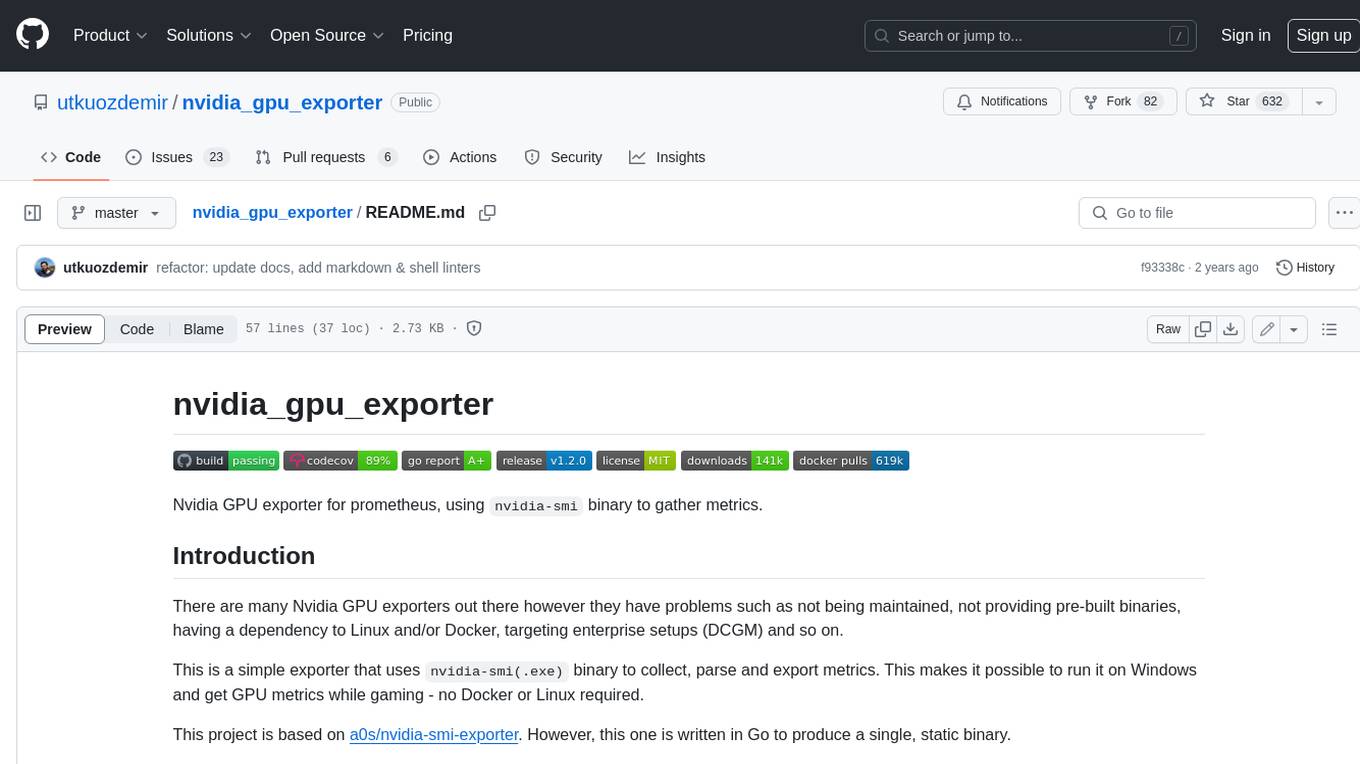
nvidia_gpu_exporter
Nvidia GPU exporter for prometheus, using `nvidia-smi` binary to gather metrics.

tracecat
Tracecat is an open-source automation platform for security teams. It's designed to be simple but powerful, with a focus on AI features and a practitioner-obsessed UI/UX. Tracecat can be used to automate a variety of tasks, including phishing email investigation, evidence collection, and remediation plan generation.
openinference
OpenInference is a set of conventions and plugins that complement OpenTelemetry to enable tracing of AI applications. It provides a way to capture and analyze the performance and behavior of AI models, including their interactions with other components of the application. OpenInference is designed to be language-agnostic and can be used with any OpenTelemetry-compatible backend. It includes a set of instrumentations for popular machine learning SDKs and frameworks, making it easy to add tracing to your AI applications.

BricksLLM
BricksLLM is a cloud native AI gateway written in Go. Currently, it provides native support for OpenAI, Anthropic, Azure OpenAI and vLLM. BricksLLM aims to provide enterprise level infrastructure that can power any LLM production use cases. Here are some use cases for BricksLLM: * Set LLM usage limits for users on different pricing tiers * Track LLM usage on a per user and per organization basis * Block or redact requests containing PIIs * Improve LLM reliability with failovers, retries and caching * Distribute API keys with rate limits and cost limits for internal development/production use cases * Distribute API keys with rate limits and cost limits for students