


VibeSurf
A powerful browser assistant for vibe surfing 一个开源的AI浏览器智能助手
Stars: 433
VibeSurf is an open-source AI agentic browser that combines workflow automation with intelligent AI agents, offering faster, cheaper, and smarter browser automation. It allows users to create revolutionary browser workflows, run multiple AI agents in parallel, perform intelligent AI automation tasks, maintain privacy with local LLM support, and seamlessly integrate as a Chrome extension. Users can save on token costs, achieve efficiency gains, and enjoy deterministic workflows for consistent and accurate results. VibeSurf also provides a Docker image for easy deployment and offers pre-built workflow templates for common tasks.
README:



Note: VibeSurf can be used in Claude Code for control and real-time preview of browsers. For more details, see the claude-surf plugin.
Note: VibeSurf is also available in Open-Claw. Install with:
npx clawhub@latest install vibesurf. For more details, see claw-surf.
VibeSurf is the first open-source AI agentic browser that combines workflow automation with intelligent AI agents - delivering browser automation that's faster, cheaper, and smarter than traditional solutions.
🎯 Why VibeSurf? Save 99% of token costs with workflows, run parallel AI agents across tabs, and keep your data private with local LLM support - all through a seamless Chrome extension.
🐳 Quick Start with Docker: Get up and running in seconds with our Docker image - no complex setup required!
If you're as excited about open-source AI browsing as I am, give it a star! ⭐
-
🔄 Revolutionary Browser Workflows: Create drag-and-drop workflows that consume virtually zero tokens - define once, run forever. Perfect for auto-login, data collection, and repetitive tasks with 100x speed boost.
-
🚀 Multi-Agent Parallel Processing: Run multiple AI agents simultaneously across different browser tabs for massive efficiency gains in both deep and wide research.
-
🧠 Intelligent AI Automation: Beyond basic automation - perform deep research, intelligent crawling, content summarization, and adaptive browsing with AI decision-making.
-
🔒 Privacy-First Architecture: Full support for local LLMs (Ollama, etc.) and custom APIs - your browsing data never leaves your machine during vibe surfing.
-
🎨 Seamless Chrome Extension: Native browser integration without switching applications - feels like a natural part of your browser with intuitive UI.
-
🐳 One-Click Docker Deployment: Get started instantly with our Docker image - includes VNC access for remote browsing and easy scaling.
🎯 Efficiency First: Most browser operations follow predictable patterns - why rebuild them every time with agents? Workflows let you define once, run forever.
💰 Token Savings: Workflows consume virtually zero tokens, only using them when dynamic information retrieval is needed. Save costs while maintaining intelligence.
⚡ Speed & Reliability: Deterministic workflows deliver consistent, fast, and highly accurate results. No more waiting for agents to "think" through repetitive steps.
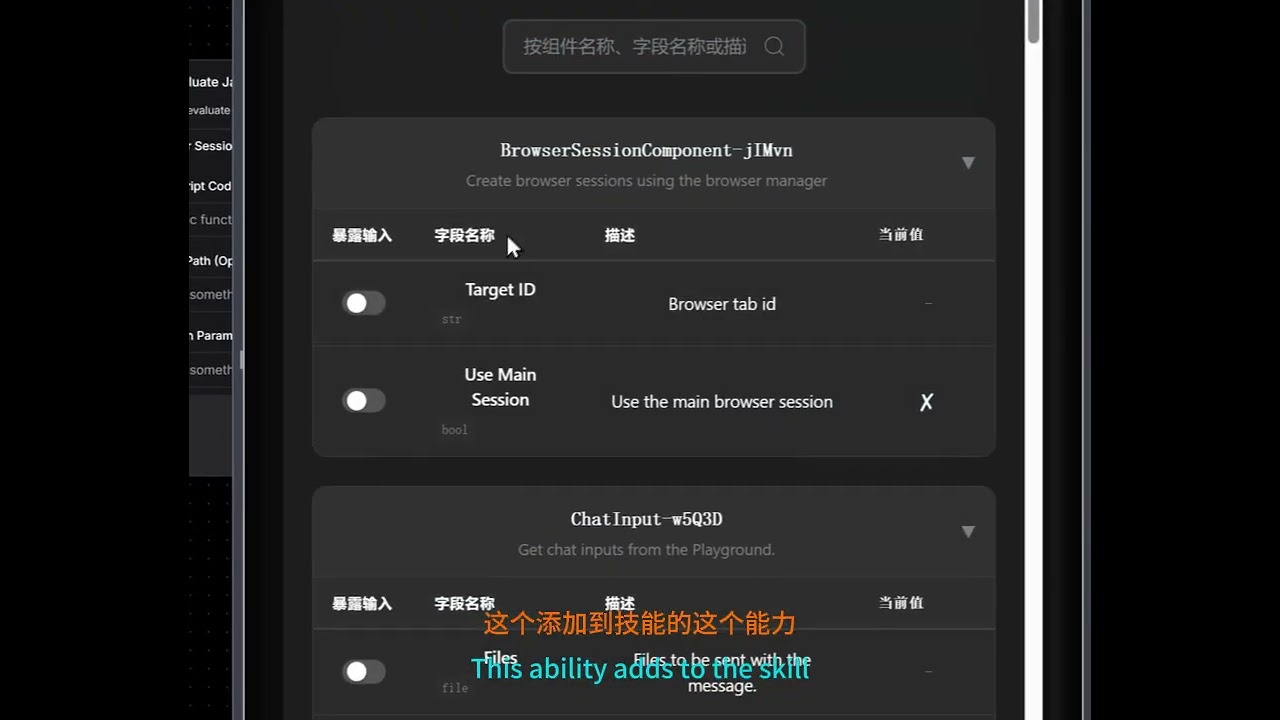
A tutorial that step-by-step guides you from scratch on using VibeSurf to build a browser automation workflow that searches X and extracts results. Beyond the basics, it demonstrates how to transform this workflow into a deployable API and integrate it as a custom Skill within Claude Code.
👉 Explore Workflow Templates - Get started with pre-built workflows for common tasks!
For Windows users: You can also download and run our one-click installer: VibeSurf-Installer.exe
Note: If you encounter DLL errors related to torch c10.so or onnxruntime during installation, please download and install the Microsoft Visual C++ Redistributable.
Get VibeSurf up and running in just three simple steps. No complex configuration required.
Install uv package manager from the official website
MacOS/Linux
curl -LsSf https://astral.sh/uv/install.sh | shWindows
powershell -ExecutionPolicy ByPass -c "irm https://astral.sh/uv/install.ps1 | iex"Install VibeSurf as a tool
uv tool install vibesurfTip: Use
uv tool upgrade vibesurfto upgrade to the latest version.Full Installation: To install with all optional features (including PyTorch, OCR, and advanced document processing), use
uv tool install vibesurf[full].
Start the VibeSurf browser assistant
vibesurfNote: Starting from Chrome 142, the --load-extension flag is no longer supported. When you first start VibeSurf, the browser will show a popup displaying the extension path. To manually load the extension:
- Open chrome://extensions
- Enable Developer mode
- Click "Load unpacked" and navigate to the extension folder
Typical Extension Locations:
-
Windows:
C:\Users\<username>\AppData\Roaming\uv\tools\vibesurf\Lib\site-packages\vibe_surf\chrome_extension -
macOS:
~/.local/share/uv/tools/vibesurf/lib/python3.<version>/site-packages/vibe_surf/chrome_extension(replace<version>with your Python version, e.g.,python3.12)Tip: Besides the popup, you can also find the extension path in the command line startup logs. For macOS users, press
Cmd+Shift+Gin Finder, paste the path, and press Enter to navigate directly to the folder.
Your browser does not support playing this video!
You can also run VibeSurf in Docker with browser VNC access:
# 1. Clone VibeSurf Repo
git clone https://github.com/vibesurf-ai/VibeSurf
cd VibeSurf
# Optional: Edit docker-compose.yml to modify envs

# 2. Start VibeSurf
docker-compose up -d

# 3. Access VibeSurf
# - Backend: http://localhost:9335
# - Browser VNC (Web): http://localhost:6080 (default password: vibesurf)Note: The VNC browser environment defaults to English input. Press
Ctrl + Spaceto switch to Chinese Pinyin input method.
Note: To use a proxy, set the
HTTP_PROXYandHTTPS_PROXYenvironment variables indocker-compose.yml(e.g.,HTTP_PROXY: http://proxy.example.com:8080).
# Pull the image
docker pull ghcr.io/vibesurf-ai/vibesurf:latest

# Run the container
docker run --name vibesurf -d --restart unless-stopped \
  -p 9335:9335 \
  -p 6080:6080 \
  -p 5901:5901 \
  -v ./data:/data \
  -e IN_DOCKER=true \
  -e VIBESURF_BACKEND_PORT=9335 \
  -e VIBESURF_WORKSPACE=/data/vibesurf_workspace \
  -e RESOLUTION=1440x900x24 \
  -e VNC_PASSWORD=vibesurf \
  --shm-size=4g \
  --cap-add=SYS_ADMIN \
ghcr.io/vibesurf-ai/vibesurf:latestWant to contribute to VibeSurf? Follow these steps to set up your development environment:
git clone https://github.com/vibesurf-ai/VibeSurf.git
cd VibeSurfMacOS/Linux
uv venv --python 3.12
source .venv/bin/activate
uv pip install -e .
Full Installation (with all optional features)
uv pip install -e ".[full]"Windows
uv venv --python 3.12
.venv\Scripts\activate
uv pip install -e .If you're working on frontend changes, you need to build and copy the frontend to the backend directory:
# Navigate to frontend directory
cd vibe_surf/frontend

# Install frontend dependencies
npm ci

# Build the frontend
npm run build

# Copy build output to backend directory
mkdir -p ../backend/frontend
cp -r build/* ../backend/frontend/Option 1: Direct Server
uvicorn vibe_surf.backend.main:app --host 127.0.0.1 --port 9335Option 2: CLI Entry
uv run vibesurfWe're building VibeSurf to be your ultimate AI browser companion. Here's what's coming next:
-
[x] Smart Skills System - Completed Add
/searchfor quick information search,/crawlfor automatic website data extraction and/codefor webpage js code execution. Integrated native APIs for Xiaohongshu, Douyin, Weibo, and YouTube. -
[x] Third-Party Integrations - Completed Connect with hundreds of popular tools including Gmail, Notion, Google Calendar, Slack, Trello, GitHub, and more through Composio integration to combine browsing with powerful automation capabilities
-
[x] Agentic Browser Workflow - Completed Create custom drag-and-drop and conversation-based workflows for auto-login, data collection, and complex browser automation tasks
-
[ ] Powerful Coding Agent - In Progress Build a comprehensive coding assistant for data processing and analysis directly in your browser
-
[ ] Intelligent Memory & Personalization - Planned Transform VibeSurf into a truly human-like companion with persistent memory that learns your preferences, habits, and browsing patterns over time
Your browser does not support playing this video!
Your browser does not support playing this video!
This repository is licensed under the VibeSurf Open Source License, based on Apache 2.0 with additional conditions.
VibeSurf builds on top of other awesome open-source projects:
Huge thanks to their creators and contributors!
Welcome to join our WeChat group for discussions!

For Tasks:
Click tags to check more tools for each tasksFor Jobs:
Alternative AI tools for VibeSurf
Similar Open Source Tools
For similar tasks
TagUI
TagUI is an open-source RPA tool that allows users to automate repetitive tasks on their computer, including tasks on websites, desktop apps, and the command line. It supports multiple languages and offers features like interacting with identifiers, automating data collection, moving data between TagUI and Excel, and sending Telegram notifications. Users can create RPA robots using MS Office Plug-ins or text editors, run TagUI on the cloud, and integrate with other RPA tools. TagUI prioritizes enterprise security by running on users' computers and not storing data. It offers detailed logs, enterprise installation guides, and support for centralised reporting.
Scrapegraph-demo
ScrapeGraphAI is a web scraping Python library that utilizes LangChain, LLM, and direct graph logic to create scraping pipelines. Users can specify the information they want to extract, and the library will handle the extraction process. This repository contains an official demo/trial for the ScrapeGraphAI library, showcasing its capabilities in web scraping tasks. The tool is designed to simplify the process of extracting data from websites by providing a user-friendly interface and powerful scraping functionalities.
VibeSurf
VibeSurf is an open-source AI agentic browser that combines workflow automation with intelligent AI agents, offering faster, cheaper, and smarter browser automation. It allows users to create revolutionary browser workflows, run multiple AI agents in parallel, perform intelligent AI automation tasks, maintain privacy with local LLM support, and seamlessly integrate as a Chrome extension. Users can save on token costs, achieve efficiency gains, and enjoy deterministic workflows for consistent and accurate results. VibeSurf also provides a Docker image for easy deployment and offers pre-built workflow templates for common tasks.
openops
OpenOps is a No-Code FinOps automation platform designed to help organizations reduce cloud costs and streamline financial operations. It offers customizable workflows for automating key FinOps processes, comes with its own Excel-like database and visualization system, and enables collaboration between different teams. OpenOps integrates seamlessly with major cloud providers, third-party FinOps tools, communication platforms, and project management tools, providing a comprehensive solution for efficient cost-saving measures implementation.
better-chatbot
Better Chatbot is an open-source AI chatbot designed for individuals and teams, inspired by various AI models. It integrates major LLMs, offers powerful tools like MCP protocol and data visualization, supports automation with custom agents and visual workflows, enables collaboration by sharing configurations, provides a voice assistant feature, and ensures an intuitive user experience. The platform is built with Vercel AI SDK and Next.js, combining leading AI services into one platform for enhanced chatbot capabilities.
Sage
Sage is a production-ready, modular, and intelligent multi-agent orchestration framework for complex problem solving. It intelligently breaks down complex tasks into manageable subtasks through seamless agent collaboration. Sage provides Deep Research Mode for comprehensive analysis and Rapid Execution Mode for quick task completion. It offers features like intelligent task decomposition, agent orchestration, extensible tool system, dual execution modes, interactive web interface, advanced token tracking, rich configuration, developer-friendly APIs, and robust error recovery mechanisms. Sage supports custom workflows, multi-agent collaboration, custom agent development, agent flow orchestration, rule preferences system, message manager for smart token optimization, task manager for comprehensive state management, advanced file system operations, advanced tool system with plugin architecture, token usage & cost monitoring, and rich configuration system. It also includes real-time streaming & monitoring, advanced tool development, error handling & reliability, performance monitoring, MCP server integration, and security features.
rowfill
Rowfill is an open-source document processing platform designed for knowledge workers. It offers advanced AI capabilities to extract, analyze, and process data from complex documents, images, and PDFs. The platform features advanced OCR and processing functionalities, auto-schema generation, and custom actions for creating tailored workflows. It prioritizes privacy and security by supporting Local LLMs like Llama and Mistral, syncing with company data while maintaining privacy, and being open source with AGPLv3 licensing. Rowfill is a versatile tool that aims to streamline document processing tasks for users in various industries.
private-search
EXO Private Search is a privacy-preserving search system based on MIT's Tiptoe paper. It allows users to search through data while maintaining query privacy, ensuring that the server never learns what is being searched for. The system converts documents into embeddings, clusters them for efficient searching, and uses SimplePIR for private information retrieval. It employs sentence transformers for embedding generation, K-means clustering for search optimization, and ensures that all sensitive computations happen client-side. The system provides significant performance improvements by reducing the number of PIR operations needed, enabling efficient searching in large document collections, and maintaining privacy while delivering fast results.
For similar jobs

promptflow
**Prompt flow** is a suite of development tools designed to streamline the end-to-end development cycle of LLM-based AI applications, from ideation, prototyping, testing, evaluation to production deployment and monitoring. It makes prompt engineering much easier and enables you to build LLM apps with production quality.

deepeval
DeepEval is a simple-to-use, open-source LLM evaluation framework specialized for unit testing LLM outputs. It incorporates various metrics such as G-Eval, hallucination, answer relevancy, RAGAS, etc., and runs locally on your machine for evaluation. It provides a wide range of ready-to-use evaluation metrics, allows for creating custom metrics, integrates with any CI/CD environment, and enables benchmarking LLMs on popular benchmarks. DeepEval is designed for evaluating RAG and fine-tuning applications, helping users optimize hyperparameters, prevent prompt drifting, and transition from OpenAI to hosting their own Llama2 with confidence.

MegaDetector
MegaDetector is an AI model that identifies animals, people, and vehicles in camera trap images (which also makes it useful for eliminating blank images). This model is trained on several million images from a variety of ecosystems. MegaDetector is just one of many tools that aims to make conservation biologists more efficient with AI. If you want to learn about other ways to use AI to accelerate camera trap workflows, check out our of the field, affectionately titled "Everything I know about machine learning and camera traps".

leapfrogai
LeapfrogAI is a self-hosted AI platform designed to be deployed in air-gapped resource-constrained environments. It brings sophisticated AI solutions to these environments by hosting all the necessary components of an AI stack, including vector databases, model backends, API, and UI. LeapfrogAI's API closely matches that of OpenAI, allowing tools built for OpenAI/ChatGPT to function seamlessly with a LeapfrogAI backend. It provides several backends for various use cases, including llama-cpp-python, whisper, text-embeddings, and vllm. LeapfrogAI leverages Chainguard's apko to harden base python images, ensuring the latest supported Python versions are used by the other components of the stack. The LeapfrogAI SDK provides a standard set of protobuffs and python utilities for implementing backends and gRPC. LeapfrogAI offers UI options for common use-cases like chat, summarization, and transcription. It can be deployed and run locally via UDS and Kubernetes, built out using Zarf packages. LeapfrogAI is supported by a community of users and contributors, including Defense Unicorns, Beast Code, Chainguard, Exovera, Hypergiant, Pulze, SOSi, United States Navy, United States Air Force, and United States Space Force.

llava-docker
This Docker image for LLaVA (Large Language and Vision Assistant) provides a convenient way to run LLaVA locally or on RunPod. LLaVA is a powerful AI tool that combines natural language processing and computer vision capabilities. With this Docker image, you can easily access LLaVA's functionalities for various tasks, including image captioning, visual question answering, text summarization, and more. The image comes pre-installed with LLaVA v1.2.0, Torch 2.1.2, xformers 0.0.23.post1, and other necessary dependencies. You can customize the model used by setting the MODEL environment variable. The image also includes a Jupyter Lab environment for interactive development and exploration. Overall, this Docker image offers a comprehensive and user-friendly platform for leveraging LLaVA's capabilities.

carrot
The 'carrot' repository on GitHub provides a list of free and user-friendly ChatGPT mirror sites for easy access. The repository includes sponsored sites offering various GPT models and services. Users can find and share sites, report errors, and access stable and recommended sites for ChatGPT usage. The repository also includes a detailed list of ChatGPT sites, their features, and accessibility options, making it a valuable resource for ChatGPT users seeking free and unlimited GPT services.

TrustLLM
TrustLLM is a comprehensive study of trustworthiness in LLMs, including principles for different dimensions of trustworthiness, established benchmark, evaluation, and analysis of trustworthiness for mainstream LLMs, and discussion of open challenges and future directions. Specifically, we first propose a set of principles for trustworthy LLMs that span eight different dimensions. Based on these principles, we further establish a benchmark across six dimensions including truthfulness, safety, fairness, robustness, privacy, and machine ethics. We then present a study evaluating 16 mainstream LLMs in TrustLLM, consisting of over 30 datasets. The document explains how to use the trustllm python package to help you assess the performance of your LLM in trustworthiness more quickly. For more details about TrustLLM, please refer to project website.

AI-YinMei
AI-YinMei is an AI virtual anchor Vtuber development tool (N card version). It supports fastgpt knowledge base chat dialogue, a complete set of solutions for LLM large language models: [fastgpt] + [one-api] + [Xinference], supports docking bilibili live broadcast barrage reply and entering live broadcast welcome speech, supports Microsoft edge-tts speech synthesis, supports Bert-VITS2 speech synthesis, supports GPT-SoVITS speech synthesis, supports expression control Vtuber Studio, supports painting stable-diffusion-webui output OBS live broadcast room, supports painting picture pornography public-NSFW-y-distinguish, supports search and image search service duckduckgo (requires magic Internet access), supports image search service Baidu image search (no magic Internet access), supports AI reply chat box [html plug-in], supports AI singing Auto-Convert-Music, supports playlist [html plug-in], supports dancing function, supports expression video playback, supports head touching action, supports gift smashing action, supports singing automatic start dancing function, chat and singing automatic cycle swing action, supports multi scene switching, background music switching, day and night automatic switching scene, supports open singing and painting, let AI automatically judge the content.