


chat-ai
None
Stars: 57
A Seamless Slurm-Native Solution for HPC-Based Services. This repository contains the stand-alone web interface of Chat AI, which can be set up independently to act as a wrapper for an OpenAI-compatible API endpoint. It consists of two Docker containers, 'front' and 'back', providing a ReactJS app served by ViteJS and a wrapper for message requests to prevent CORS errors. Configuration files allow setting port numbers, backend paths, models, user data, default conversation settings, and more. The 'back' service interacts with an OpenAI-compatible API endpoint using configurable attributes in 'back.json'. Customization options include creating a path for available models and setting the 'modelsPath' in 'front.json'. Acknowledgements to contributors and the Chat AI community are included.
README:

This repository contains the stand-alone web interface of Chat AI. The implementation of the remaining components of the complete architecture can be found in two other repos:
- Server components, incl. API gateway and SSH proxy: https://github.com/gwdg/saia-hub
- HPC components, incl. scheduler and slurm scripts: https://github.com/gwdg/saia-hpc

Together these repos provide the entire underyling mechanism for Chat AI, which can be generalized as a slurm-native HPC web service.

Note that Chat AI's web interface provided in this repository can be set up on any device independently from the rest of the architecture, to act solely as a wrapper for an OpenAI-compatible API endpoint.
-
Ensure that Docker is installed. Follow the guides to install Docker on your operating system.
docker --version
-
Clone this repository and navigate to the root folder.
git clone https://github.com/gwdg/chat-ai cd chat-ai -
In the
secretsdirectory, renamefront.json.sampletofront.jsonandback.json.sampletoback.json, and configure them accordingly. For a local installation with a valid Chat AI API key, you only need to replace the value ofapiKeyinback.json:{ "port": 8081, "apiEndpoint": "https://chat-ai.academiccloud.de/v1", "apiKey": "<your_chat_ai_api_key>", "serviceName": "Custom Chat AI" } -
Run the components using
docker-compose:docker compose up
-
Open your browser and navigate to
http://localhost:8080/, or whichever path and port number you have configured.
The web interface consists of two Docker containers, front and back. The front service is a ReactJS app served by ViteJS and runs entirely on the client's browser. The back service is simply a wrapper for message requests which gives the developer more control over the requests and prevents CORS errors on the user's browser.
Make sure you have docker installed and docker compose.
For Ubuntu 24.04, install docker compose with:
aptitude install docker-compose-v2To build the images, run:
docker compose build front
docker compose build back
To start either of the two components, run:
docker compose up front -d
docker compose up back -d
You should then be able to access the web interface via the path and port number specified in the config file.
To apply any changes in the configuration and/or source code, run:
docker compose restart front
docker compose restart back
Note that in some cases rebuilding the docker image might be necessary.
You can set the port numbers for both the front and back services in the front.json and back.json files.
The front service uses the following configurable attributes in front.json:
-
mode: Set todevto enable development environment andprodfor production. -
port: Port number to listen on. Default: 8080 -
backendPath: Path tobackservice, used for sending messages and processing PDF files, e.g.http://localhost:8081/or/backend -
modelsPath: Path to get list of available models from. Simply set to<backendPath>/modelsif unsure -
userDataPath: (Optional) Path to get user data. Simply set to<backendPath>/userif unsure -
default: Default settings for new conversations, including defaultmodelwithmodel.idandmodel.name, as well astop_pandtemperature. -
titleGenerationModel: Model ID for title generation -
memoryGenerationModel: Model ID for memory generation and updates -
announcement: Text to be displayed in the announcement bar at the top of the window
The back service listens to requests from front and interacts with an OpenAI-compatible API endpoint to produce responses. It uses the following configurable attributes in back.json:
-
port: Port number to listen on. Default: 8081 -
apiEndpoint: Endpoint of your API provider. If you have a Chat AI API key, set this tohttps://chat-ai.academiccloud.de/v1 -
apiKey: Your valid API key -
serviceName: (Optional) A custom service name to be sent as a header in API requests to your provider. Will not be visible in the interface
If you wish to avoid using different ports for the front and back services, you must set up a reverse proxy or virtual host to route paths such as /models and /backend to the backend service listening on its own distinguished port. This can be done with popular server software such as Apache or Nginx.
If you wish to customize the list of available models, you must create a path that returns an OpenAI-style JSON response containing the model ids and names, and set the modelsPath in front.json accordingly. If configured correctly, your custom list will be displayed in the dropdown menu in the interface, instead of the list from your API provider.
We thank all contributors for the design and implementation of the web interface.
We thank the Chat AI community, and all colleagues and partners involved in this project.
If you use Chat AI in your research or services, please cite us as follows:
@misc{doosthosseiniSAIASeamlessSlurmNative2025,
  title = {{{SAIA}}: {{A Seamless Slurm-Native Solution}} for {{HPC-Based Services}}},
  shorttitle = {{{SAIA}}},
  author = {Doosthosseini, Ali and Decker, Jonathan and Nolte, Hendrik and Kunkel, Julian},
  year = {2025},
  month = jul,
  publisher = {Research Square},
  issn = {2693-5015},
  doi = {10.21203/rs.3.rs-6648693/v1},
  url = {https://www.researchsquare.com/article/rs-6648693/v1},
  urldate = {2025-07-29},
  archiveprefix = {Research Square}
}
For Tasks:
Click tags to check more tools for each tasksFor Jobs:
Alternative AI tools for chat-ai
Similar Open Source Tools
chat-ai
A Seamless Slurm-Native Solution for HPC-Based Services. This repository contains the stand-alone web interface of Chat AI, which can be set up independently to act as a wrapper for an OpenAI-compatible API endpoint. It consists of two Docker containers, 'front' and 'back', providing a ReactJS app served by ViteJS and a wrapper for message requests to prevent CORS errors. Configuration files allow setting port numbers, backend paths, models, user data, default conversation settings, and more. The 'back' service interacts with an OpenAI-compatible API endpoint using configurable attributes in 'back.json'. Customization options include creating a path for available models and setting the 'modelsPath' in 'front.json'. Acknowledgements to contributors and the Chat AI community are included.
vectorflow
VectorFlow is an open source, high throughput, fault tolerant vector embedding pipeline. It provides a simple API endpoint for ingesting large volumes of raw data, processing, and storing or returning the vectors quickly and reliably. The tool supports text-based files like TXT, PDF, HTML, and DOCX, and can be run locally with Kubernetes in production. VectorFlow offers functionalities like embedding documents, running chunking schemas, custom chunking, and integrating with vector databases like Pinecone, Qdrant, and Weaviate. It enforces a standardized schema for uploading data to a vector store and supports features like raw embeddings webhook, chunk validation webhook, S3 endpoint, and telemetry. The tool can be used with the Python client and provides detailed instructions for running and testing the functionalities.
PolyMind
PolyMind is a multimodal, function calling powered LLM webui designed for various tasks such as internet searching, image generation, port scanning, Wolfram Alpha integration, Python interpretation, and semantic search. It offers a plugin system for adding extra functions and supports different models and endpoints. The tool allows users to interact via function calling and provides features like image input, image generation, and text file search. The application's configuration is stored in a `config.json` file with options for backend selection, compatibility mode, IP address settings, API key, and enabled features.
chat-ui
A chat interface using open source models, eg OpenAssistant or Llama. It is a SvelteKit app and it powers the HuggingChat app on hf.co/chat.
debug-gym
debug-gym is a text-based interactive debugging framework designed for debugging Python programs. It provides an environment where agents can interact with code repositories, use various tools like pdb and grep to investigate and fix bugs, and propose code patches. The framework supports different LLM backends such as OpenAI, Azure OpenAI, and Anthropic. Users can customize tools, manage environment states, and run agents to debug code effectively. debug-gym is modular, extensible, and suitable for interactive debugging tasks in a text-based environment.
llm-ollama
LLM-ollama is a plugin that provides access to models running on an Ollama server. It allows users to query the Ollama server for a list of models, register them with LLM, and use them for prompting, chatting, and embedding. The plugin supports image attachments, embeddings, JSON schemas, async models, model aliases, and model options. Users can interact with Ollama models through the plugin in a seamless and efficient manner.
vector-inference
This repository provides an easy-to-use solution for running inference servers on Slurm-managed computing clusters using vLLM. All scripts in this repository run natively on the Vector Institute cluster environment. Users can deploy models as Slurm jobs, check server status and performance metrics, and shut down models. The repository also supports launching custom models with specific configurations. Additionally, users can send inference requests and set up an SSH tunnel to run inference from a local device.
hash
HASH is a self-building, open-source database which grows, structures and checks itself. With it, we're creating a platform for decision-making, which helps you integrate, understand and use data in a variety of different ways.
gpt-cli
gpt-cli is a command-line interface tool for interacting with various chat language models like ChatGPT, Claude, and others. It supports model customization, usage tracking, keyboard shortcuts, multi-line input, markdown support, predefined messages, and multiple assistants. Users can easily switch between different assistants, define custom assistants, and configure model parameters and API keys in a YAML file for easy customization and management.
termax
Termax is an LLM agent in your terminal that converts natural language to commands. It is featured by: - Personalized Experience: Optimize the command generation with RAG. - Various LLMs Support: OpenAI GPT, Anthropic Claude, Google Gemini, Mistral AI, and more. - Shell Extensions: Plugin with popular shells like `zsh`, `bash` and `fish`. - Cross Platform: Able to run on Windows, macOS, and Linux.
safety-tooling
This repository, safety-tooling, is designed to be shared across various AI Safety projects. It provides an LLM API with a common interface for OpenAI, Anthropic, and Google models. The aim is to facilitate collaboration among AI Safety researchers, especially those with limited software engineering backgrounds, by offering a platform for contributing to a larger codebase. The repo can be used as a git submodule for easy collaboration and updates. It also supports pip installation for convenience. The repository includes features for installation, secrets management, linting, formatting, Redis configuration, testing, dependency management, inference, finetuning, API usage tracking, and various utilities for data processing and experimentation.
loz
Loz is a command-line tool that integrates AI capabilities with Unix tools, enabling users to execute system commands and utilize Unix pipes. It supports multiple LLM services like OpenAI API, Microsoft Copilot, and Ollama. Users can run Linux commands based on natural language prompts, enhance Git commit formatting, and interact with the tool in safe mode. Loz can process input from other command-line tools through Unix pipes and automatically generate Git commit messages. It provides features like chat history access, configurable LLM settings, and contribution opportunities.
py-vectara-agentic
The `vectara-agentic` Python library is designed for developing powerful AI assistants using Vectara and Agentic-RAG. It supports various agent types, includes pre-built tools for domains like finance and legal, and enables easy creation of custom AI assistants and agents. The library provides tools for summarizing text, rephrasing text, legal tasks like summarizing legal text and critiquing as a judge, financial tasks like analyzing balance sheets and income statements, and database tools for inspecting and querying databases. It also supports observability via LlamaIndex and Arize Phoenix integration.
MCPJungle
MCPJungle is a self-hosted MCP Gateway for private AI agents, serving as a registry for Model Context Protocol Servers. Developers use it to manage servers and tools centrally, while clients discover and consume tools from a single 'Gateway' MCP Server. Suitable for developers using MCP Clients like Claude & Cursor, building production-grade AI Agents, and organizations managing client-server interactions. The tool allows quick start, installation, usage, server and client setup, connection to Claude and Cursor, enabling/disabling tools, managing tool groups, authentication, enterprise features like access control and OpenTelemetry metrics. Limitations include lack of long-running connections to servers and no support for OAuth flow. Contributions are welcome.
codespin
CodeSpin.AI is a set of open-source code generation tools that leverage large language models (LLMs) to automate coding tasks. With CodeSpin, you can generate code in various programming languages, including Python, JavaScript, Java, and C++, by providing natural language prompts. CodeSpin offers a range of features to enhance code generation, such as custom templates, inline prompting, and the ability to use ChatGPT as an alternative to API keys. Additionally, CodeSpin provides options for regenerating code, executing code in prompt files, and piping data into the LLM for processing. By utilizing CodeSpin, developers can save time and effort in coding tasks, improve code quality, and explore new possibilities in code generation.
mlx-lm
MLX LM is a Python package designed for generating text and fine-tuning large language models on Apple silicon using MLX. It offers integration with the Hugging Face Hub for easy access to thousands of LLMs, support for quantizing and uploading models to the Hub, low-rank and full model fine-tuning capabilities, and distributed inference and fine-tuning with `mx.distributed`. Users can interact with the package through command line options or the Python API, enabling tasks such as text generation, chatting with language models, model conversion, streaming generation, and sampling. MLX LM supports various Hugging Face models and provides tools for efficient scaling to long prompts and generations, including a rotating key-value cache and prompt caching. It requires macOS 15.0 or higher for optimal performance.
For similar tasks
chat-ai
A Seamless Slurm-Native Solution for HPC-Based Services. This repository contains the stand-alone web interface of Chat AI, which can be set up independently to act as a wrapper for an OpenAI-compatible API endpoint. It consists of two Docker containers, 'front' and 'back', providing a ReactJS app served by ViteJS and a wrapper for message requests to prevent CORS errors. Configuration files allow setting port numbers, backend paths, models, user data, default conversation settings, and more. The 'back' service interacts with an OpenAI-compatible API endpoint using configurable attributes in 'back.json'. Customization options include creating a path for available models and setting the 'modelsPath' in 'front.json'. Acknowledgements to contributors and the Chat AI community are included.
simple-openai
Simple-OpenAI is a Java library that provides a simple way to interact with the OpenAI API. It offers consistent interfaces for various OpenAI services like Audio, Chat Completion, Image Generation, and more. The library uses CleverClient for HTTP communication, Jackson for JSON parsing, and Lombok to reduce boilerplate code. It supports asynchronous requests and provides methods for synchronous calls as well. Users can easily create objects to communicate with the OpenAI API and perform tasks like text-to-speech, transcription, image generation, and chat completions.
MCP-Bridge
MCP-Bridge is a middleware tool designed to provide an openAI compatible endpoint for calling MCP tools. It acts as a bridge between the OpenAI API and MCP tools, allowing developers to leverage MCP tools through the OpenAI API interface. The tool facilitates the integration of MCP tools with the OpenAI API by providing endpoints for interaction. It supports non-streaming and streaming chat completions with MCP, as well as non-streaming completions without MCP. The tool is designed to work with inference engines that support tool call functionalities, such as vLLM and ollama. Installation can be done using Docker or manually, and the application can be run to interact with the OpenAI API. Configuration involves editing the config.json file to add new MCP servers. Contributions to the tool are welcome under the MIT License.
For similar jobs

weave
Weave is a toolkit for developing Generative AI applications, built by Weights & Biases. With Weave, you can log and debug language model inputs, outputs, and traces; build rigorous, apples-to-apples evaluations for language model use cases; and organize all the information generated across the LLM workflow, from experimentation to evaluations to production. Weave aims to bring rigor, best-practices, and composability to the inherently experimental process of developing Generative AI software, without introducing cognitive overhead.

agentcloud
AgentCloud is an open-source platform that enables companies to build and deploy private LLM chat apps, empowering teams to securely interact with their data. It comprises three main components: Agent Backend, Webapp, and Vector Proxy. To run this project locally, clone the repository, install Docker, and start the services. The project is licensed under the GNU Affero General Public License, version 3 only. Contributions and feedback are welcome from the community.
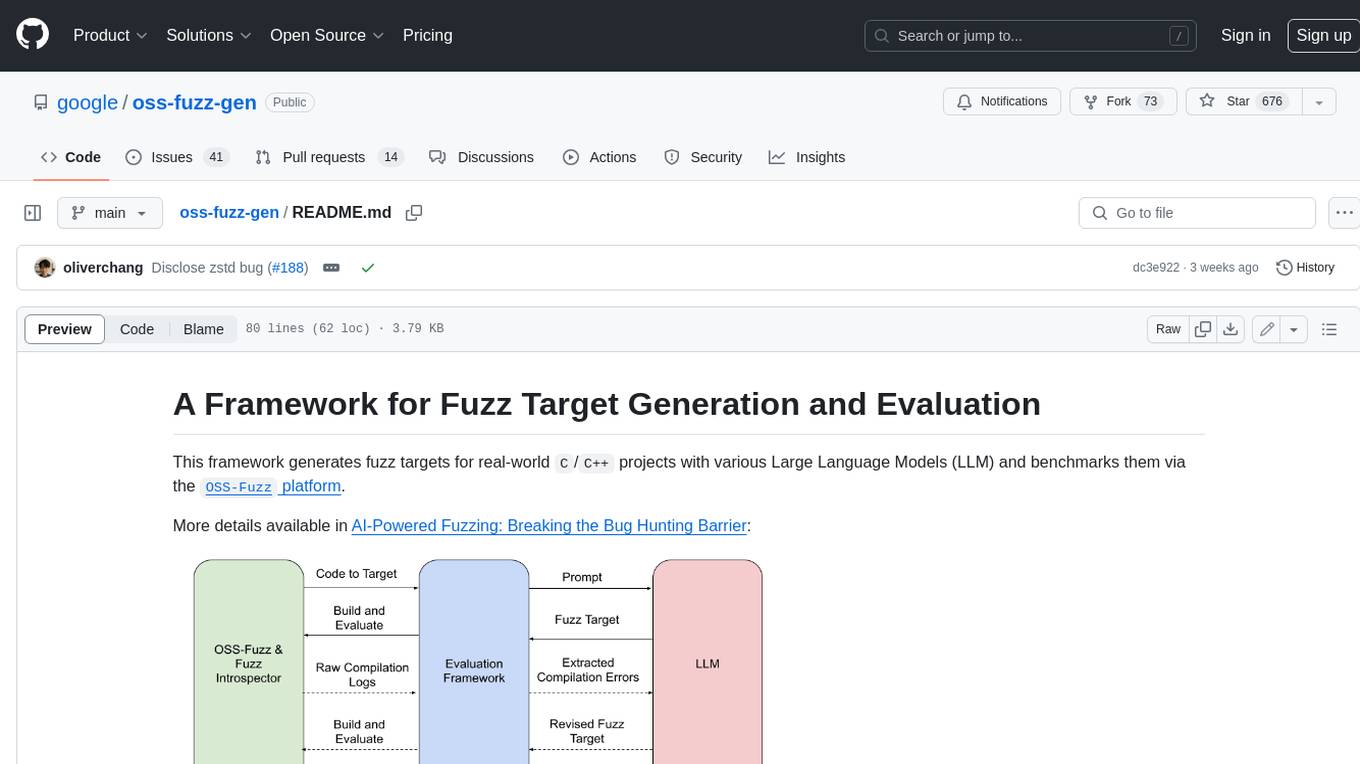
oss-fuzz-gen
This framework generates fuzz targets for real-world `C`/`C++` projects with various Large Language Models (LLM) and benchmarks them via the `OSS-Fuzz` platform. It manages to successfully leverage LLMs to generate valid fuzz targets (which generate non-zero coverage increase) for 160 C/C++ projects. The maximum line coverage increase is 29% from the existing human-written targets.

LLMStack
LLMStack is a no-code platform for building generative AI agents, workflows, and chatbots. It allows users to connect their own data, internal tools, and GPT-powered models without any coding experience. LLMStack can be deployed to the cloud or on-premise and can be accessed via HTTP API or triggered from Slack or Discord.

VisionCraft
The VisionCraft API is a free API for using over 100 different AI models. From images to sound.

kaito
Kaito is an operator that automates the AI/ML inference model deployment in a Kubernetes cluster. It manages large model files using container images, avoids tuning deployment parameters to fit GPU hardware by providing preset configurations, auto-provisions GPU nodes based on model requirements, and hosts large model images in the public Microsoft Container Registry (MCR) if the license allows. Using Kaito, the workflow of onboarding large AI inference models in Kubernetes is largely simplified.

PyRIT
PyRIT is an open access automation framework designed to empower security professionals and ML engineers to red team foundation models and their applications. It automates AI Red Teaming tasks to allow operators to focus on more complicated and time-consuming tasks and can also identify security harms such as misuse (e.g., malware generation, jailbreaking), and privacy harms (e.g., identity theft). The goal is to allow researchers to have a baseline of how well their model and entire inference pipeline is doing against different harm categories and to be able to compare that baseline to future iterations of their model. This allows them to have empirical data on how well their model is doing today, and detect any degradation of performance based on future improvements.

Azure-Analytics-and-AI-Engagement
The Azure-Analytics-and-AI-Engagement repository provides packaged Industry Scenario DREAM Demos with ARM templates (Containing a demo web application, Power BI reports, Synapse resources, AML Notebooks etc.) that can be deployed in a customer’s subscription using the CAPE tool within a matter of few hours. Partners can also deploy DREAM Demos in their own subscriptions using DPoC.